
In January 1997 a US education-technology journal told schools to direct their PCs to boot from a LAN server. The article, published in T.H.E. Journal under the title "Direct PCs to Boot from a LAN Server", promised that an administrator could "upgrade the entire network in the same time it would take to do just one workstation". Almost thirty years later the phrase is still printed in firmware menus. To boot from LAN means that a PC loads its operating system from a server on the local network and not from a drive inside its own case.
The definition has not changed since then. What has changed is who relies on it and how often, and that shift is poorly reflected in the pages that currently explain the term.
One idea, four names
Four labels are in circulation, and they describe the same mechanism at different levels. "Boot from LAN" and "Boot on LAN" are firmware menu labels, the wording a motherboard vendor chose for the switch that lets the network adapter act as a boot device. "Network boot" is the generic term used in operating system documentation and by administrators. PXE, the Preboot Execution Environment, is the specification that defines how the exchange between the PC and the server takes place. In nearly every case, a PC that is set to boot from LAN is performing a PXE boot.
Term | Where it appears | What it refers to |
Boot from LAN | Firmware setup menus, | The option that lets the |
Boot on LAN | Firmware menus and | The same option in |
Network boot | Operating system and | Any startup in which the |
PXE | Specifications, on-screen | The standard that defines |
One neighboring term is often confused with these four. Wake on LAN, which came out of the same Intel initiative as PXE, switches a PC on from the network. It does not decide what the PC starts from once it has power. The two are frequently used together, with one signal to power the machine on and the other mechanism to load its system, but they are separate settings and separate functions.
The mechanism can be stated in one paragraph. At power-on, the firmware uses the wired network adapter to ask the LAN for an address and for the location of a boot file. A server answers, the firmware downloads a small boot program, and that program loads the operating system from the server. The sequence is covered in detail in a step-by-step account of the PXE exchange elsewhere on this site. Two properties matter for the rest of this article. The PC does not need a working local drive, and the content it starts from is held in one place.
From boot ROMs to a firmware standard
In 1997 the capability was sold as an add-on. The T.H.E. The journal article describes a boot ROM installed in the ROM socket of a LAN adapter, with no common standard behind it. Each ROM vendor supported the network protocols it chose. The case made to schools rested on central control: boot files on the server, the article states, "remain protected from end-user modifications, corruption and piracy", and upgrades are carried out in one place. Those are the same arguments made for the technique today.
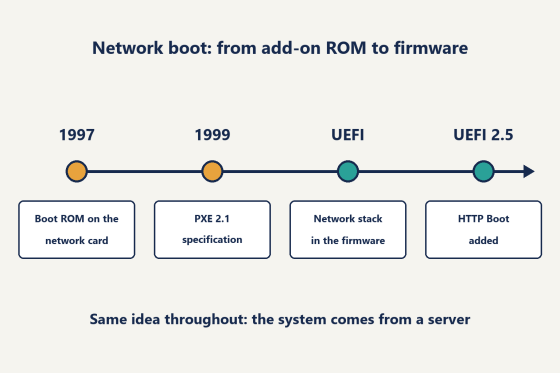
Standardization came from Intel's Wired for Management initiative. Intel announced the Wired for Management Baseline 2.0 specification on September 14, 1998, with PXE among its features, according to the company's press release of that date. PXE version 2.0 followed in December 1998. Version 2.1 carries the date September 20, 1999. It is the version still referenced in documentation. From that point a network adapter and a boot server from different vendors could be expected to work together. The boot ROM became a standard option ROM shipped with the adapter, and the firmware menu entry became common.
UEFI firmware moved the function again. The option ROM gave way to a network stack built into the firmware itself. What the PC does on the wire stayed the same, but the code lives in a different place and the menu wording changed with it. Version 2.5 of the UEFI specification added HTTP Boot, which carries the boot file over HTTP in place of the older file transfer protocol that PXE uses. Sources that describe HTTP Boot note that it handles larger files, and also that firmware support for it varies, so PXE remains the default on most systems.
The legacy path has been closing since 2017. In November of that year, AnandTech reported an Intel firmware engineer's plan to end legacy BIOS support on the company's client and server platforms by 2020, leaving only UEFI. The sources reviewed for this article do not document how completely each board vendor followed that schedule. The direction is not in doubt: on current hardware, the firmware network stack is the route by which a PC starts from the network.
Timeline of network boot from a 1997 boot ROM to PXE 2.1, the UEFI network stack and HTTP Boot
Three jobs boot from LAN does today
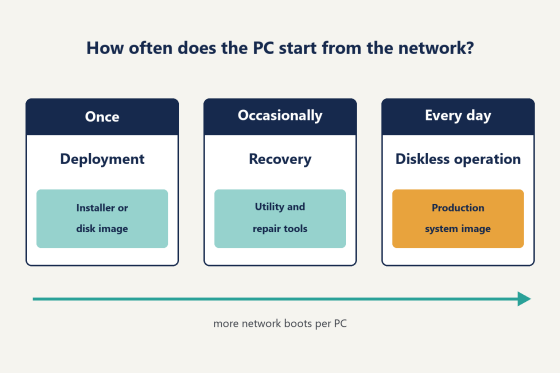
The uses of the technique are easiest to separate by one measure: how often a given PC starts from the network. On that measure there are three jobs.
The first is deployment. The PC starts from the network once, receives an installer or a disk image, writes it to a local drive, and from then on starts from that drive. This is the use that most documentation describes, and the first page of search results for the term is dominated by it. Enterprise IT departments and system builders are the typical users, along with schools preparing for a new term. The server holds installation images.
The second is recovery and diagnostics. The PC starts from the network when something has gone wrong, such as a failed drive or a system that no longer starts, or when a technician needs to run a memory test or an imaging tool. The use is occasional and unplanned. The server holds a small set of utility environments.
The third is diskless operation. The PC starts from the network every time it is powered on, because there is no operating system on a local drive, and often no local drive at all. The operating system and every application, games included, are held on the server. Each client reads from that shared image and keeps its own temporary changes separately, and those changes are discarded at restart. The server holds the production image.
Job | How often a PC | What the server | Typical sites |
Deployment | Once per | Installers or disk | Enterprise IT, |
Recovery and | Occasionally, | Utility and repair | Any managed fleet |
Diskless operation | At every power-on | The production | Gaming centers, |
Diagram of three uses of LAN boot ordered by how often a PC starts from the network
The common reading treats boot from LAN as an installer feature. Measured by the number of network boots, that reading is incomplete. A deployed PC uses the network boot path once in its service life, or once per reinstallation. A diskless PC uses it every working day. As an illustration, a 40-seat gaming center that opens 360 days a year performs at least 14,400 network boots annually, while an enterprise that deploys 40 PCs performs 40. Wherever diskless operation is present, it accounts for the great majority of network boots on that site.
A limit on this claim should be stated. No public count of diskless seats was found during research for this article. Customer totals disclosed by vendors are the only indicator available, and they count customers, not seats, so they cannot be compared between vendors. The argument here concerns intensity of use per site and does not estimate the size of a market.
The three jobs also place different demands on the same technology. In deployment, the speed of a network boot matters for an hour. In diskless operation it is part of every opening, and the server and the network together determine how the floor performs for paying customers. Sites in the third group therefore treat the boot server and the network as production infrastructure, and the software that serves them forms a product category of its own, separate from deployment tools.
Where daily LAN boot is concentrated
Daily network boot is found where three conditions meet: many identical PCs, users who do not own them, and software that changes often. Gaming centers and esports lounges fit most closely. They run dozens of PCs with the same game library, the games are patched frequently, and each customer session is expected to begin from a clean system. School computer labs are the second group, and the esports rooms now appearing in US K-12 schools are a recent form of the audience that the 1997 article addressed. Enterprises with shared workstations and render farms complete the list.
In the United States the case for daily network boot is argued mainly on labor. Venues are commonly staffed by one person per shift, and a school district typically assigns a small technical team to many buildings. Under those conditions the relevant measure is the number of machines one person can keep identical. A single image held on a server changes that number more than any tool that works on one PC at a time.
CCBoot, the diskless boot system from Youngzsoft, is one of the products built for this group, and the vendor reports more than 30,000 customers. Its published feature set matches the conditions above. CCBoot client PCs need no local drive. An update made on one machine reaches the others when they restart. Every restart returns the system to its saved state, which removes any malware picked up during a session. For school computer labs, the vendor cites energy savings of up to 40%.
The argument has changed little in three decades. Francis Tungpalan of GetPoint Gaming in the Philippines, in a testimonial published by the vendor, puts it this way: "We have about 5 online games that update every week, now we only update the server." That is the 1997 claim in different words. The cause of the work has moved from operating system upgrades to game patches, and the remedy is the same.
On the commercial side, CCBoot is licensed per client PC with monthly and annual billing. This article does not reproduce figures, and readers can consult the current per-PC pricing on the vendor's purchase page. Sites that want to test the approach on their own hardware can begin with a trial build, one server and a single client PC.
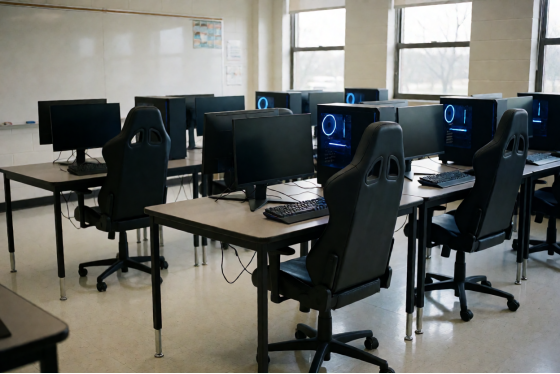
Rows of gaming PCs in a US school esports lab with no students present
Network boot through 2028
Three developments are likely to shape the technique through 2028.
First, the legacy path leaves new hardware. The firmware network stack becomes the only route, and the label "LAN option ROM" disappears from setup menus, while the boot-list entry survives under names such as "Boot from LAN" or "Network".
Second, Secure Boot becomes a working assumption. According to Microsoft's support documentation, the Secure Boot certificates the company issued in 2011 began expiring in June 2026, with the last reaching its date on October 19, 2026. Certificates issued in 2023 replace them. For sites that start PCs from the network, signed boot files and current certificates become a routine maintenance item, handled alongside firmware updates.
Third, HTTP Boot is more likely to coexist with PXE than to displace it, because firmware support remains uneven and PXE is still the default.
None of this alters the definition. In 2028, to boot from LAN will mean what it meant in 1997: the operating system comes from a server. For the sites that use it daily, it is simply the normal way a PC starts.