
Short answer first. If you're buying the PCs now, build the room diskless and put the drive money into graphics cards. If every PC on your floor already has an SSD in it, keep the drives, leave Windows on them, and move the game library to one server.
That covers most rooms. The reason the diskless vs local SSD gaming cafe argument never ends on forums is that the two camps aren't arguing about the same thing. One side is talking about how fast a single PC loads a map. The other is talking about what it takes to keep 40 PCs identical on a Tuesday night with one person on shift. Both are right about their own question.
Are they even solving the same problem?
No.
A local SSD solves a one-machine problem. This PC reads its own files from its own drive, quickly, and it doesn't care what the PC next to it is doing. For a gamer at home that's the whole story, which is why the advice sounds so obvious when it comes from someone who has only ever owned one computer.
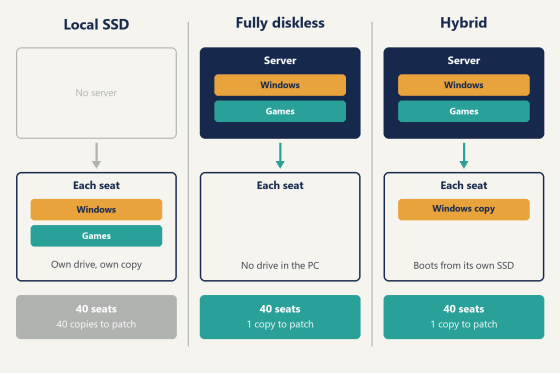
Diskless boot solves a many-machines problem. Every seat loads Windows and its games from one image on a server, so there's one copy of the operating system, one copy of each game, one place to patch and one thing to fix. The seats stop being 40 separate computers and start being 40 screens onto the same computer.
So the useful comparison isn't to drive against the network. It's 40 installs against one. Everything below follows from that.
Diagram comparing local SSD, fully diskless and hybrid layouts for a gaming cafe
Patch night
A cafe with local drives keeps 40 copies of every game, and each copy has to be updated on the machine it lives on.
In practice that goes one of three ways. The launchers update themselves whenever a customer opens them, which means the customer pays for the wait. Or someone on staff walks the rows after closing, logs in at each seat, starts the downloads and comes back to check. Or the room buys an imaging tool, updates one PC, and pushes the result to the others overnight, which works until one machine doesn't take it.
That one machine is the real cost. Out of 40 seats, 39 finish and one stalls at 84%. Nobody notices at 2am. At opening the next day a customer sits down at it, the game won't launch, and now you're moving a paying player while you troubleshoot a seat you thought was done.
On a diskless floor the update happens once. With CCBoot you install the patch on the master, reboot the rest of the PCs, and every seat has it, because every seat is reading the same files. There isn't a state where seat 23 is a version behind. One person can run the whole network that way, and patch night becomes a job you do at the server with a coffee instead of a lap of the room.
New releases work the same way, and that's where it shows most. When a big title launches on a Thursday and every regular wants it by Friday, a per-seat room is looking at 40 installs of a very large game in one night. A diskless room installs it once, restarts, and has the launch-day title on every seat before the after-school crowd arrives (which is the hour it earns its money).
For a US room this is the argument that matters most. Bandwidth is rarely the limit here. Payroll is. Honestly, if you only weigh one section of the diskless vs local SSD gaming cafe comparison, weigh this one, because it's the cost that comes back every single week.
What the seat looks like after 300 customers
Every customer changes the PC a little. A browser extension. A voice chat app that starts with Windows. A "performance tool" a friend recommended. A cheat loader, sooner or later, and whatever came bundled with it.
With a drive in every PC, all of that stays. The usual answer is restore software that rolls the disk back, plus a reimage every so often when a seat gets strange anyway. It's a second system to buy and then keep in step with every game update, since a frozen disk that reverts at reboot will also revert the patch you just installed unless you thaw it first. (Anyone who has run a frozen floor has lost a patch that way at least once.)
Diskless has the clean-up built into how it boots. The seat's changes go to a temporary write-back file, and that file is dropped at restart. Viruses, trojans, spyware, stray installs: gone, on every seat, every time, with nothing to schedule. The things that should survive a reboot can. A personal disk holds data you want kept, and the image itself only changes when you decide to change it.
This is also where the "it runs faster" claim comes from. A PC that has had 300 strangers on it accumulates junk that slows it down, and a seat that returns to its day-one state at every restart doesn't.
Speed, where people expect local to win
Here's what the floor feels: cache.
On a diskless floor, the files a seat asks for most are held in the server's memory, backed by an SSD cache behind it. A cafe isn't 40 people doing 40 different things. On a Friday night most of the room is in the same four or five games, which means most of the room is asking for the same data, and the server already has it in RAM because the seat before you asked for it too. The more seats play the same title, the better this gets.
Then there's the writing side. Each client can use a local write-back cache, so the temporary data a seat generates during a session is handled close to the seat.
So the tuning order is simple, and it's worth being firm about: put the budget into server memory first. A room that feels quick is a room where the popular games are sitting in cache, and that's a RAM decision long before it's anything else. Fast storage for the game disk and a server uplink that matches your seat count come next.
Which drives and network cards are worth buying changes every few months, so rather than name parts that will age, ask support for the current parts list for your seat count. They'll size it for the room you have.
Where the hardware money goes
A drive in every PC means buying the game library's worth of storage 40 times. The library keeps growing, so the drives that were roomy when you opened are tight two years later, and then the choice is to carry fewer games or replace 40 drives.
Drives also wear out, and they do it one seat at a time. Olcay Taylan of TAY-NET Cafe in Turkey described the moment plainly: "I checked my hard disk and 20 out of 35 hard disks had bad sectors and other issues. I had two ways to fix this, buy 20 new harddisks or use a diskless server. And I chose the latter. Now, I can update the games in one place and all the clients will get them."
A pile of drives pulled from gaming PCs on a workbench beside an open case
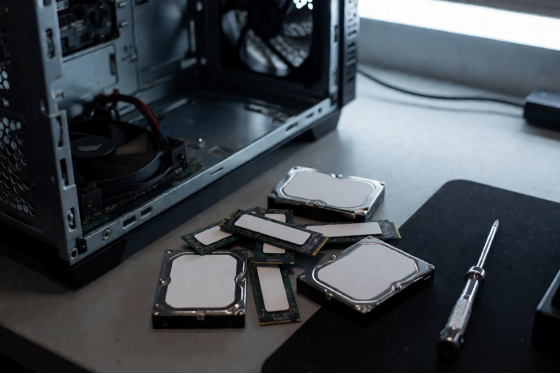
Twenty out of 35 is a dramatic number, but the shape of the problem is ordinary. Drives in a cafe work harder than drives at home. They're written all day by people who don't own them, they sit in cases that run warm for 14 hours at a stretch, and they all went into service on the same date, so they tend to reach the end together too.
A diskless client doesn't need a drive at all. The storage budget moves to one server, where a single set of fast disks serves the whole floor, and what you would have spent per seat goes somewhere customers can see. In a gaming room that means the graphics card. Nobody books a seat because of what it boots from.
A failed PC is a different event too. With no local install, a replacement machine goes on the desk, boots from the network and is the same seat it replaced. One image fits clients with different specs, so the replacement doesn't have to match the hardware it's standing in for.
Software licensing is counted per client PC, and you can check the current per-PC pricing against your own seat count.
Already have an SSD in every PC? Keep it
This is the objection US owners raise first, and it's a fair one. Gaming PCs here ship with NVMe drives. The money is spent.
You don't have to pull them out. In hybrid mode the server's Windows image is written to each client's own SSD as a VHD, and the PC boots Windows from that local copy, while the games and shared data live on the server and are managed there. The drive you already paid for keeps doing the part it's good at. The part that was costing you nights, 40 copies of the game library, becomes one.
You get the management along with it. The image has versions, you update it from one PC in Super Client, and anything a customer changes on a seat is reverted at the next reboot, the same clean-seat behavior a fully diskless floor has.
Nothing changes for the customer. They sit down, the PC is already on, the games are on the menu. What changes is behind the counter. The games folder on each seat stops being something you maintain and becomes a view of the one library on the server, and the SSD in that seat has a much easier life, since it's holding Windows and a cache instead of several hundred gigabytes of game files being rewritten every patch.
Patch night looks the same as it does on a fully diskless floor: update the game on the server, and the seats see it. The setup is documented step by step on the hybrid pages in the wiki.
Evening crowd at a gaming cafe with customers seen from behind
Diskless vs local SSD gaming cafe setups at a glance
| Local SSD in | Fully diskless | Hybrid |
Game patch | Once per PC | Once, on the | Once, on the |
Copies of the | One per seat | One | One |
Windows | Installed on each | One image, | One image, copied |
Seat clean-up | Restore software | Automatic at every | Automatic at every |
Adding a new | Install on every PC | Install once | Install once |
Drive in the client | Required, sized for | Not needed | The one you |
Read the table by column, not by row. The first column is a method that scales with the number of seats: every task is multiplied by 40. The other two are methods that don't.
How to decide this week
Two questions settle it.
Have you bought the PCs yet? If not, spec them without drives, build the floor fully diskless, and move that money up the parts list. You get the single image, the automatic clean-up and the replace-any-seat behavior from day one, and you never own 40 drives.
If the PCs are already on the desks with SSDs in them, go hybrid. Keep the drives where they are, move the games to the server, and take patch night back.
You can also do both. The choice is made per PC, so the 30 seats you opened with can run hybrid on the SSDs they came with while the 20 you add next spring arrive without drives and boot from the network, all on one server and one admin panel.
The second question is who looks after the machines. In most rooms the honest answer is whoever is on shift (the same person who is also running the register, restocking drinks and resetting a headset for seat 12). That answer points the same direction on either path. A setup that needs a dedicated technician to keep 40 installs in line is a setup that quietly assumes a salary, and a setup with one library to patch fits the staff you really have.
The first step is the same on both paths, and it's small. Download the trial and boot one spare PC from it. Put one game on the server, patch it once, restart the client and watch what the seat does. CCBoot is trusted by over 30,000 customers, and one machine on a bench is enough to see why before you change anything on the floor.
The diskless vs local SSD gaming cafe question sounds like a hardware question. It's a staffing question. Pick the setup where next Tuesday's patch is one job.