
Here's the number first. A 40-seat computer shop in Cebu that switches to hybrid and pays annually spends USD 80 a month on licenses, roughly PHP 5,000. At PHP 15 to 30 an hour, each PC covers its own share with four to eight paid hours a month. That's the whole hybrid internet cafe cost on the monthly side, and the rest of this piece shows where it comes from and what it buys back.
Hybrid, in one line: Windows stays on each PC's own SSD, and the game library moves to one server that every seat reads over the LAN. Patches download once. Nobody walks the rows.
The one-time side is mostly things you already own
Most cost articles start with a shopping list. This one starts with a list of things you don't have to buy, because in a shop where every PC already has an SSD, that list is longer.
The client drives to stay. Each PC keeps the SSD it boots from today, with the same Windows install on it, the same drivers and the same desktop. Nothing comes out of any case, which matters in a market where every peso spent on hardware has to come back through the counter.
The server is smaller than most owners expect. In hybrid mode it never serves Windows, so it needs no image disk at all. It needs a game disk for the library and write-back disks for the small writes clients make, and the official memory figure is modest: a 32GB CCDisk server, which is what the server becomes in hybrid mode, is enough for 100 PCs. Plenty of shops already have a machine in the back office with that much memory, and for them the one-time spend comes down to drives.
A few items round out the list:
- A switch with one port that matches the server's speed. Past about 30 seats, the server side runs on 10GbE while the clients stay on their gigabit ports.
- A UPS for the server and the core switch. In brownout season this is the cheapest insurance in the building.
- An SSD for any seat that still boots Windows from a spinning disk.
That last one is the only client-side purchase, and in a shop that has been open five or six years it usually affects a handful of older machines rather than the whole floor.
What this article won't give you is a peso figure for the server parts. Hardware prices in Manila move month to month, and a number printed here would be wrong by the time you read it. For the boards, NVMe drives and switches on sale right now, ask support for a current parts quote. The software side is fixed and public, and it's where CCBoot's diskless boot system keeps the math simple.
The monthly side, by seat count
Licensing follows the client PCs. A 40-seat shop needs a 40-PC license, and one license key runs on one server. There are two plans worth pricing for a hybrid shop: CCBootCloud on its own, or CCBootCloud bundled with iCafeCloud for memberships, billing and game license pooling in the same panel.
Figures below are per month. The annual columns are the monthly cost when you pay for the year up front. Pesos are converted at about PHP 62.5 to the dollar (the rate at the end of September 2026) and rounded, so check the rate on the day you pay.
Seats | CCBootCloud, monthly | CCBootCloud, annual | With iCafeCloud, monthly | With iCafeCloud, annual |
20 | USD 50 (PHP 3,125) | USD 40 (PHP 2,500) | USD 80 (PHP 5,000) | USD 64 (PHP 4,000) |
40 | USD 100 (PHP 6,250) | USD 80 (PHP 5,000) | USD 160 (PHP 10,000) | USD 128 (PHP 8,000) |
60 | USD 150 (PHP 9,375) | USD 120 (PHP 7,500) | USD 240 (PHP 15,000) | USD 192 (PHP 12,000) |
Annual billing works out to a 20 percent discount on every row. The per-PC rates behind the table are USD 2.50 monthly or USD 2.00 annually for CCBootCloud, and USD 4.00 or USD 3.20 for the bundle, all listed on the per-PC pricing page.
For a shop with a different seat count, the math is one line: seats times the per-PC rate. A 33-seat shop on annual CCBootCloud pays USD 66 a month.
Which column is yours depends on what's running at the counter today. If you already have billing and membership software you're happy with, CCBootCloud alone is the whole hybrid internet cafe cost on the software side. If you'd rather run timers, top-ups, member discounts and shared game licenses from the same panel that manages the game disk, the bundle replaces that separate bill, and the difference between the two columns is what you'd otherwise pay for billing elsewhere.
How many paid hours cover one PC?
Owners in the Philippines rarely think about software in dollars per month. They think in hours on a seat, because that's how the money comes in. So turn the license into hours.
One PC on annual CCBootCloud costs USD 2.00 a month, about PHP 125. At PHP 30 an hour, that's a little over four paid hours. At PHP 15 an hour, a bit over eight. On monthly billing the per-PC figure is about PHP 156, which is five to ten hours depending on your rate.
The bundle with iCafeCloud comes to about PHP 200 a PC on annual billing, so seven to thirteen hours at the same rates. On monthly billing it's about PHP 250, which works out to eight to seventeen hours.
Now put that next to what a seat actually sells. A shop open twelve hours a day has around 360 hours per PC per month to sell. The hybrid license takes the first four to ten of them. Everything a seat earns after that, in the same month, is already past the software line.
This is the number to write on the whiteboard behind the counter, because it's the one staff and partners understand straight away. Four to eight hours a PC, a month.
It also makes the hybrid internet cafe cost easy to compare with anything else you spend on a seat. A new headset, a chair repair, a month of the seat's electricity: put each of them in paid hours and the license turns out to be one of the smaller lines.
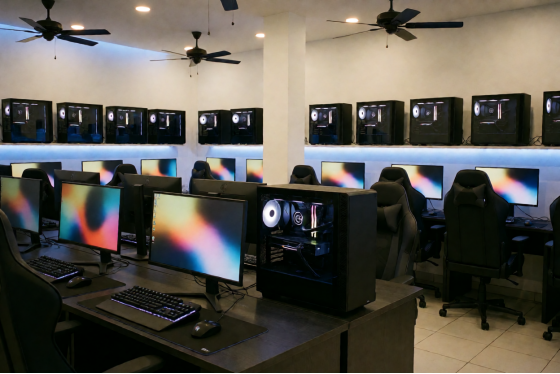
Empty Philippine computer shop before opening, with rows of modern gaming PCs
What stops costing you on patch night
The license is the line that shows up on the bill. The savings mostly don't show up anywhere, which is exactly why they're easy to underestimate. Three of them are worth measuring in your own shop.
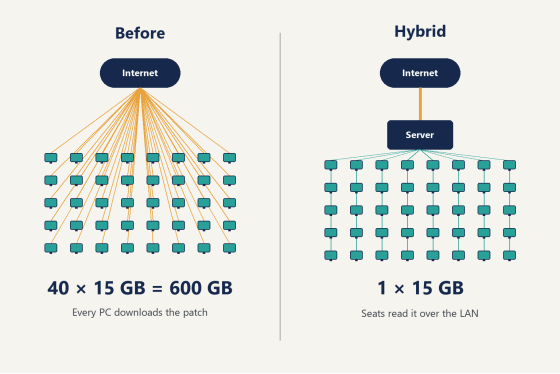
The first is the line into the shop. Take a 15GB update, the kind of size a big competitive title can push on patch day. In a shop where every PC keeps its own games, forty PCs pull that update forty times: 600GB through the same fiber that customers are using to play. In hybrid mode the update downloads once onto the server's game disk, and every seat reads it over the LAN. That's 15GB. When the connection is shared with paying customers and prone to slowing down in the evening, the difference isn't a number on an invoice. It's whether the Dota 2 players on row three notice lag at 9pm.
Francis Tungpalan of GetPoint Gaming in the Philippines described the same change on the CCBoot site: "We have about 5 online games that update every week, now we only update the server. Imagine the bandwidth we've saved!"
Diagram of patch downloads before and after a hybrid setup, 600 GB versus 15 GB
The second is time. In a shop without a central game disk, patch night means going seat to seat: starting launchers, checking progress bars, waiting for the slowest PC. In hybrid mode, one person sits at one PC, switches on Super Client (the mode that lets a single machine write to the shared game disk), runs the update once, and switches it off. Every seat has the new version on its next start. Measure how long your last patch night took, multiply by how many patch nights you have in a month, and that's the time you get back. In practice it's usually the owner's own evening, which is the hardest hour in the business to put a price on.
The third is the drives themselves, over the long run. Once the game library lives on the server, a client SSD only holds Windows and its write-back cache. When a seat's drive eventually comes due for replacement, it doesn't have to be sized for a game library that grows every season, and that's a smaller part to buy each time.
None of these three is a guess you have to take on trust. The bandwidth is patch size times seats. The hours are on your own clock. The drive sizes are on the invoice for the next one you replace.
Hybrid next to a fully diskless build, on paper
Owners who shop around will find both modes in the same product, and the license costs the same either way. The difference is in the hardware sheet.
A fully diskless build serves Windows to every seat as well as the games. The server holds an image disk, and its memory scales with the room: 32GB for 10 to 30 clients, 64GB for 30 to 70, 128GB or more for 70 to 100. The client PCs don't need drives at all, which is the right sheet for a shop buying new machines.
A hybrid build serves only games. No image disk, 32GB of memory for up to 100 PCs, and the clients keep the SSDs they already have. For a shop whose PCs came with drives in them, hybrid puts hardware you already paid for to work, and leaves the server doing the one job that saves you the most on patch night.
The hybrid deployment page in the wiki covers the switch itself if you want to see how the two modes differ in the panel.
Where the numbers get biggest
Every line in the savings column scales with something you can see from the counter.
More seats multiply the bandwidth saving directly, since each extra PC is one more copy of every patch that no longer comes down the line. A shop with a longer game list saves on every title, not only the popular ones. Titles that patch often, like the competitive games that pull weekly updates, add a patch night each time. And a tighter connection, the kind that has to carry customers and downloads at the same time, makes each saved gigabyte count for more.
So the shops that feel hybrid most are the ones with a full floor, a long library and a line that's already busy by evening. Honestly, that describes most computer shops that have been open more than a couple of years.
The license side moves the other way. It rises in a straight line with seats and never jumps, so the hybrid internet cafe cost per PC is the same at 20 seats as at 60, while the bandwidth and hours it saves grow with every row you add.
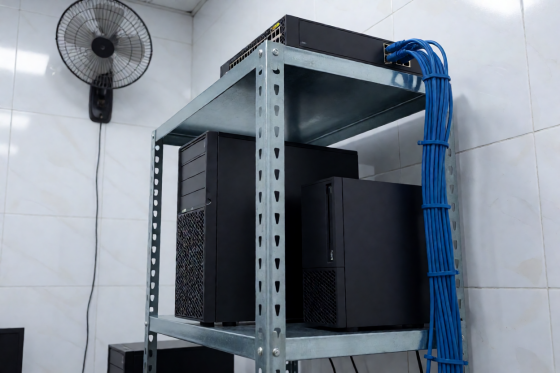
Tower server, switch and UPS on a metal shelf in a computer shop back room
Work out the hybrid internet cafe cost for your own shop
Three lines on the back of a receipt are enough.
1. Monthly license: your seats times the per-PC rate, times the day's exchange rate.
2. Paid hours per PC: the per-PC rate in pesos divided by your hourly price.
3. Patch traffic saved: the update size times your seats, minus one copy of it.
Then ask support for a quote on whatever server parts your back office is missing, and add that one-time figure on top. For most shops with SSDs already in every PC, it's shorter than expected.
The easiest way to see the numbers on your own floor is to try them on one row. Download the free trial, set up the server, convert six seats, and run them through the next patch night. By the end of that week you'll have your own hybrid internet cafe cost on one side of the receipt and your own savings on the other.