
Print the standard diskless server spec sheet, pick up a pen, and start crossing lines out. If your gaming center is going hybrid, about half of that sheet doesn't apply to you. The image disk goes. The memory tiers that climb to 128GB go. The DHCP and boot services go. What's left is a shorter list of hybrid diskless server requirements, and most rooms already own a machine that meets it.
Hybrid keeps Windows on each client's own SSD and moves the game library to one server. The machines boot the way they always have. Only the games travel over the network, and that one change takes most of the weight off the server.
Cross off, keep, add
Start with the full list for a fully diskless floor and go line by line. In CCBoot's diskless boot system the two modes share the same software and the same panel, so the comparison is exact.
Requirement | Fully diskless build | Hybrid build |
Image disk | 512GB or larger SSD | Not needed |
Game disk | 2TB or larger SSD or | 2TB or larger SSD or |
Write-back disks | Two or more SSDs past | Same, with client SSDs |
Server memory | 32GB, then 64GB, then | 32GB for up to 100 PCs |
DHCP, TFTP and PXE | Served by CCBoot, router | Stopped, router left as it is |
Server network | 10GbE past 30 seats | 10GbE past 30 seats |
Client drive | None | Local SSD running Windows |
Client addressing | Handed out at boot | Static IP and a unique PC name |
The crossed-off lines all trace back to one fact. Nothing boots over the network. A fully diskless server holds the Windows image and serves every boot block to every seat at opening time, which is why it needs an image disk and memory that scales with the room. A hybrid server never serves Windows at all.
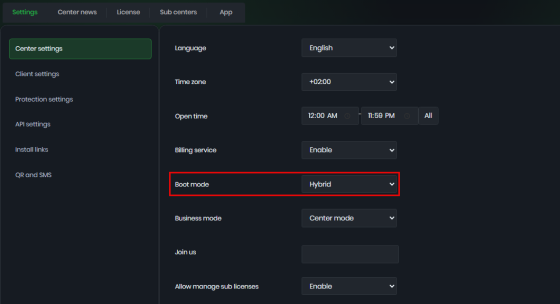
That's also why the boot services disappear. When you set Boot mode to Hybrid in Center settings, the server stops its TFTP and DHCP services, DHCP proxy included, because no client is asking for a boot file. Your router keeps handing out addresses to the counter PC, the Wi-Fi and customers' phones exactly as it did before.
CCBoot cloud panel Center settings page with Boot mode set to Hybrid
The lines that stay are the ones about games. A game disk is a game disk in either mode, and a network that carries forty map loads at once has to be sized for forty map loads at once.
Three lines are new, and they're all on the client side: a local SSD running Windows, a static IP and a unique name for each PC. None of them costs money in a room that already owns its machines. They do cost attention, which is why they get their own section further down.
But the short version of the table is simple. Hybrid diskless server requirements are the fully diskless list minus everything to do with booting, plus a little discipline on the client side.
Memory: why 32GB carries a hundred seats
Server memory in a fully diskless room is a boot cache first and a game cache second. At opening, every seat reads the same Windows boot files, and the server keeps them in RAM so the disk only answers once. The official guidance scales with that job: 32GB for 10 to 30 clients, 64GB for 30 to 70, 128GB or more for 70 to 100.
In hybrid mode the boot half of that job is gone. Every seat reads its Windows files from its own SSD, so the server's memory holds only the game data that's hot tonight: the Valorant client thirty people launch at 7pm, the CS2 maps in the current pool, the League of Legends patch that dropped this week. The official figure for a CCDisk server, which is what the server becomes in hybrid mode, is short and worth remembering. A 32GB CCDisk server is enough for 100 PCs.
For a 40-seat room, that's a number plenty of back-office machines already meet. Of all the hybrid diskless server requirements, memory is the one where owners most often find they're already done, and it's worth checking before you price a new build.
Buy the memory as two matched sticks rather than one, so the board runs in dual-channel. For floors past 100 seats, get the sizing from support rather than extrapolating from the 100-seat figure, because the right answer depends on your library and how many titles are hot on the same night.
Two jobs for storage, not four
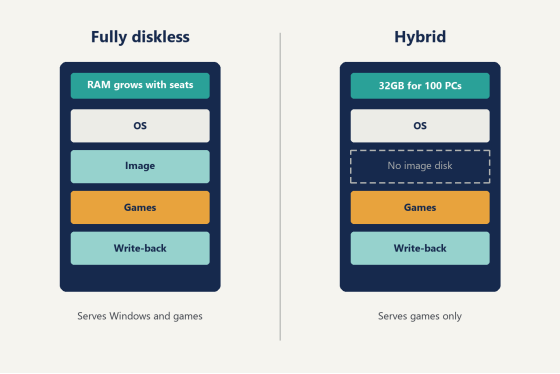
A fully diskless server has four storage roles: the Windows install on the server itself, the image disk the clients boot from, the game disk, and the write-back disks. Hybrid drops the image disk and keeps the other three, which in practice leaves two jobs that matter to the floor, games and write-back.
The server's own Windows lives on a 512GB or larger SSD. It's the least interesting drive in the box, and it should stay that way, so keep games and client writes off it.
The game disk holds the library, 2TB or more on SSD or NVMe. Anything larger than 2TB has to be initialized as GPT rather than MBR, and it's far easier to do that on day one than after the drive is full of installed games (nobody enjoys moving 1.8TB of launchers to fix a partition table). If the game disk is NVMe or a good SSD, you don't need a separate SSD cache in front of it. The memory cache and the drive itself carry the load.
The write-back disks catch the writes each client makes to the game disk: shader caches, config files, the small changes a launcher makes every time it opens. Past 20 seats, plan on two or more separate SSDs or NVMe drives of 512GB or larger. Don't put them in RAID. RAID 0 on SSDs does little for the small random reads and writes that write-back produces, and CCBoot spreads client write-back across multiple disks on its own, so two independent drives do the job better than the same two drives striped.
Hybrid has one more trick here, and it's the reason the server can stay small as the room grows. Every client in a hybrid room already has an SSD, so you can turn on the local write-back cache and let each seat keep its own writes locally instead of sending them to the server. The client's drive needs to be an SSD or NVMe, formatted with a 32K allocation unit, with a single partition, and it should be the only drive in the machine because the client uses the first disk it detects. Once it's working, two files appear on that drive, C.CCachex and D.CCachex, one for each drive letter being cached. The local write-back cache settings are one checkbox in the client's edit settings.
Format every data drive on the server with a 32K allocation unit as well. Games that stutter on the default 4K units stop doing it on 32K, and it's a setting you can only choose when you format.
Diagram comparing the drives in a fully diskless server and a hybrid diskless server
Does the network still matter if nothing boots from it?
Yes. The boot traffic is gone, but every game read still crosses the switch, and game reads are the heavy part. When a five-stack queues into the same match, five seats pull the same map at the same moment, and on a busy Friday that happens across the whole room at once.
Size the server side of the network by seat count, the same way you would for a fully diskless build:
- 20 to 30 seats: three to five gigabits of server ports, as five 1GbE ports or two 2.5GbE ports.
- Past 30 seats: a 10GbE port on the server.
- Clients stay on 1GbE or 2.5GbE ports.
- CAT6 cabling, with CAT5e acceptable for a small room of 10 to 20 seats.
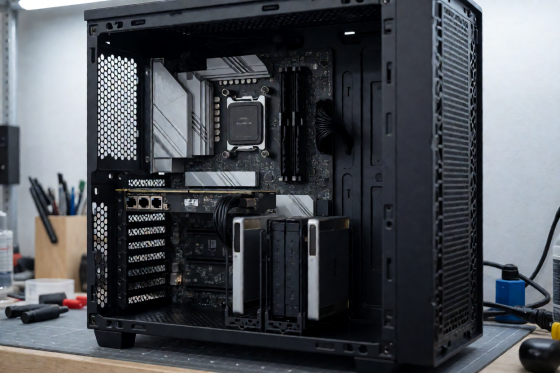
The 10GbE card goes in the first full-length slot on the board, usually labeled PCIE_1. That slot typically has sixteen lanes. Lower slots on many boards have four, and a 10GbE card seated there links up, shows its lights, and never reaches the speed you paid for. It's the most common reason a well-specced server feels slow, and it takes thirty seconds to check with the side panel off.
The network is also where hybrid diskless server requirements and fully diskless ones look identical, and that's worth saying plainly. Dropping the image disk shrinks the server. It doesn't shrink the pipe, because the heavy traffic was always the games. Spend the money you saved on memory here instead.
Choose an Intel or Realtek network card, and always a PCIe card rather than an older PCI one. The switch needs one port that matches the server's speed, a 10GbE port for a 10GbE server, plus 1GbE or 2.5GbE ports for the clients. Managed or unmanaged both work.
What every client PC brings to the table
In a fully diskless room the client brings a network card and not much else. In a hybrid room it brings its own boot drive, and that makes the client part of the spec.
Each client needs:
- A local SSD with Windows installed and running, the same install it boots from today.
- A unique static IP address that never gets switched back to automatic.
- A unique PC name.
- A gigabit network port.
The static IP and name deserve a plan rather than a guess. Tie both to the desk: desk 1 is PC-01 on .101, desk 2 is PC-02 on .102, and so on down the room. Honestly, it's the cheapest thing on this whole list and the one people are gladdest they did a year later, when a new staff member can find PC-27 without asking anyone.
Then open each case and count drives. If a machine still has an old second drive nobody uses, take it out now. The local write-back cache uses the first disk the client detects, and a forgotten drive in the second bay can end up being the one it picks. One SSD per client leaves nothing to chance.
If a few older seats still boot Windows from a spinning disk, give those an SSD before they join. The local write-back cache wants an SSD or NVMe, and those seats end up among the quickest on the floor once they have one.
Clients with different motherboards, GPUs or ages are fine side by side. Each one keeps its own Windows and its own drivers, so a hybrid floor doesn't care whether PC-03 was built in the same year as PC-33 (which, in most rooms that have been open a few years, it wasn't).
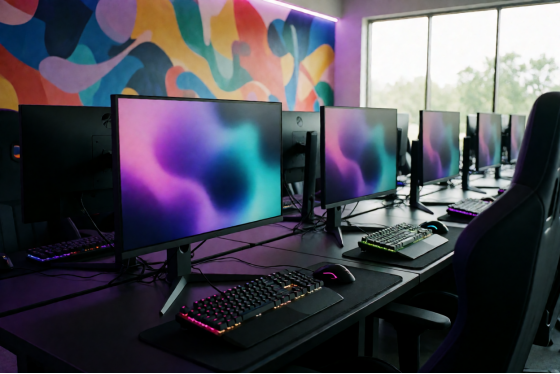
A row of gaming stations in a US esports lounge on a quiet afternoon
The operating system and three settings nobody checks
Run a current Windows Server release on the server, Standard or Datacenter edition. For the exact release and build to install this month, support will give you the current recommendation.
Then three settings that cost nothing and get skipped all the time:
1. Leave antivirus off the server. Scanning adds disk activity that shows up on the floor as slow loading, and nobody browses the web on that machine.
2. Keep SATA mode set to AHCI in the BIOS.
3. Format the game and write-back drives with a 32K allocation unit, as covered above.
Put the server and the core switch on a UPS while you're in there. It's not a requirement on any spec sheet, but every room that has had a brownout on a tournament night has one now.
Open tower server with SSDs and a network card in the top PCIe slot
Check hybrid diskless server requirements in one afternoon
You can check every line above against the hardware you already own in a single afternoon, before you buy anything.
Open the server and count drives: one for its own Windows, one for games at 2TB or more, two for write-back if you're past 20 seats. Check the memory is 32GB. Look at which slot the network card is in. Check that the switch has a port matching the server's speed. Then walk the floor with a notepad and count the drives in every client, noting any second drive and any spinning disk.
What's left after that walk is your shopping list, and for most rooms going hybrid it's short. For the specific server boards, NVMe drives, network cards and switches on sale right now, ask support for the current parts list, since that list changes faster than any article.
Licensing follows the client PCs, with one key per server. Per-PC pricing is USD 2.50 per PC per month, or USD 2.00 per PC per month billed annually. If you also want memberships and billing in the same panel, along with game license pooling, CCBootCloud with iCafeCloud comes to USD 4.00 per PC per month, or USD 3.20 on annual billing.
Then download the free trial, set Boot mode to Hybrid, and point one row of clients at the game disk. A row of six seats on a Friday night tells you more than any spec sheet, and once it holds up, you'll know the hybrid diskless server requirements for your room are already sitting in your back office.