
It's 11pm on a Thursday in a 40-seat computer shop in Quezon City. Forty machines are downloading the same Dota 2 update through the same fiber line, and the owner is standing behind PC-27 because it's always the last one to finish. Tomorrow that line has to carry paying customers. Tonight it's carrying one patch forty times.
The hybrid upgrade internet cafe owners keep asking about fixes that particular night. Windows stays exactly where it is, on each PC's own SSD. The game library moves to one server in the back room, and every seat reads it over the LAN. And the shop never has to close to get there, because the work goes in one row at a time, after hours, over about ten nights.
What changes, and what you get to keep
Most of the shop stays put. That's the reason to do it this way.
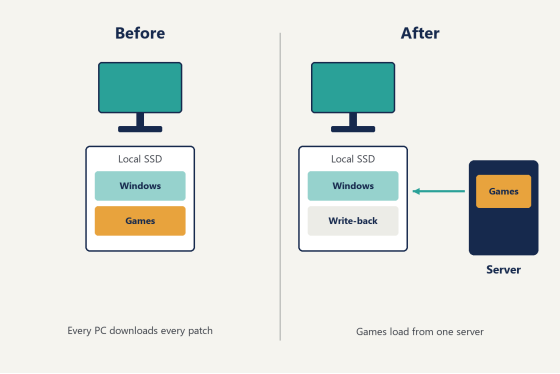
Hybrid is a mode of CCBoot's diskless boot system in which each client keeps running Windows from its local SSD while the games and shared data live on the server. Nothing about how a PC powers on changes. What changes is where Steam, the Riot Client and the rest of the library read their files from.
Keep | Retire | Add |
Each PC's SSD and the | A separate copy of every | One server with a game |
The router, and the way it | Forty downloads of every | The CCBootCloud client |
Desktops and shortcuts, | The walk down every row | A static IP and a unique |
The middle row of the first column is what makes an upgrade during business weeks realistic. When a CCBoot server switches to Hybrid, its TFTP and DHCP services stop, DHCP proxy included, since nothing in the room boots over the network any more. Your router keeps handing out addresses to the counter PC, the Wi-Fi and customers' phones exactly as it did last week. A fully diskless install begins by turning the router's DHCP off. A hybrid one leaves it alone.
That one fact is why a hybrid upgrade internet cafe staff can carry out after closing never needs a day off the calendar. The counter keeps working, the Wi-Fi keeps working, and the seats you haven't reached yet keep running exactly as they did. Every change happens on a machine that's already switched off for the night.
Night 0: walk the floor with a clipboard
Before anything gets installed, spend one quiet evening finding out what's actually inside the cases. Whether it's called a computer shop in Manila or a warmer in Surabaya, a place that has been open five or six years rarely has forty identical machines. There's the batch from the opening year, a batch bought second-hand when the shop expanded, a few rebuilt from parts after a bad month. That's normal, and hybrid handles a mixed floor well because every PC keeps its own Windows and its own drivers. You just need to know what you've got.
Walk every seat and write down:
- How many drives are in the case, and which one Windows boots from.
- Whether that boot drive is an SSD or a spinning disk.
- That the network port runs at gigabit.
- The total size of the installed game library, which sets the size of the server's game disk.
Two of those decide more than they seem to.
The first is the extra drive. Plenty of machines still carry an old second disk nobody has opened in years, holding a game folder from 2021 or nothing at all. Pull it out tonight. The local write-back cache you'll turn on later uses the first disk the client detects, and a forgotten drive in the second bay turns into a puzzle at 7pm on a full Saturday. One drive per case leaves nothing to guess.
The second is the boot drive itself. Any seat still starting Windows from a spinning disk gets an SSD before its row converts, since the local write-back cache wants an SSD or NVMe underneath it. It's one part per machine, and those seats end up among the quickest in the room.
Then make the address plan, which takes twenty minutes and pays off for years. Every client in hybrid mode needs a unique static IP and a unique PC name, and the IP should never be switched back to automatic. So tie both to the desk. Desk 1 is PC-01 on .101, desk 2 is PC-02 on .102, all the way down the room. Print the sheet and tape it inside the counter (the staff member you hire next year will thank you, because they'll find PC-27 without asking anyone where it is).
Night 1: the server goes in the back room
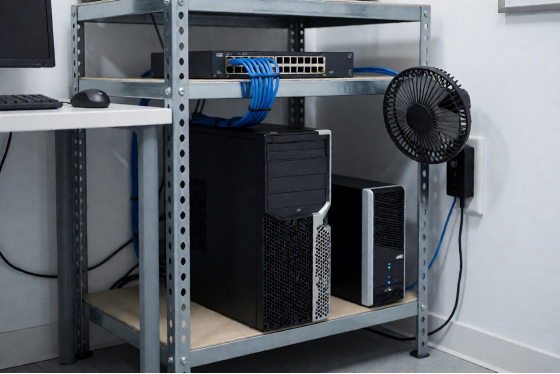
The server for a hybrid shop is smaller than most owners expect. It doesn't hold a Windows image, so there's no image disk. It needs a game disk and a write-back disk, and the official memory figure is modest: a 32GB CCDisk server is enough for 100 PCs. Size the game disk to your Night 0 total with room to grow, because libraries only get bigger. For the server board, NVMe drives and switch that are actually on sale this month, ask support for the current hardware list, since that list moves faster than any article can keep up with.
Put the server and the core switch on a UPS first. In brownout season that's the difference between a pause and starting the night over.
Install the CCBootCloud server from the cloud panel, where the installer sits under Settings, then Install links. Then open Settings, then Center settings, set Boot mode to Hybrid, and save.
CCBoot cloud panel Center settings page with Boot mode set to Hybrid
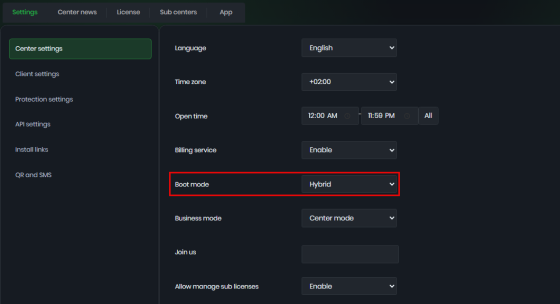
The panel's main page changes to Disks once the mode takes, which is your confirmation that it worked. The hybrid deployment page in the wiki shows each dialog if you'd rather follow along click by click.
Finish the night by filling the game disk. Put one machine in Super Client mode, which is what lets a single PC write to the shared game disk, and install each title once: Dota 2, Valorant, League of Legends, CS2, CrossFire, whatever your regulars actually play. Log into each launcher so the first-run updates finish tonight rather than tomorrow afternoon. Then switch Super Client off.
Not one seat on the floor has been touched. The shop opens tomorrow exactly as it did today.
Night 2: one row, six seats
Pick the row nearest the counter. You walk past it a hundred times a day, which makes it the easiest row to watch.
For each of the six PCs:
1. Set the static IP and PC name from your Night 0 sheet.
2. Run the CCBootCloud installer, choose the client installation, and let it finish.
3. When it offers to reboot and upload an image, answer No, because a hybrid client boots from its own SSD and there's no image to send.
4. Turn on the local write-back cache in the client's edit settings, with the SSD formatted at a 32K allocation unit and a single partition.
5. Reboot, open the game disk, and launch two or three titles.
Only after step 5 do you delete that PC's local game folders. Verify first, clean up second. The space you free on the SSD is where the write-back cache lives from now on, and once it's running you'll find two files on that drive, C.CCachex and D.CCachex, one for each drive letter being cached. Seeing them there is the quickest way to know the seat is set up right. Glance at them again on Night 3 and they'll have grown, which tells you the cache is doing its job.
Nothing you do on Night 2 is a one-way door, either. Windows never left the SSD. Each converted PC still starts from its own drive the way it did yesterday, so the first row is a trial you can shape as you go rather than a commitment you're locked into. Six seats fit comfortably into one night after closing.
Diagram of one cafe PC before and after a hybrid upgrade, with games moved to the server
Will the rest of the floor notice?
No. Run the shop for a week with six seats on the server and thirty-four on their own drives, and customers won't be able to tell which is which. Same desktop, same login, same shortcuts. Billing carries on as it did. The one difference shows up on Friday night, when that row fills with a five-stack queuing into the same Valorant match and the map comes off a server that already has it sitting in memory.
The week also gives you one full patch cycle on a split floor, and it's worth paying attention to. When the next update drops, you apply it once through Super Client for the six converted seats. The other thirty-four update the way they always have. By Wednesday the difference in effort is obvious to whoever is on shift, and that person is usually the one asking when the next row goes over.
That Friday is the test that counts. One PC loading a game tells you almost nothing. Six of them loading the same map in the same second, while the rest of the floor is busy on its own drives, is the closest thing to a full house you can measure without converting the house, so watch it and write down what you see.
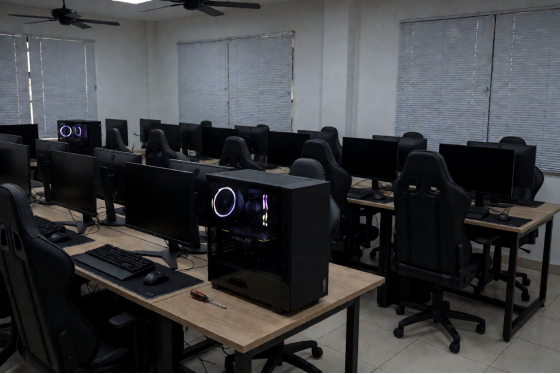
A row of gaming PCs in a Southeast Asian computer shop after closing, one case open on a desk
Nights 8 and 9: the rest of the room
After a week, the rest is repetition. Take the remaining rows two or three at a time after closing, with the same five steps and the same address sheet, and a 40-seat shop is done in two nights. Honestly, by the third row nobody needs the checklist.
This is the stretch of a hybrid upgrade internet cafe owners tend to rush, and there's no reason to. Keep the order sensible. Convert the rows your regulars use most on the first of the two nights, so they get the benefit first, and leave the VIP or tournament row for the second (by then it sits on a setup that has already had a week and a half of real customers on it). Tick each desk off the address sheet as it goes over, so the paper on the counter always matches the floor.
When the last seat is done, walk the room once more with the sheet. Every PC should show the game disk, every write-back SSD should have its two cache files, and no machine should still be holding a local copy of Dota 2 in some forgotten folder. Any PC that does is quietly downloading patches on its own again, and it's a two-minute fix once you spot it.
Watch the link between the switch and the server as rows join, because every converted seat reads its games through it. Past about 30 seats the server side runs on 10GbE, while the clients stay on the gigabit ports they already have.
What the hybrid upgrade internet cafe owners get back
Next Thursday looks different. A Dota 2 patch lands at 10pm. You sit down at the PC by the counter, switch on Super Client, let the update download once onto the game disk, and switch it off. Every seat is on the new version the next time it starts. Nobody walks the rows. Nobody stands behind PC-27.
Francis Tungpalan of GetPoint Gaming in the Philippines described the same change on the CCBoot site: "We have about 5 online games that update every week, now we only update the server. Imagine the bandwidth we've saved!"
That bandwidth line lands harder in Southeast Asia than almost anywhere else. When the fiber that brings in customers is also the fiber that brings in patches, forty copies of a big update can eat the evening's connection before the evening has started, and a customer paying PHP 15 to 30 an hour notices lag long before they notice anything else about your shop. One download leaves the line for the people who are paying to use it. In practice the hours matter just as much. When one person runs the counter, the floor and the till, getting Thursday night back is worth as much as the bandwidth.
Tower server and network switch on a metal shelf in a computer shop back room
What it costs, and the first thing to do tomorrow
Licensing follows the client PCs, with one key per server. Per-PC pricing is USD 2.50 per PC per month, or USD 2.00 per PC per month billed annually. If you also want memberships and billing handled from the same panel, along with game license pooling, CCBootCloud with iCafeCloud comes to USD 4.00 per PC per month, or USD 3.20 on annual billing.
The hardware bill is short because the upgrade keeps what you already own. The client SSDs stay where they are. The server needs a game disk, a write-back disk and 32GB of memory for up to 100 seats.
So tomorrow, don't install anything. Print the address sheet, take a clipboard and a screwdriver, and walk the floor: count the drives, note the spinning disks, pull the forgotten second ones. When that's done, download the free trial and give the server its Night 1. Ten nights from now the hybrid upgrade internet cafe owners keep putting off will be finished, and your shop won't have closed once.