
In today's fast-paced IT world, efficiency and cost-effectiveness are paramount. Network boot software offers a solution to these demands. It allows computers to boot from a network server instead of a local hard drive. This technology is transforming IT environments by streamlining operations and reducing costs.
Network booting software, like CCBoot, is gaining popularity. It supports diskless booting, which is ideal for environments with multiple computers. This includes schools, offices, and data centers. By centralizing system management, it simplifies updates and installations.
Security is another significant advantage. Network booting reduces the risk of data loss from local storage failures. It also enhances system performance by utilizing high-speed network connections. This ensures quick recovery and reinstallation in case of system failure.
Network boot software is versatile. It supports various operating systems, including Windows, Linux, and macOS. It also integrates with virtual desktop infrastructure for added flexibility. This guide will explore the benefits, features, and implementation of network boot software.
What is Network Boot Software?
Network boot software allows computers to start up by loading an operating system from a network server. This is done instead of booting from a local hard drive. It uses a network connection for the boot process.
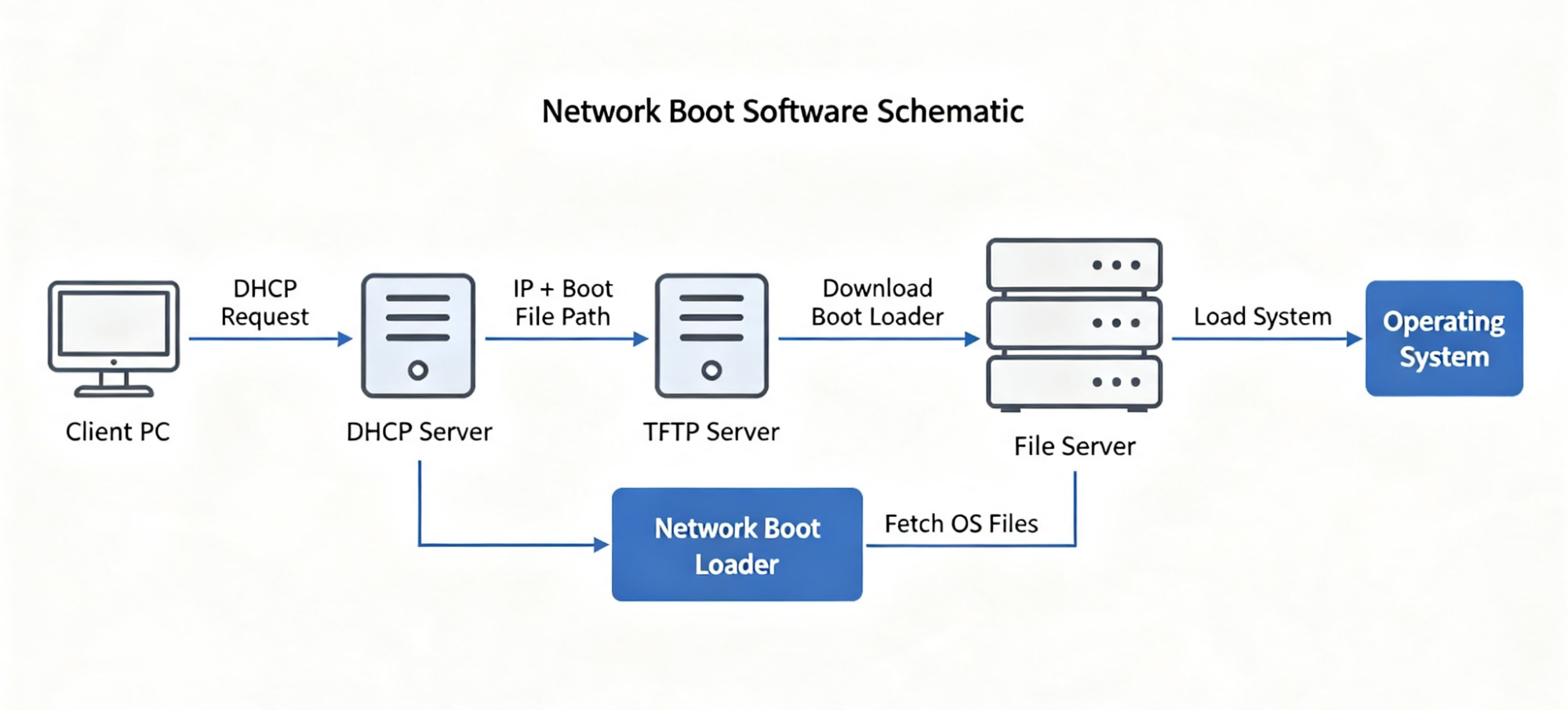
The technology relies on the Preboot Execution Environment (PXE) protocol. PXE enables network-based deployment of operating systems. During this process, a device fetches the necessary boot files over a network.
Key components of network boot software include:
- A network server hosting the operating system images
- A boot client, which is the device to be booted
- A PXE-enabled network card for facilitating communication
This setup significantly reduces the reliance on local storage. It can bring down hardware costs and streamline system management. By hosting everything centrally, it ensures all devices run on up-to-date software.
Network booting software is a crucial tool for IT professionals. It simplifies the complexity involved in managing multiple devices across various locations. With it, IT teams can efficiently deploy, update, and manage their systems. It is especially advantageous for large-scale environments where maintaining individual hard drives can be cumbersome.
Importance of Network Booting in Modern IT Environments
Network booting is a vital component for IT infrastructures today. It offers a streamlined approach to system deployment and maintenance. This technology minimizes the need for physical media, thereby expediting operations.
Its significance grows in environments with numerous devices, such as schools and enterprises. These setups benefit from centralized management and reduced maintenance tasks. Consistent software updates across devices become more manageable.
Network boot software enhances security. By eliminating local storage, it reduces vulnerability to data breaches. Centralized data also ensures easier implementation of security protocols.
Here are key benefits of network booting in IT settings:
- Cost Reduction: Fewer hard drives mean lower expenses.
- Efficiency: Speeds up deployment processes dramatically.
- Scalability: Easily adapt infrastructure as the organization grows.
- Security: Centralized data management boosts protection.
This technology seamlessly integrates with existing infrastructure, requiring minimal changes. It is an ideal solution for organizations seeking cost-effective yet robust systems. Furthermore, network booting supports collaboration across different locations, enhancing productivity. It stands out as an adaptable tool for IT professionals aiming to optimize resources and improve operational efficiency.
Overview of CCBoot
CCBoot is a robust network boot software solution that has gained popularity for its effectiveness. Tailored for environments with multiple systems, CCBoot allows diskless booting of operating systems from a network server. This approach not only conserves resources but also streamlines management tasks for IT teams.
One of CCBoot's primary advantages is its support for diverse environments. From gaming cafes to educational institutions, this tool provides a unified platform for managing numerous devices with ease. Its versatility contributes to a consistent and efficient IT infrastructure.
CCBoot is renowned for its user-friendly features, which simplify implementation and usage. Key features include:
- Diskless Boot: Boot client systems without hard drives.
- Centralized Management: Administer all connected devices from one interface.
- Cross-Compatibility: Supports various operating systems like Windows and Linux.
- Performance Optimization: Enhances system performance through efficient resource allocation.
Overall, CCBoot stands out as a valuable solution for IT professionals seeking to harness the capabilities of network booting. Its capabilities facilitate greater control over IT environments, resulting in improved system stability and reduced overhead.
Benefits of Using Network Boot Software
Network boot software offers numerous advantages for IT environments. Primarily, it centralizes system management and enhances operational efficiency. By eliminating individual hard drives, organizations save costs and maintenance time significantly.
Moreover, network booting boosts security and reduces risks associated with data loss or corruption. With these benefits, network boot software becomes an indispensable tool for IT professionals, helping streamline processes and ensuring a robust IT infrastructure. Implementing this solution can revolutionize system administration across various sectors.

Cost Efficiency
Network boot software is a cost-effective solution for managing IT infrastructures. By reducing the need for local storage, it cuts down both upfront and ongoing hardware expenses. This efficiency is critical for organizations working with tight budgets.
Key aspects of cost efficiency include:
- Reduced Capital Expenditure: Minimize initial hardware investments.
- Lower Operational Costs: Decrease maintenance and upgrade expenses.
- Optimized Resource Allocation: Efficiently use existing IT resources.
Incorporating network boot software ensures sustainable financial savings alongside technological advancement.
Reducing Hardware Costs
Utilizing network boot software eliminates the necessity for local drives in client machines. This reduction not only slashes hardware costs but also simplifies procurement processes. Enterprises save significantly on bulk purchasing of hardware components.
Essential elements of hardware cost reduction include:
- Elimination of Hard Drives: No need for individual storage components.
- Simplified Hardware Infrastructure: Reduces the complexity and cost of hardware setups.
- Extended Device Lifespan: Less wear and tear on physical devices, extending their use.
Such cost reductions are pivotal for optimizing IT budgets without compromising performance.
Simplifying Maintenance
Maintaining numerous systems can be daunting. Network boot software streamlines maintenance by centralizing updates and management tasks. This centralization reduces downtime and IT workload significantly.
Advantages of simplified maintenance encompass:
- Centralized Updates: Apply patches and software upgrades from one locati0n.
- Reduced Downtime: Less frequent need for individual machine checks.
- Lowered IT Support Burden: Fewer technical issues and troubleshooting tasks.
This simplified approach allows IT teams to focus on innovation instead of constant troubleshooting.
Increased Security
With network boot software, organizations can enhance their security posture. By enabling centralized control of systems, IT teams can swiftly deploy security patches and updates. This approach mitigates vulnerabilities effectively.
Primary security benefits include:
- Rapid Update Deployment: Quickly address security patches across devices.
- Data Centralization: Reduces risk of data loss on local machines.
- Improved Monitoring: Easier oversight of system activities and anomalies.
Such features make network boot software an integral part of secure IT infrastructures.
Centralized Control
Centralized control is a cornerstone of robust security strategies. Network boot software provides a unified management interface, allowing IT admins to oversee all connected devices effectively.
Control benefits are:
- Unified Management Dashboard: Oversee all systems from one interface.
- Consistent Security Policies: Implement uniform security protocols across devices.
- Streamlined User Management: Easily manage user permissions and access.
This centralization enhances overall system security and simplifies administrative tasks.
Protection Against Malware
Protection against malware is crucial in today's digital landscape. Network boot software mitigates malware risks by storing operating systems on secure, centrally-managed servers.
Ways it protects against malware include:
- Secure Boot Images: Load OS images from trusted sources.
- Uniform Security Standards: Consistent security measures across all devices.
- Quick Recovery and Backup: Rapidly restore systems post-compromise.
These practices fortify the organization’s defenses against malicious attacks and data breaches.
Flexibility and Scalability
Network boot software offers unmatched flexibility and scalability. Organizations can scale their IT resources without hefty hardware investments. This adaptability meets the dynamic needs of modern enterprises effectively.
Scalability features include:
- Dynamic Resource Management: Allocate resources based on current demands.
- Ease of Integration: Seamlessly integrate with existing infrastructure.
- Scalable IT Solutions: Expand network capabilities with minimal effort.
Such flexible structures support long-term growth and technological evolution.
Easily Add/Remove Devices
Adding or removing devices can be seamless with network boot software. Scaling up or down involves no complex hardware installation or removal processes. This ease promotes a nimble IT environment.
Key processes include:
- Plug-and-Play Connectivity: Fast setup with minimal configuration.
- Streamlined Device Management: Quickly reassign resources as needed.
- Efficient Scalability: Adjust device count with operational demand.
This flexibility facilitates rapid response to organizational growth or restructuring.
Adaptable to Growing Needs
As organizations grow, their IT infrastructure must keep pace. Network boot software supports evolving business requirements with minimal disruption. The adaptability it offers is crucial for dynamic environments.
Adaptation benefits involve:
- Effortless Expansion: Scale infrastructure without hardware barriers.
- Future-Ready Architecture: Prepare systems for emerging technologies.
- Customizable Deployment: Tailor IT solutions to specific organizational goals.
By integrating network boot software, businesses ensure they remain agile and competitive in fast-changing markets.
How CCBoot Works
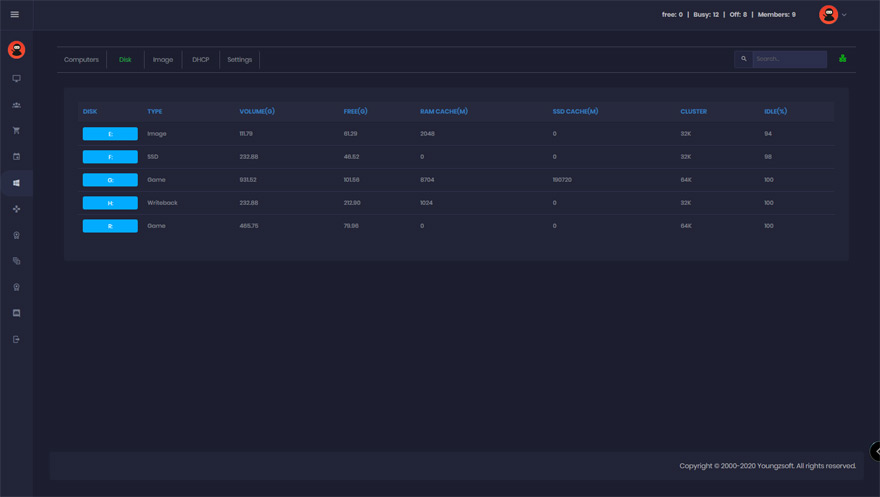
CCBoot is an advanced network booting software that enables diskless booting across multiple computers. It works by loading operating systems from a network server rather than individual hard disks. The core functionality relies on high-speed networking to distribute boot images to client PCs seamlessly.
This setup simplifies system management by centralizing OS deployment and updates. With CCBoot, organizations can efficiently manage a large number of computers without the need for internal storage, thereby reducing costs and enhancing operational efficiency.
The Technology Behind CCBoot
CCBoot leverages cutting-edge technology to facilitate diskless booting. It operates using the Preboot Execution Environment (PXE), which allows client devices to retrieve boot images over a network. The PXE server hosts these images, ensuring they are accessible during the boot process.
Key technologies include high-speed protocols and customizable boot options. CCBoot supports multicast technology, which helps deliver boot images to multiple clients simultaneously, reducing network strain. It also incorporates advanced cache mechanisms to enhance performance by storing frequently accessed data locally.
Fundamental technological aspects of CCBoot include:
- PXE Protocol Utilization: Standardizes network-based boot operations.
- Multicast Transmission: Simultaneously sends data to multiple clients.
- Caching Capabilities: Improves client-side performance with local caching.
Through these technologies, CCBoot ensures efficient, reliable, and scalable network booting solutions ideal for various environments.
Installation and Setup Process
Setting up CCBoot involves straightforward steps that ensure swift deployment. First, download and install the CCBoot server software on a network server. During installation, configure network settings to align with the organization's IT infrastructure, ensuring proper communication between server and client PCs.
Next, create and upload boot images. This process involves capturing a disk image from a master machine and storing it on the CCBoot server. Configuration options allow customization of client settings, such as automatic updates and user preferences.
The setup steps are as follows:
- Download Software: Acquire the latest CCBoot server version.
- Configure Network: Adjust settings to meet specific requirements.
- Create Boot Images: Capture and upload images from source machines.
Following these steps ensures a smooth transition to a diskless environment, enhancing productivity and reducing administrative overhead.
Compatibility with Various Systems
CCBoot boasts broad compatibility across multiple operating systems. It supports Windows, Linux, and other modern OSs, making it versatile for diverse IT environments. This flexibility is crucial for organizations with heterogeneous systems.
Integration is seamless due to CCBoot's support for both BIOS and UEFI boot modes. It is compatible with a range of hardware configurations, ensuring no substantial changes to existing infrastructure are necessary. This includes different types of network adapters and storage devices.
Highlighted compatibility features include:
- Multi-OS Support: Ensures functionality with Windows and Linux.
- UEFI and BIOS Compatibility: Cater to various system architectures.
- Hardware Versatility: Operates with different network and storage setups.
Such adaptability makes CCBoot an excellent choice for enterprises looking to integrate a robust diskless booting solution into their infrastructure, facilitating efficient and flexible IT operations.
Use Cases for Network Boot Software
Network boot software is ideal for environments with multiple endpoints needing centralized management. It's particularly beneficial in settings requiring uniform OS deployments without compromising on speed or efficiency. Businesses across various sectors leverage its capabilities for cost-effective and streamlined IT operations.
Institutions like schools and offices find network boot software invaluable. It supports swift deployments, making it suitable for frequently changing computing environments. This technology ensures users have quick access to up-to-date software, enhancing productivity and reliability.
Ideal Scenarios for CCBoot
CCBoot shines in scenarios that demand rapid and efficient deployment of operating systems across numerous devices. Its strength lies in environments where minimizing hardware costs and ensuring swift maintenance are priorities.
Organizations such as internet cafes and educational institutions benefit greatly from CCBoot. It supports a diverse range of uses from gaming to educational purposes, providing consistent performance and easy management.
Internet Cafes
Internet cafes can maximize their profitability by deploying CCBoot. This software eliminates the need for hard drives in every PC, dramatically lowering operational costs. It allows cafes to maintain a uniform and updated environment across all machines with minimal effort.
Key advantages for internet cafes include:
- Reduced Hardware Costs: No need for separate hard drives.
- Easy Management: Simple updating process.
- Uniform Environment: Consistent user experience.
This uniformity not only simplifies maintenance but also ensures that all PCs perform optimally, improving customer satisfaction.
Educational Institutions
In schools, CCBoot provides a robust solution to handle multiple computer labs efficiently. It simplifies OS and software rollouts, ensuring every student accesses the same educational resources. With diskless booting, schools can allocate their budgets towards improving other educational services rather than hardware.
Benefits for educational institutions include:
- Centralized Management: Easy updates and software deployments.
- Cost Savings: Hardware expenses reduced.
- Resource Consistency: Equal access for all students.
This setup enhances the teaching and learning experience by ensuring reliable access to needed applications.
Large Enterprises
Large enterprises benefit from the scalability and control provided by CCBoot. It facilitates IT operations by enabling centralized management of vast networks, thus ensuring compliance and security standards are consistently met across the board.
Advantages for large enterprises include:
- Scalability: Supports growth without infrastructure overhaul.
- Consistent Compliance: Centralized control maintains standards.
- Enhanced Security: Centralized updates reduce vulnerabilities.
This capability supports dynamic business environments needing quick system adjustments and robust security measures.
Real-World Success Stories
Various organizations have successfully integrated CCBoot into their networks. A prominent university leveraged network booting to manage hundreds of lab computers efficiently. The outcome was a significant reduction in IT costs and improved system reliability.
A notable internet cafe upgraded its services by deploying CCBoot. This resulted in faster systems and happier customers, leading to increased revenue. Their setup allowed swift updates and easy maintenance, which kept their offerings fresh and competitive.
In addition, a large corporation implemented CCBoot to manage its diverse IT infrastructure. The result was seamless integration of new devices, ensuring uniform compliance with IT policies.
Key takeaways from these success stories include:
- Efficiency Gains: Streamlined operations and reduced IT workloads.
- Cost Reduction: Lower hardware and maintenance costs.
- Enhanced User Satisfaction: Consistently up-to-date systems.
These real-world applications underscore CCBoot's versatility, demonstrating its value across different sectors by improving efficiency and resource management.
Conclusion
Network boot software transforms IT management by providing streamlined and cost-effective solutions. Its ability to simplify complex deployment tasks makes it indispensable for many businesses. By centralizing operations, organizations benefit from easier management and increased security.
As technology evolves, network boot software continues to offer flexibility and scalability. Businesses and institutions can adapt this technology to meet their specific needs, ensuring efficient operations. Its potential to reduce costs and improve productivity highlights its enduring value in modern IT environments.
Future of Network Booting Software
The future of network booting software looks promising with technological advancements. We can expect further enhancements in speed and security, essential for adapting to increasingly digital workspaces. As demands rise, innovations will focus on leveraging cloud technology and expanding integration capabilities.
Potential developments include:
- Cloud Integration: Seamless integration with cloud services.
- Enhanced Security: Improved encryption and authentication methods.
- AI-Driven Management: Smarter monitoring and optimization.
These advancements promise to streamline and secure IT infrastructures, driving network boot software's relevance as businesses evolve.
Key Takeaways for IT Professionals
IT professionals can harness network boot software to elevate their infrastructure's efficiency. This technology not only simplifies management but also reduces costs significantly. Utilizing features like centralized control and security gives IT teams more leverage over system operations.
Important points to remember:
- Cost Efficiency: Dramatically cuts down hardware expenses.
- Scalability: Seamlessly accommodates organizational growth.
- Security Enhancements: Protects from threats via central management.
These attributes make network boot software an indispensable tool, offering scalable, secure, and efficient IT solutions.