
If you run labs, classrooms, or a gaming cafe, you have probably seen the same pattern: local drives fail at the worst time, Windows images drift over months of “just one more hotfix,” and a single bad update can take out a whole row of PCs. iSCSI boot is one of the cleanest ways to get control back. Instead of booting from a local SSD or HDD, each PC loads its system disk from an iSCSI LUN hosted on a server. The workstation becomes a diskless workstation—easy to rebuild, consistent, and fast to roll out at scale.
This guide explains how iSCSI boot works, how it compares with local-disk and PXE-only approaches, and how to deploy it for a multi-PC venue. Along the way, I will use CCBoot as a concrete example of diskless management software operators used to deliver iSCSI-based diskless boot in PC clubs and internet cafes.
Diskless PC (iSCSI initiator) Ethernet switch (VLAN / dedicated LAN) Image / iSCSI server (CCBoot) iSCSI target + cache SSD/NVMe storage iSCSI iSCSI
With iSCSI boot, the “disk” lives on the server. The client reads and writes blocks over the network to an iSCSI target.
What is iSCSI boot (and why admins use it)
iSCSI (Internet Small Computer Systems Interface) transports SCSI block storage over TCP/IP. In plain terms: the server exports a block device; the client connects as an initiator; and the OS sees the remote disk as if it were local. With iSCSI boot, that remote disk is not just “data”—it is the boot volume.
That changes day-to-day operations. Patching is done once on a master image, then rolled out. If a PC will not start, you do not troubleshoot a mystery local drive; you reassign the machine to a known-good image and get it back on the floor. In environments where uptime and consistency matter more than “pet” machines—think gaming lounges, exam labs, or training rooms—this is often worth the network and storage planning it requires.
How iSCSI boot works: initiator, iSCSI target, and the boot flow
An iSCSI boot design has three core parts: the client-side initiator, the server-side iSCSI target, and the network in between. The implementation details vary by vendor, but the boot story is usually the same.
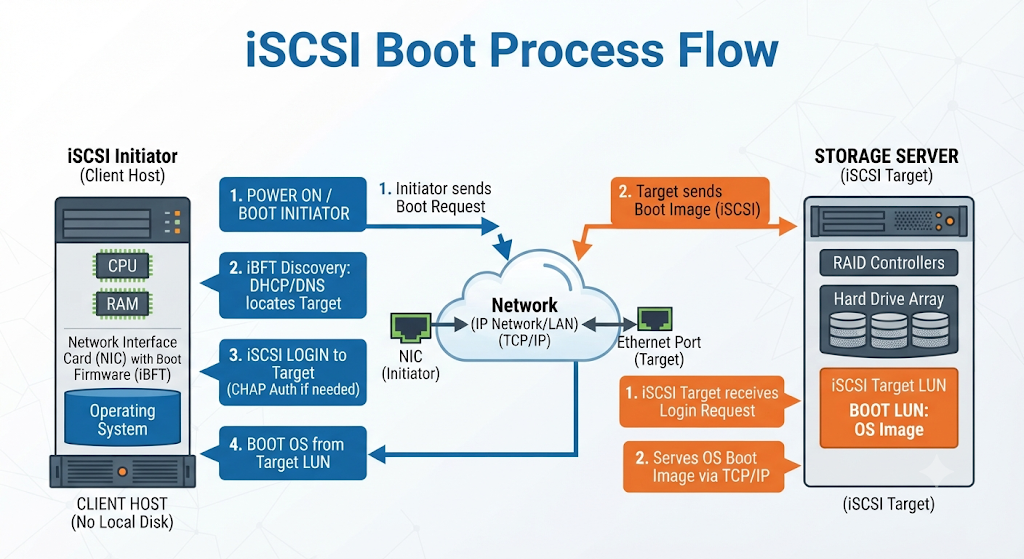
1) The initiator comes up before the OS
Before Windows or Linux loads, something has to bring up the NIC, get an IP address, and log in to storage. That “something” is typically one of these:
- UEFI/iBFT firmware initiator on the NIC or motherboard (common on modern hardware)
- NIC option ROM with iSCSI boot support (older but still seen)
- PXE chainloading a small bootloader that then attaches iSCSI (common in diskless deployments)
In many cafe-style builds, PXE is still part of the picture—not to run the OS, but to get the machine to the point where it can attach to iSCSI reliably with the right parameters.
2) The client logs in to the iSCSI target
The storage server (or appliance) publishes one or more targets. Each target exposes one or more LUNs (virtual disks). Access is controlled by IQN rules and/or CHAP credentials. Once the initiator logs in, the LUN appears as a bootable disk to the firmware.
3) Firmware hands off to the OS loader
After the iSCSI session is established, the firmware treats the iSCSI LUN like a local drive and loads the bootloader (Windows Boot Manager, GRUB, etc.). From that point on, the OS continues using the iSCSI session for reads and writes just like it would use SATA or NVMe storage—only the I/O is riding your Ethernet network.
4) Write caching and “where do changes go?”
In real diskless deployments you rarely want every client writing permanently to the base image. You typically use one of these models:
- Shared read-only base + per-client writeback (each PC gets its own delta disk)
- Shared base + temporary cache (changes discarded on reboot, common for public PCs)
- Full per-client disk (simpler conceptually, heavier on storage)
Diskless suites such as CCBoot are common in PC club deployments because they combine the boot path, image assignment, and cache/writeback policy into a single operator workflow instead of making you glue together PXE, DHCP, iSCSI, and image management as separate systems.
Power on UEFI / PXE NIC init + IP + params iSCSI login target + LUN attached Bootloader + OS reads/writes over iSCSI
High-level boot sequence: firmware brings up networking, attaches the iSCSI LUN, then the OS boots and continues I/O over the same iSCSI session.
iSCSI boot vs local disk boot vs PXE boot
It helps to be precise here, because people often say “PXE boot” when they mean three different things.
Local-disk boot
Local boot is simple and self-contained. The downside is operational: every PC becomes its own snowflake over time. Even with management tools, drift happens—drivers, user-installed apps, disk wear, and quick fixes that never get documented.
PXE boot (by itself)
PXE is a network boot method that usually downloads a bootloader over TFTP and then starts an installer, WinPE, a Linux live image, or some other pre-OS environment. PXE is excellent for deployment and recovery. It is not ideal as the long-term transport for a full desktop OS because TFTP and file-based approaches do not behave like block storage and do not scale the same way.
iSCSI boot (often using PXE to get started)
iSCSI is block-based. Once the session is up, you get predictable disk semantics: partitions, file systems, and I/O patterns behave like a real disk. That is why iSCSI boot is also called SAN boot in many datacenter designs. In cafes and PC clubs, it is the same idea applied to a room full of desktops: central storage, central images, central control.
Benefits of iSCSI boot in multi-PC operations
When you run more than a handful of machines, iSCSI boot stops being a neat trick and starts being an operations strategy.
Centralized image management
Instead of touching 40 PCs, you maintain a small number of gold images. Want to patch Windows, update GPU drivers, or roll out a new game library? Do it once, test it, then publish the updated image.
Lower hardware cost (and fewer drive-related failures)
Diskless clients can run with no local SSD/HDD at all, or with minimal local storage reserved for emergency tools. Fewer moving parts means fewer failures, and it is common to redeploy older PCs longer when storage is centralized.
Easier maintenance and faster recovery
When a machine misbehaves, you can revert it quickly by clearing its cache/writeback, reassigning it to a clean image, or booting it into a maintenance mode. This is the practical reality behind “rebuild in minutes.”
Faster deployment across many machines
Need to add 10 new seats? With the right switch capacity and a prepared image, you are mostly doing cabling and firmware settings. The boot disk and software stack are already waiting on the server.
Common use cases
- Internet cafes and gaming lounges: consistent performance, quick resets, and simpler rollouts of updates
- Schools and training labs: standardized images per course, easy semester refresh
- Call centers: predictable desktop builds, rapid swap-out of failed PCs
- Edge kiosks: centralized management when local access is limited
If you have ever wished you could treat a row of desktops like stateless endpoints, diskless iSCSI boot is the path that gets you there—assuming the network and storage are sized correctly.
Practical setup: iSCSI boot for a PC club or gaming cafe (dozens of clients)
Let’s walk through a pattern that works for an internet cafe or PC club. You can build this with standard Windows/Linux services, but many operators choose a purpose-built stack such as CCBoot because it packages the pieces into a single management surface: client registration, image (vDisk) management, caching, and batch actions.
1) Plan the network like it is part of your storage backplane
iSCSI boot turns your Ethernet into a storage bus. Treat it that way:
- Use 10GbE (or better) on the server; consider dual NICs and separate switches if uptime matters.
- Isolate iSCSI traffic on its own VLAN or physical switch fabric. Do not mix it with guest Wi-Fi.
- Set MTU consistently (1500 everywhere, or jumbo frames everywhere). Mixed MTU is a classic “it boots sometimes” problem.
- Enable edge/PortFast on access ports used by clients so the link comes up immediately at boot.
Ask yourself: what happens when 30 PCs reboot after a power event? Your design has to handle that storm.
2) Size storage for IOPS, not just capacity
Boot storms and game launches are I/O heavy. SSD/NVMe on the server (often with caching tiers) is common. If you rely on spinning disks, you will feel it immediately as long login times and stutter under load. Many diskless operators also use RAM/SSD cache on the server side to absorb repeated reads from a shared base image.
3) Build a clean master image, then decide how clients persist
For a cafe, you usually want the OS and core apps to be consistent and mostly immutable, but you may need certain data to persist (user profiles, game save data, configuration files, anti-cheat updates). Typical approaches:
- Keep the system image read-only and store persistent data on a separate network share or per-client disk.
- Use per-client writeback for machines that need individuality (VIP rigs, streaming PCs).
- Auto-clear caches on reboot for public stations to keep them clean without manual reimaging.
4) Configure DHCP/PXE and the iSCSI parameters
In a diskless setup, PXE often handles the first hop: it brings the client up, points it at the right bootstrap, and then that bootstrap attaches the iSCSI LUN for the OS. If you have ever fought with inconsistent firmware settings across mixed hardware, you will appreciate centralized boot configuration.
This is where operator-focused tools earn their keep. In many CCBoot deployments, the admin experience is less about hand-editing boot files and more about assigning a client to an image and policy (cache mode, writeback, reboot behavior), then letting the system handle the mechanics.
5) Manage dozens of machines from one server image
Here is the workflow most cafe operators care about:
- Maintain one or a small set of gold images (for example: “Standard PCs,” “High-end GPUs,” “Tournament build”).
- Schedule updates during off-hours, test on a small group, then roll out to the rest.
- When a station acts up, reset its cache or move it back to the clean image instead of troubleshooting locally.
That is the operational promise of diskless iSCSI boot: less time with a screwdriver, more time with predictable systems.
6) Where iCafeCloud fits in
Boot and imaging are only part of running a venue. You still need day-to-day PC club operations: sessions, accounts, billing, policies, and visibility into what is happening on the floor. That is where iCafeCloud is often considered alongside diskless infrastructure. If you want to evaluate the management side in a real environment, you can apply for a free trial license and test workflows before committing.
The pairing is straightforward: CCBoot-style diskless management keeps the machines consistent and easy to recover, while iCafeCloud focuses on the operator layer that sits above the OS image.
Security notes: do not ignore the basics
Because iSCSI boot traffic is valuable (it is literally your OS disk), keep it on a controlled network. Use CHAP where supported, restrict target access by IQN/MAC, and avoid routing iSCSI across untrusted segments. If you must traverse L3 boundaries, do it intentionally with ACLs and monitoring. Also remember: if your server is compromised, all clients are compromised. Treat the image server like critical infrastructure.
Conclusion: when iSCSI boot makes sense (and how CCBoot helps)
iSCSI boot is a proven way to run diskless endpoints with centralized control. In multi-PC venues—gaming cafes, PC clubs, training labs—it simplifies image management, speeds up rollouts, and reduces the churn caused by failing local drives. Software stacks like CCBoot are common in these environments because they focus on the operator reality: fast deployment, consistent client behavior, and straightforward image/caching policies you can apply across dozens of stations.
If you are evaluating a full operating model (not just the boot method), it is worth testing the management layer as well. You can apply for a free trial license for iCafeCloud to see how it fits into a PC club workflow alongside diskless boot and centralized imaging.
FAQ
Is iSCSI boot secure?
It can be, but only if you treat it like storage traffic. Use a dedicated VLAN or switch fabric, restrict target access, and enable CHAP when available. Do not run iSCSI over a shared guest network.
How many clients can boot from one server?
It depends on storage IOPS, cache design, and network bandwidth more than raw CPU. A well-sized server with NVMe storage and 10GbE/25GbE can support dozens of clients, but boot storms are the real test—plan for many machines rebooting at once.
Do clients need to be completely diskless?
No. Some operators keep a small local SSD for emergency tools or local scratch space while still booting the OS over iSCSI. Fully diskless is common, but it is not mandatory.
Is this the same as PXE boot?
PXE is usually the initial network boot method; iSCSI is the block storage transport that can host the actual OS disk. Many diskless setups use PXE to start and iSCSI to run.