
Diskless boot on Windows 11 is a practical way to standardize desktops, reduce endpoint maintenance, and improve security—especially in environments with many similar PCs (call centers, training rooms, classrooms, factory floors, kiosks, labs, and shared workstations). Instead of relying on a local SSD for the operating system, devices start from the network and run Windows from a centrally managed disk image.
If your goal is to run diskless boot Windows 11 in production with centralized management, CCBoot is built specifically for this kind of deployment. In the sections below, we’ll use CCBoot as the reference implementation to explain the technology and the business value.
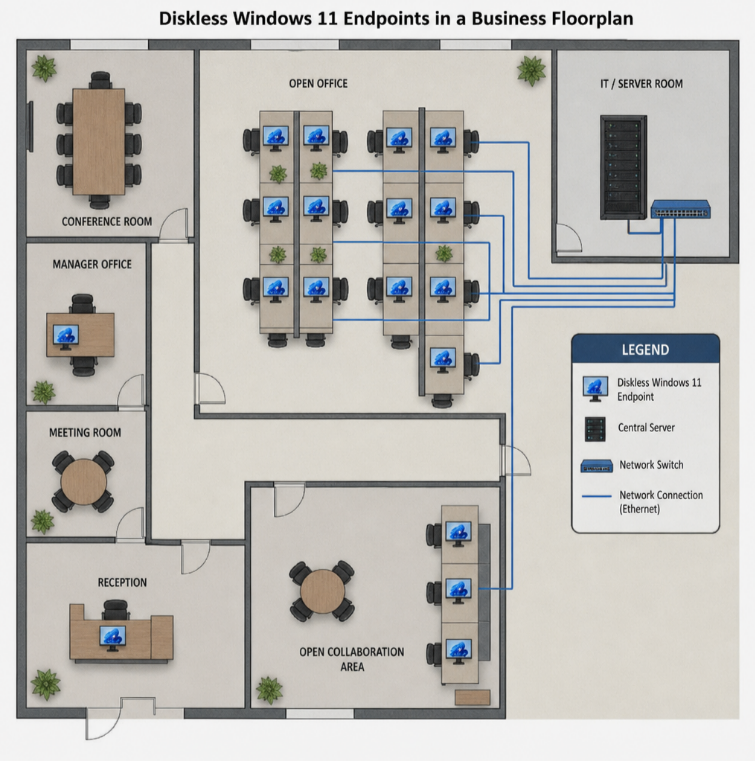
What “Diskless Boot Windows 11” Means (In Business Terms)
In a diskless model, the endpoint has little to no persistent local storage for the OS. At startup, it performs PXE boot (network boot), then attaches to a centralized Windows 11 system disk image hosted and managed on a server. With a platform like CCBoot, the OS image lifecycle (create, update, clone, recover) is managed centrally, and endpoints become easier to maintain.
For many organizations, the core outcomes are:
- Centralized control: update a primary image once, propagate to many endpoints.
- Fast recovery: restore a broken workstation by rebooting to a clean state.
- Lower endpoint hardware cost: reduce SSD requirements and local failure points.
- More consistent operations: fewer “snowflake” machines drifting from standard configuration.
Why Businesses Adopt Diskless Boot for Windows 11
1) Standardization at Scale
When every workstation boots from centrally managed images, IT can enforce a consistent baseline: Windows 11 version, patches, drivers, apps, and security settings. With CCBoot as the platform, this standardization is typically achieved by maintaining one or more master images and assigning them to device groups based on role or hardware.
2) Faster Provisioning and Hardware Refresh
Diskless boot simplifies hardware rollouts because the workstation identity is less tied to a local drive. With a CCBoot-style design, new or replaced PCs can be pointed to an existing image and become operational quickly—especially when paired with a predictable UEFI + PXE boot configuration.
3) Less Endpoint Maintenance (and Fewer Tickets)
Traditional Windows fleets accumulate issues over time: failed updates, inconsistent software versions, misconfigurations, and local disk problems. A diskless model reduces drift. When problems occur, recovery is often a controlled reboot or image revert rather than a full manual rebuild.
4) Security and Data Handling Advantages
Many diskless strategies pair well with redirected user data and centralized identity controls. Even if endpoints are lost or tampered with, the OS baseline can be re-established quickly and the organization can reduce reliance on locally stored data.
Where Diskless Boot Fits Best (and Where It Doesn’t)
Diskless boot is a strong fit when workstations are:
- Standardized (same core apps, similar workflows)
- Task-focused (limited need for deep personalization)
- Shared or high-churn (labs, training, rotating shifts)
- Managed by a small IT team that benefits from centralization
It’s less ideal when users require:
- Heavy offline work
- Highly individualized local configurations
- Performance that strongly depends on dedicated local NVMe for large creative datasets
Many organizations end up with a hybrid approach: diskless for frontline/shared devices, traditional local installs for power users.
Core Building Blocks in a CCBoot-Based Diskless Boot Design
A reliable windows 11 network boot setup is usually less about one magic setting and more about putting the right components together:
- UEFI + PXE boot on the client (the endpoint must be able to network boot consistently)
- DHCP + network boot delivery (to direct clients to the correct boot program)
- CCBoot server (central image management and disk service layer, depending on your configuration)
- High-performance storage on the server (SSD/NVMe recommended for multi-client concurrency)
- Reliable switching (bandwidth, low latency, and sane VLAN/IP helper configuration)
Using CCBoot as the reference point is helpful because it frames the project around an operational product: you’re not only building a PXE boot pipeline—you’re building a repeatable system for Windows 11 diskless endpoints.
How a Typical CCBoot Diskless Boot Flow Works
Exact details vary by environment, but a common diskless flow looks like this:
- Client powers on and performs PXE boot (UEFI network boot).
- The boot process contacts the server using the network boot configuration provided by your environment.
- The client is assigned a Windows 11 image/disk based on rules or device grouping (often defined centrally).
- Windows 11 starts using the server-hosted disk image, and endpoint changes are handled in a controlled way (for example, by separating the base image from per-client changes, depending on your chosen mode).
This is where solutions like CCBoot matter: the “diskless” part isn’t just about booting—it’s about managing images, client identity, and ongoing operations so the experience is stable day-to-day.
Diskless Boot Options for Windows 11 (Pros/Cons)
When teams search for diskless boot, they often mix different approaches. Here’s how to separate them—and how CCBoot typically fits into the picture.
Option A: Traditional Windows 11 Installation to Local Disk (Centralized Deployment)
This is the classic “network deployment” model: you still use local disks, but you standardize provisioning. It’s simpler and supports offline work, but it doesn’t provide the same level of central control after deployment.
Best for: mobile users, offline requirements, limited network capacity.
Option B: True Diskless Runtime (Central OS Disk on the Network)
This is what most people mean by diskless boot windows 11: the system disk is centralized. The benefits are strongest here—standardization, rapid recovery, and simplified endpoint lifecycle.
Best for: labs, call centers, classrooms, factories, kiosks, shared workstations.
CCBoot is positioned around enabling and operating this kind of diskless runtime at scale, with centralized image management and client control.
Option C: “Reset-on-Reboot” / Non-Persistent Endpoints
Some businesses want endpoints that return to a baseline state on every restart. This can reduce support burden dramatically for shared PCs. With a CCBoot-style approach, this is often implemented by controlling how changes are handled relative to the base image.
Best for: training rooms, student labs, public kiosks, high-risk environments.
PXE Boot vs iSCSI vs “Diskless”: Clarifying the Terms
It’s common to see these terms used interchangeably, but they’re different layers:
- PXE boot is the network boot mechanism that starts the process.
- iSCSI is a network storage protocol that can be used to present a remote disk.
- Diskless boot is the operational outcome: endpoints run Windows without relying on a local OS disk.
In practice, many production designs use PXE plus a server-managed disk image service. CCBoot is typically deployed to unify these moving parts into a manageable workflow for Windows endpoints.
Planning a Windows 11 Diskless Project Using CCBoot
Phase 1: Validate Client Hardware and UEFI PXE Consistency
- Standardize BIOS/UEFI settings across device models where possible.
- Ensure UEFI network boot works reliably (and consistently across revisions).
- Confirm NIC support and driver maturity on your chosen hardware.
Phase 2: Design the Network for Reliability (Not Just “It Boots Once”)
Diskless Windows 11 is sensitive to network stability because the OS depends on the network for disk access. For business use, focus on:
- Low-latency switching (avoid oversubscribed uplinks in high-density labs).
- Correct DHCP/VLAN helper configuration so clients always reach the right boot services.
- Clear segmentation and access control around boot and image services.
Phase 3: Build a Clean, Maintainable Windows 11 Base Image
Even with diskless boot, your windows 11 installation hygiene matters. A strong base image usually includes:
- Approved Windows 11 version and updates
- Hardware drivers aligned to your supported models
- Standard apps and configuration baselines
- Security settings consistent with your policies
In a CCBoot-centered workflow, this base image becomes the foundation you update and roll forward over time, rather than rebuilding each PC individually.
Phase 4: Decide How You’ll Handle User State and Persistence
Diskless endpoints work best when user data and identity are planned deliberately:
- Redirect user data to approved storage locations
- Define what should persist (if anything) between reboots
- Ensure sign-in, profiles, and core apps behave predictably for shared devices
Secure Boot and Network Boot: Staying Secure Without Losing Manageability
Security teams often worry that network boot increases risk. The right response is a controlled design, not abandoning the model. For secure boot with network boot, consider:
- UEFI-first configuration and consistent firmware baselines
- Restrict who can change boot configurations and who can modify images
- Limit PXE availability to the correct VLANs/subnets and known device populations
- Implement auditing and change control around the Windows 11 base image lifecycle
If you need product-specific guidance on aligning CCBoot with your security requirements, start with the official overview at ccboot.com and map its deployment model to your organization’s standards.
Troubleshooting Checklist (Diskless Boot Windows 11)
PXE Boot Not Working
- UEFI vs legacy mismatch (boot file/boot method must match client firmware mode)
- DHCP scope or VLAN helper misconfiguration
- Boot traffic blocked or rate-limited by security devices
Clients Boot but Performance Is Poor
- Server storage is saturated (move to faster SSD/NVMe or improve parallel I/O)
- Network uplinks are oversubscribed (especially in high-density rooms)
- Image design encourages excessive writes (review how changes are handled per client)
Some Hardware Models Fail While Others Work
- Inconsistent firmware settings or outdated BIOS/UEFI versions
- Driver differences across models (standardize supported hardware where possible)
- NIC firmware quirks with UEFI PXE
Operational Benefits You Can Measure and Report
To justify the investment, connect diskless boot to measurable outcomes:
- Provisioning time: reduced time to bring new PCs online
- Mean time to repair: quicker recovery from broken updates or corrupted systems
- Patch consistency: fewer devices missing updates due to local drift
- Support load: fewer rebuilds and fewer workstation-specific issues
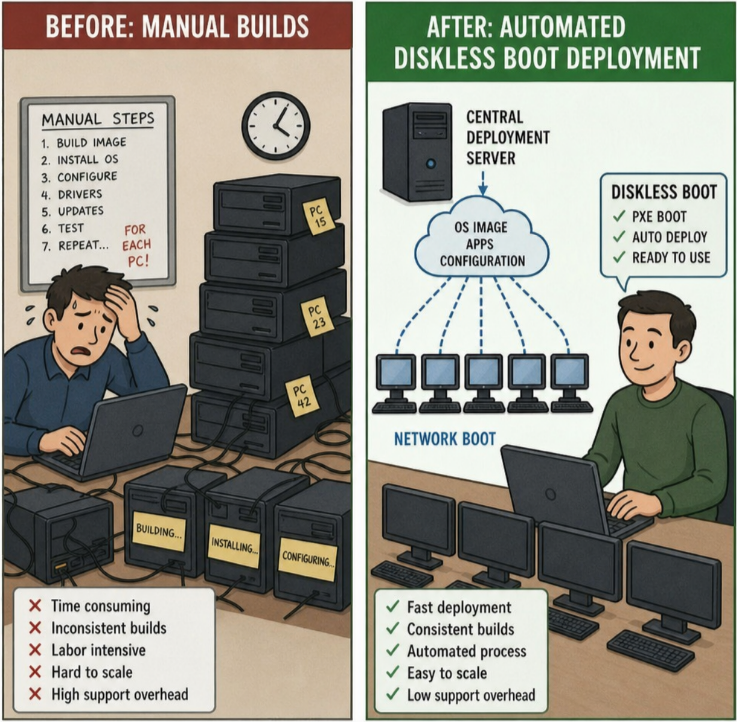
Key Takeaways
A well-designed diskless boot windows 11 deployment can be a strategic upgrade for businesses that manage many similar endpoints. Using a purpose-built platform like CCBoot as the operational baseline helps turn the concept into a repeatable system: centralized image management, predictable endpoint behavior, and faster recovery. Start with a pilot, validate PXE reliability, size your server storage and network correctly, and treat the Windows 11 base image as a product you maintain—not a one-time project.