
Ask anyone who's run a gaming cafe for more than a year and they'll tell you the machines aren't the hard part. Keeping them clean is.
Windows updates that land at the worst possible time. An 80GB game patch that has to be pulled down forty separate times. A customer who somehow installed three browser toolbars and a crypto miner during a two-hour session. A drive that dies on seat 14 the night of a tournament. None of these problems is dramatic on its own, but stack them across a full floor of PCs and maintenance quietly eats your week — and your margins along with it.
That's the problem a diskless internet cafe solves. Instead of forty machines that each need to be installed, patched, cleaned, and repaired individually, you run one master image on a server and let every seat boot from it over the network. It sounds like a niche technical trick. It's actually one of the few decisions that changes the economics of the whole business, which is why it has become the default way to run a gaming cafe in much of Asia and is steadily catching on with esports lounges in the US.
Here's how it works, what it costs, and where CCBoot — the software most cafes end up using — fits into the picture.
Understanding Diskless Internet Cafes
What "diskless" actually means
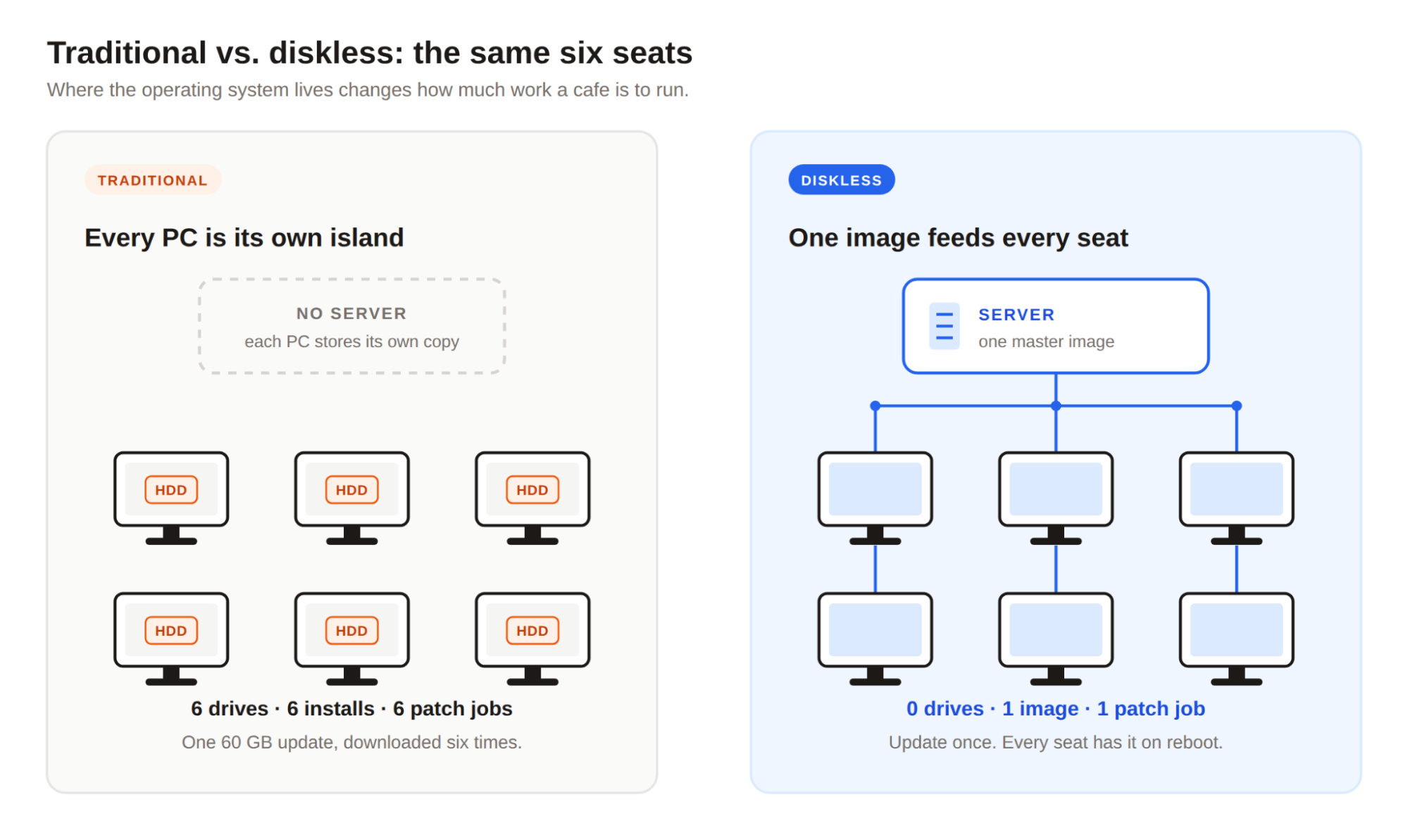
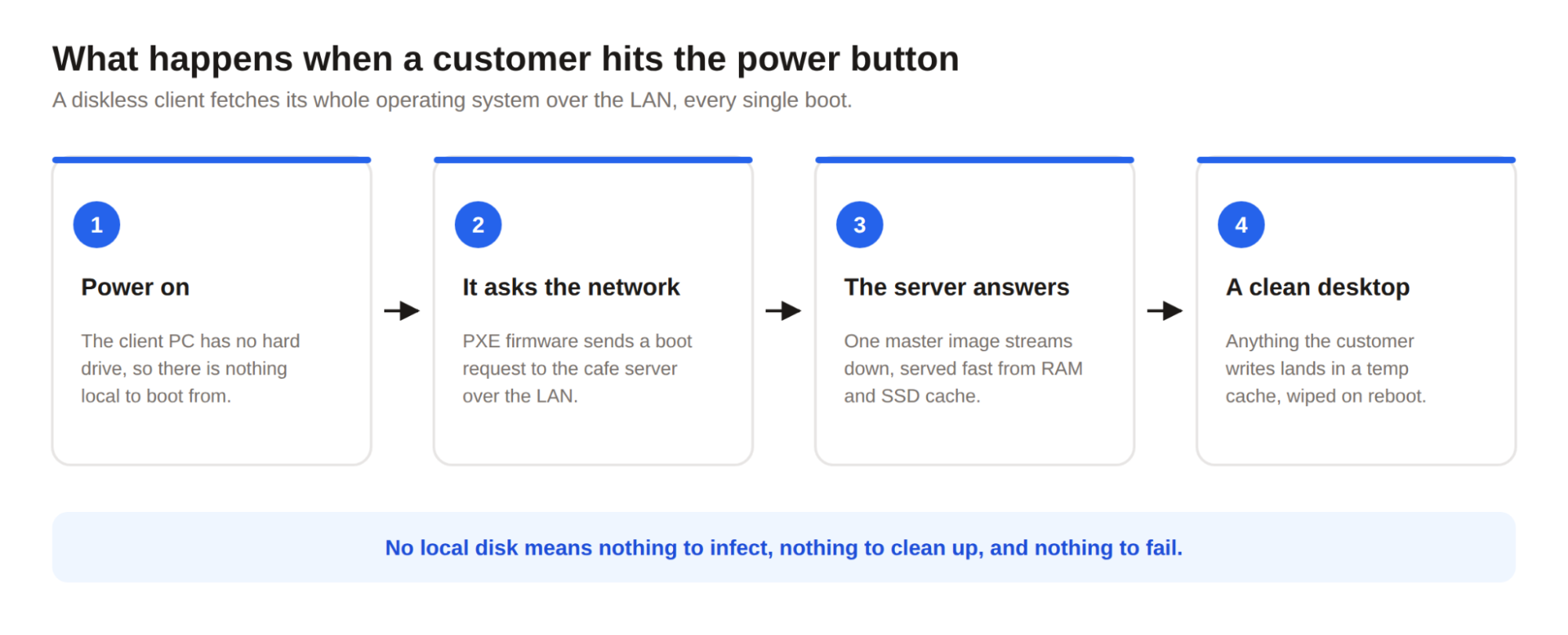
In a diskless internet cafe, the client PCs have no hard drives at all. Not small drives, not hidden recovery partitions — none. When a customer powers on a machine, it boots over the local network from a central server, which streams the operating system, the game library, and all the settings from a single master image.
To the person sitting at the machine, nothing looks different. Windows loads, the games are there, everything runs at full speed. The difference is entirely on your side of the counter: there is now exactly one copy of Windows in the building that matters, and it lives on the server where you can see it.
If the concept sounds unfamiliar, that's mostly a geography thing. In the US, where the LAN center scene faded and is now coming back as esports lounges, plenty of operators still run each machine as its own island. In markets where gaming cafes never went away, diskless quietly won this argument years ago — for reasons that apply just as much to a lounge in Ohio as to one in Manila.
Every seat is a clean, identical clone of that image. And because nothing a customer does is ever written to a local disk, every reboot is a factory reset. Whatever they installed, downloaded, broke, or infected simply evaporates when the machine restarts.
The key components
A diskless system has four parts, and only one of them is exotic.
The server. This is the heart of the setup. It doesn't need a monster CPU, but it does need plenty of RAM and fast SSD storage, because it's feeding the operating system and games to every seat at once. For a 30–50 seat cafe, think a capable single server with 64GB+ of RAM and NVMe drives for caching. Bigger floors add a second server.
The network. Gigabit to every client is the floor, not the ceiling. Most owners run a 10-gigabit link between the server and the main switch so that forty machines booting at 10 a.m. don't fight over bandwidth. A decent managed switch matters more here than in a conventional cafe — this is not the place for the $30 special.
The clients. Standard gaming PCs, minus the drive. They still need their own GPU and RAM, because games execute locally; only the storage is remote. Skipping a drive in every machine offsets a chunk of the server cost.
The diskless software. This is what ties it together — handling the network boot, managing the master image, caching hot data, and keeping fifty machines from stepping on each other. More on that in a minute, because this is where the real differences between setups show up.
Why owners make the switch
The benefits compound in a way that's easy to underestimate from the outside.
Updates happen once. When a 60GB patch drops for the game everyone's playing, you update the image on the server and every seat has it. In a conventional cafe, that same patch means either hammering your internet connection forty times over or walking around with a USB drive like it's 2009.
Problems disappear on reboot. Malware, cheat software, misconfigured settings, "I just changed a few things" — all gone the moment the machine restarts. You stop doing forensic cleanup and start doing nothing, which is the correct amount of cleanup.
Machines stop aging in software terms. A conventional gaming PC gets slower over months of accumulated junk. A diskless client boots the same pristine image on day 400 as it did on day one.
And your dead-drive problem simply ceases to exist, because there are no drives to die. In a business where a down seat is unearned revenue every hour it sits dark, that alone is worth something.
The Role of Diskless Software
What the software actually does
You can't just point a PC at a server and hope. Diskless software handles the unglamorous plumbing: PXE network boot, serving the disk image over the network, write caching so that dozens of machines can "write" to the same read-only image without conflicts, and per-machine settings so seat 12 keeps its own IP address, hostname, and monitor configuration even though it shares an image with every other seat.
Get this layer right and the whole system feels boring — machines boot, games load, nobody thinks about it. Get it wrong and you have forty computers that all fail in the same way at the same time. So the choice of software matters more than any single piece of hardware.
CCBoot: the one you'll keep running into
Start researching diskless software for internet cafes and you'll run into CCBoot almost immediately. It's been in this exact niche for well over a decade, it runs in thousands of cafes worldwide, and in markets where diskless is the norm — Southeast Asia, the Philippines, much of Latin America — it's close to a default answer. That track record matters, because the diskless layer is the one part of your cafe you truly cannot afford to be someone's beta test.
CCBoot supports Windows 10 and 11 clients, scales from a handful of seats to very large floors, and plays nicely alongside cafe management and billing software, so it slots into an existing operation rather than replacing it.
The features worth caring about
A few things CCBoot does particularly well:
- One image, mixed hardware. Bought ten machines in 2023 and ten different ones in 2025? One image can boot both. You are not maintaining a separate Windows install per hardware generation.
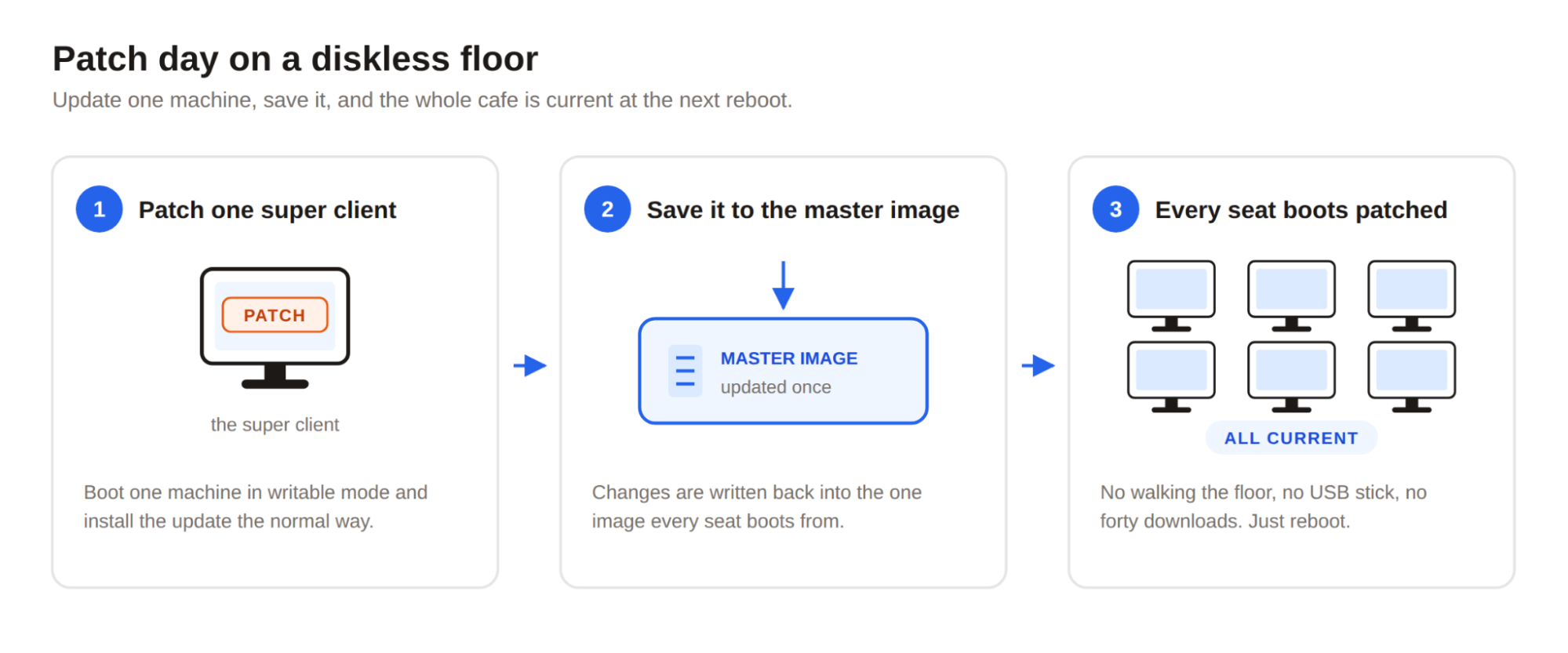
- The "super client" workflow. To update a game, you flip one machine into a writable mode, patch the game on it like normal, and save the changes back to the master image. Every other seat picks it up. The whole floor is patched in the time it takes to patch one PC.
- Layered caching. CCBoot caches hot data in the server's RAM and on SSD, so boot times and game load times stay close to what a local NVMe drive delivers. This is the part skeptics never believe until they see it.
- Restore on reboot. Automatic, every time, no cleanup scripts, no imaging software, no exceptions.
What that looks like on a Tuesday
Patch day used to mean coming in two hours early. Now it means patching one super client while you drink your coffee, saving the image, and rebooting idle seats as customers cycle out.
A machine acting weird? Reboot it. Thirty seconds later it's identical to every other seat on the floor. If it's still weird after that, you know it's hardware — which just turned a 45-minute diagnosis into a 30-second one.
Adding a new game to the whole floor is one install. Removing one is one delete. This is the operational texture of a diskless internet cafe: the work doesn't shrink by 20%, it changes category.
Cost Considerations
What you'll spend up front
Honesty first: a diskless setup costs more on day one than doing nothing. You're buying a serious server — figure somewhere in the $2,500–$5,000 range for a mid-size floor, depending on how much RAM and NVMe you put in it — plus proper switching if your network was marginal, plus software licensing, which CCBoot prices per client PC.
Against that, you're skipping an SSD in every client, which claws back a meaningful chunk at 40 seats. And if you're opening a new location rather than converting an old one, the math tilts further in your favor, because you never buy those drives at all.
Where the money comes back
The return shows up in three places, roughly in order of size.
First, labor. Whether maintenance is your own nights and weekends or a part-time tech's hourly rate, a diskless floor needs a fraction of it. The recurring work — patching, cleanup, reimaging — collapses into minutes.
Second, uptime. Every hour a seat is down for a rebuild or a drive swap is revenue you don't collect. Diskless setups fail less, and when a client does have trouble, recovery is a reboot rather than an afternoon.
Third, hardware lifespan. Client machines with no drives run cooler, have one less component to fail, and never suffer the slow software rot that makes a two-year-old gaming PC feel old.
Run a rough version of the math for a 40-seat floor. Say maintenance currently costs you ten hours a week between patching, cleanup, and the occasional rebuild — at $25 an hour, that's roughly $13,000 a year in labor, before you count a single hour of lost seat revenue from downtime. If diskless cuts that to two hours a week, the savings alone cover a $5,000 server and licensing comfortably inside twelve months. Your numbers will differ, but most owners who actually run them land in the same place: payback within the first year, and everything after that is margin.
Lessons from Cafes That Have Made the Switch
You don't have to take the theory on faith — diskless has been the standard operating model for gaming cafes across Southeast Asia for years, at every scale from 15-seat neighborhood shops to 200-seat esports arenas. The pattern in owner communities is remarkably consistent: nobody who converts goes back.
The mistakes early adopters made are just as consistent, and they're worth stealing as a checklist.
They undersized the server's RAM. Caching is what makes diskless feel fast, and RAM is the cache. When someone complains about slow game loads on a diskless floor, this is the culprit far more often than the software.
They cheaped out on the switch. A consumer-grade switch that was "fine" when it only carried web traffic becomes the bottleneck when it's carrying every machine's disk activity.
They converted the whole floor at once. The owners who had smooth rollouts ran a pilot first — five or six seats on CCBoot for a couple of weeks, tuning the image and the cache, before touching the rest of the floor.
None of these is a reason not to switch. They're the reasons to switch carefully.
Challenges and Solutions
No honest article skips this part: diskless concentrates risk. In a conventional cafe, one dead PC is one dead seat. In a diskless internet cafe, the server and the network matter to every seat at once. That's manageable, but only if you treat it seriously.
The server is a single point of failure. Mitigate it the boring way: RAID for the storage, a UPS so a power blip doesn't take the floor down, and — once you're past 30 seats or so — a second server that can carry the load if the first one dies. CCBoot supports multi-server setups for exactly this reason.
The network is now infrastructure, not furniture. Budget for a managed switch, keep a spare on a shelf, and don't daisy-chain anything. A flaky network in a diskless cafe doesn't degrade the experience; it ends it, for everyone, simultaneously.
There's a learning curve. The first image you build will take an afternoon and you'll rebuild it twice. That's normal. CCBoot's documentation covers the standard setups, and the free trial exists precisely so you can climb this curve on six machines instead of forty.
Handled with a little discipline, none of these outweighs what you're getting. Plenty of cafes have run diskless for years without an incident their customers ever noticed.
The Bottom Line
A diskless internet cafe isn't a gimmick and it isn't bleeding-edge — it's a proven operating model that trades a modest up-front investment for a business that's cheaper to run, faster to fix, and dramatically easier to keep clean. One image to maintain instead of forty. Reboots instead of rebuilds. Patch day measured in minutes.
If that sounds like your Saturday nights back, the sensible next step is small: download the CCBoot free trial, put it on a handful of machines, and run it for two weeks alongside your normal floor. Either it convinces you or it doesn't — but for most owners who try it, the only regret is not doing it a year earlier.