
Walk the floor of a decent LAN center in 2026 and you will find RTX 4070s, 240Hz panels, and chairs that cost more than the first PC most of us built. Then open a case. Inside there is a 500GB SSD doing nothing except holding a copy of Windows identical to the 47 other copies in the room.
That wasted drive is the usual argument for diskless boot for esports venues. It is also the least interesting one.
The interesting part is what happens on tournament day, and whether Riot's anti-cheat lets your players in at all.
The math esports venues get wrong
Industry writeups put the number of LAN gaming centers in the US somewhere north of 600, and most of them land on a similar profitability line: rooms with fewer than 40 stations have a hard time staying open. So the reader here probably runs 40 to 80 seats, competes on hardware and atmosphere, and has exactly one person who understands the network. Often that person is the owner.
Hardware budget in a competitive room goes where customers can see it. GPU, monitor, peripherals, chair. Nobody has ever picked a venue because of its storage.
Run the numbers on a refresh and it gets starker. A 48-seat room replacing drives at retail is looking at a bill that would cover a monitor upgrade across a third of the floor, and unlike the monitors, nobody will notice the drives, mention them in a review, or walk back through the door because of them. Storage is the one line in a competitive build that returns nothing on the customer side. Necessary overhead. Right up until it isn't.
Yet a 48-seat build with a 500GB NVMe in every machine spends four figures on drives whose entire job is holding forty-eight identical copies of the same Windows install and the same seven games. Move that money one column to the right and it becomes a monitor upgrade across the floor, or eight more seats, or one GPU tier for everybody.
Then there is the patch cycle, which is the part that actually eats your week. CS2 pushes an update on a Wednesday afternoon. On local drives that means 48 downloads, 48 verifications, and someone walking the row at closing time working out which machine stalled at 84 percent. Valorant does the same thing on its own schedule. Fortnite does it on another. By the time you have three or four live titles in rotation, patch handling stops being a task and becomes a standing appointment. On a single server image you download once, and the floor picks it up on reboot.
That is the pitch, and it is a good one. It is also the version every vendor writes.
What none of them write is the part that decides whether any of this survives contact with a competitive room.
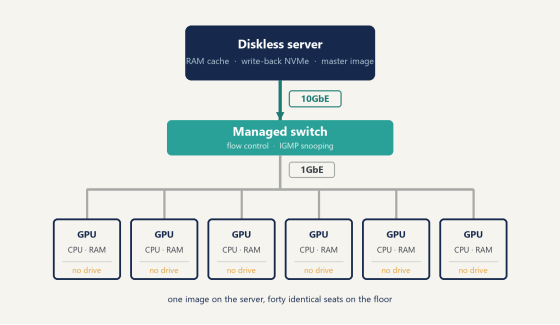
Diagram of one server streaming a single Windows image to diskless esports stations over the LAN
Does Vanguard actually work on a diskless client?
Yes. With one extra step that nobody warns you about, and a second one that quietly undoes your work if you skip it.
The longer answer needs a paragraph on how Riot's anti-cheat behaves. Vanguard registers its kernel driver as a boot-start service, so Windows loads vgk.sys during early boot, before the desktop appears and long before anyone launches the game. The reasoning is defensible. Cheats worth stopping are themselves boot-time drivers, and an anti-cheat that wakes up when the game does is already inspecting a kernel somebody else has edited.
On Windows 11 that comes with hardware conditions. Vanguard expects UEFI, Secure Boot, and TPM 2.0. Miss one and your players get VAN9001 or VAN9003 instead of a match.
The Secure Boot contradiction
Here is where network-booted rooms walk into trouble.
Most imaging guides tell you to disable Secure Boot while building the master image. That advice is not wrong. It removes a category of headaches during the phase where you are installing drivers and juggling hardware profiles. But leave it off, start booting clients that way, and Valorant refuses to launch on every seat in the building while you spend Saturday convinced you have a network fault.
It is not the network. It is a checkbox you cleared three weeks ago and forgot.
(This one catches enough operators that it has its own page rather than a footnote, which is a fair signal of how often it happens. See the UEFI and Secure Boot writeup.)
How the fix actually goes
The second issue is subtler and it is specific to diskless boot for esports rooms running kernel anti-cheat.
Vanguard writes into appdata and programdata. On a network-booted client those directories live inside a write-back file that gets discarded at reboot, so the anti-cheat installs, the player restarts, and the install is gone. Then it installs again. Forever.
CCBoot handles this through Game Fix. In the admin panel you open Settings, then Game Settings, then switch on Game Fix and enable the Riot Games entry. The server builds a folder holding appdata and programdata components and links them symbolically to the client's matching directories, so what Vanguard writes lands somewhere that outlives the reboot.
Then comes the step people skip. Install the anti-cheat with Super Client mode on, because Super Client is the mode where client-side changes get written back into the image instead of thrown away. Launch Valorant. It will say "installing" or "updating" again, which is expected rather than a failure. Let it run to the end. Restart when prompted, confirm the Riot Client now offers "Play" instead of "Install", then shut the machine down, turn Super Client off, and save the image.
Save the image at the end and the fix sticks for good. Skip the save and the next reboot starts you over. That is the whole trick. The Riot Games fix in the wiki walks the whole sequence screen by screen, and it is worth having open on a second monitor the first time through.
FACEIT AC, CS2, and PUBG each carry their own version of this. Kernel DMA Protection trips FACEIT. CS2 has a separate Vanguard conflict. None of them are hard once you know they exist, and the wiki carries a page for each. Handle them in the first week and they stay handled.
There is a reason this lands harder on esports rooms than on casual ones. A cafe running browser games and older titles may never meet kernel anti-cheat at all, so the whole category of problem stays invisible to them. A venue selling competitive seats runs Valorant, CS2 and FACEIT on the same floor on the same night, which means three separate anti-cheat systems holding three separate opinions about what your image is allowed to look like and when it is allowed to change. Sort that out once and it stays sorted. Get it wrong and you find out at a full house.
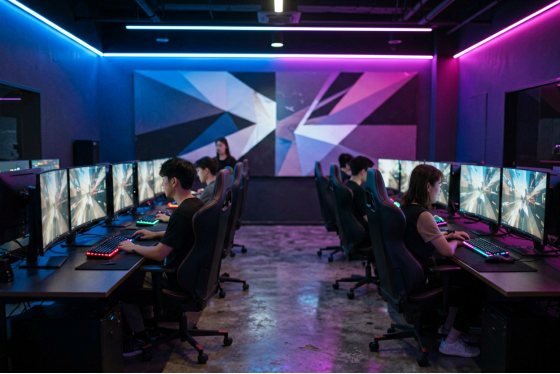
Rows of high-refresh battlestations in a US esports lounge during an evening session
Freeze the image before tournament day
Restore-on-reboot is the feature everyone sells. In a bracket, how you pair it with personal disk is what decides the day.
A player spends twenty minutes getting crosshair and sensitivity right, then keybinds, then audio levels. Someone reboots the machine between matches. It all reverts. In a casual room that is a shrug, but during a paid event it is a complaint and possibly a replay.
Personal disk solves the player half of it by keeping per-user data across reboots, so configs and profiles survive the wipe that clears everything else.
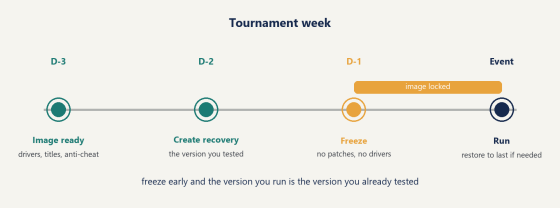
The image itself needs different discipline during event weeks. CCBoot gives you recovery points through create recovery, merge to last, and restore to last. In practice the routine that holds up is unglamorous: get the image how you want it, create a recovery point, then stop touching it. No driver updates. No game patches. Not the day before, and preferably not the two days before either.
The reason is timing rather than stability. Publishers ship patches whenever they choose, sometimes hours before an event, and a patch that breaks anti-cheat on your image at 6pm Friday is not something you fix at 6pm Friday with forty players in the room. Freezing early means the version you run is the version you already tested on a real client. Restore to last puts you back on it in minutes when a change goes wrong. None of that requires planning ahead beyond a calendar reminder, which is the cheapest insurance in this entire article.
Event days are also where the multi-server side earns its place in the budget. CCBoot supports multi-NIC and multi-server load balancing, and for a venue running paid brackets a standby server belongs in the build from the start. Configure it once and the floor keeps serving clients straight through a hardware fault. That is exactly the guarantee you want with forty players in the room who have paid to be there.
Flow showing a venue creating a recovery point and locking the image before tournament day
Pop-up events and rental gear
This is where diskless boot for esports does something local drives cannot match at any price.
You rent 20 machines for a weekend tournament and they arrive Thursday. On local storage that is 20 Windows installs, 20 game libraries to pull down, and a Thursday night you will remember for the wrong reasons. Booting from the network, you plug them into the switch, register their MAC addresses, and they load the same image your regular seats run. Same titles, same patch level, same settings.
PnP handling covers the hardware mismatch, which matters here because rental gear never matches your floor. Different motherboards, different GPUs, occasionally a NIC vendor you have not seen before. One image adapts to all of it.
Tear-down is unplugging them.
Where the money actually moves
The case for diskless boot for esports usually gets made on drive savings, and that is the smallest line in the ledger.
Pricing is per PC per month:
Plan | Monthly | Annual |
CCBootCloud | USD 2.50 | USD 2.00 |
iCafeCloud | USD 2.50 | USD 2.00 |
CCBootCloud + iCafeCloud | USD 4.00 | USD 3.20 |
Forty-eight seats on annual billing works out to USD 96 a month, so a little over eleven hundred a year for the diskless side.
Against that, the drives you stop buying, and they are not a one-time saving. Storage in a gaming room dies on a schedule. Drives running continuous read loads eight hours a day fail more often than anything else in the machine, and every failure costs a seat for an evening plus whatever your time is worth.
Labor is the bigger number and the one operators consistently underrate. Patch nights collapse from an evening of walking the floor into one download and a reboot cycle. If you pay someone hourly to handle that, the arithmetic gets obvious fast. If you do it yourself unpaid because you own the place, it is worth more than the invoice suggests.
Bandwidth is worth less here than it is elsewhere. American venues generally have enough downstream that 48 simultaneous downloads are irritating rather than fatal, so do not lead with bandwidth savings when you pitch this to a partner. Lead with the hours.
Part of the saving goes into the server, and speccing it properly up front is what keeps the rest of the numbers clean. Three things carry the load: real RAM for cache, enterprise NVMe for the write-back volume, and a 10GbE uplink into the switch. Put the money into RAM first. Cache is what the floor actually feels, and a well-fed cache serves the fiftieth machine launching a title straight out of memory rather than off disk. Get those three right and one box carries 48 competitive clients comfortably. The published per-PC pricing covers software only.
Where diskless boot for esports pays off hardest
Past 40 stations the arithmetic stops being close. Each machine you add costs one more license and no additional work, while patch night stays exactly as long as it was at seat one. That flat curve is why the rooms pushing this hardest tend to be the biggest ones.
Two things make the return land faster.
The first is how often your image changes. A venue running four or five live competitive titles is touching that image constantly, and every one of those touches happens once instead of forty-eight times. CCBoot has been at this long enough to carry a wiki page for nearly every title that needs special handling, so most of the work is reading rather than guessing.
The second is hardware variety. A floor assembled over several years across different motherboards and GPU generations is precisely what PnP handling was built for. One image covers the lot, and adding a new batch of machines is a matter of registering MAC addresses. (Turn the DHCP server off on your router before you start. Everyone arrives at this eventually. Arriving at it first saves an evening.)
Try it on one machine
Take a spare PC, pull its drive, and let it boot from the server. Load Valorant on it, run through Game Fix and the Super Client sequence, and see whether the client reaches "Play". That single test answers most of what this article covers, and it costs you one evening instead of a rebuild.
If it holds on one seat, it holds on forty. Pull the trial down and point it at that spare machine before you plan anything larger. Diskless boot for esports is not a decision you have to commit the whole floor to on day one, and the venues that get it right almost always started exactly this way, with one spare box and an evening nobody else wanted.