
Friday, ten past six. Valorant has shipped a 12GB patch, thirty-one of your forty seats are taken, and every one of the nine free machines wants to play the thing that just updated. You can walk the row with a USB stick and a lot of patience. Or the room can already be patched, because you updated a single machine that afternoon and the rest picked it up on reboot. The second version is what a PXE server is really for, and it is not the version most setup guides describe.
Both are PXE. Only one of them gives you your Friday back.
Two things people mean by "PXE server"
Search the term and you land on dnsmasq configs, FOG, Clonezilla, Windows Deployment Services. They all do the same trick. The client asks the network for something to boot, the server hands over an installer or an imaging tool, the image gets written to the local drive, and the network's involvement ends right there. Deploy once, walk away. A deployment PXE server is a delivery van, and for a lab that gets reimaged every August that is a perfectly reasonable way to live.
The other kind never stops. There is no local drive to write to, because the client's operating system stays on the server for the entire session and streams over the LAN, and when the machine reboots, every change it made during the day is thrown away. CCBoot is a diskless boot system built around that second model, used by more than 30,000 customers, mostly in rooms where one person is responsible for keeping several dozen machines identical to each other.
Which one you want comes down to a boring question: how often does the room change? Twice a year, deployment PXE is fine. If the honest answer is "every time a game patches," build the other kind. A PXE server that keeps the room running is a different animal from one that merely installs it, and the difference shows up in your calendar rather than in any spec sheet.
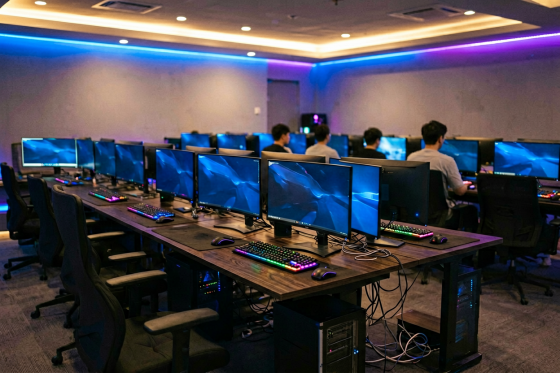
Rows of gaming PCs in a LAN center during evening hours
The four seconds after someone presses power
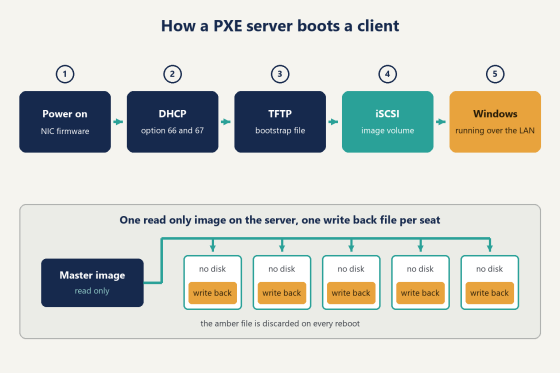
Nothing on that client is running yet. No Windows, no bootloader, no disk. What wakes up first is firmware sitting on the network card, and its entire vocabulary consists of one question: is there a PXE server out there willing to tell me what to load?
It asks by broadcasting a DHCP request tagged as coming from a PXE client. An ordinary DHCP server answers with an address and calls it a day. A PXE server, or a DHCP service that knows one is present, attaches two extra fields. Option 66 carries the address of the boot server. Option 67 carries a filename, the network bootstrap program, a few hundred kilobytes of code whose only real job is to be small enough to arrive over TFTP without anybody noticing the wait.
(and yes, switch the DHCP server off on your router before you start, otherwise half the room picks up a perfectly valid address with no option 66 attached and then sits on PXE-E53 looking exactly like a hardware fault)
TFTP is a slow protocol, which does not matter here, because this stage moves almost nothing. The bootstrap lands in memory and runs. It connects back to the server over iSCSI, and from that moment the client treats a volume living on the server the same way it would treat a local SSD. Windows boots off it. Games load off it. The user sits down and never learns that the box under the desk has no storage in it at all.
Writes are the part worth understanding. Everything the client writes during a session goes into a write-back file that belongs to that machine alone, so forty clients share one read-only image while each keeps its own scratch space, and none of them can contaminate the others. On reboot the scratch file is discarded. Malware that arrived at 8pm is gone by 8:04.
In practice this changes what maintenance even means. There is no antivirus sweep to schedule, no reimaging queue, no machine quietly drifting away from the others because somebody installed a browser toolbar on it in March. The image on the PXE server is the only copy of the truth, and every seat rebuilds itself from that copy several times a day without anyone asking it to.
Diagram of a PXE server boot chain from DHCP to a running Windows client
Server hardware that decides how the room feels
RAM first. Before the CPU, before anything.
A PXE server spends its life answering the same read requests over and over, which makes it much closer to a cache appliance than to a general-purpose machine, and buying it like a general-purpose machine is how people end up with a fast processor sitting idle above a starved cache.
Forty clients booting Windows at five o'clock are all asking for the same blocks in roughly the same order, so the first machine pulls them off disk and every machine after that gets them out of memory. Cache hit rate is what the floor actually feels. A room that boots instantly and a room that crawls are often the same hardware with a different amount of RAM in the server, and the operators of the slow one usually blame the switch.
(a used dual-socket box with a lot of DIMM slots often beats a shiny new workstation here, which feels wrong and is nonetheless true)
Then the SSD tier. Keep the master image on its own NVMe device and give the write-back files another, because those two workloads have nothing in common: the image is read a thousand times and written never, the write-back is a constant dribble of small random writes from every seat in the building.
Network side, the server wants a 10GbE uplink, or two gigabit NICs bonded if 10GbE is not in the budget this year. Desk side, plain gigabit is plenty. CCBoot supports multiple NICs on a single server and load balancing across several servers, so growing the room does not mean rebuilding it. Use a managed switch. You will want VLAN support and per-port control later even if you cannot think of a reason today.
Schools end up here through a different door and land on the same shopping list, which is why school computer labs run the same way as gaming venues: thin clients with no drives, one image, and a lot less time spent walking between desks.
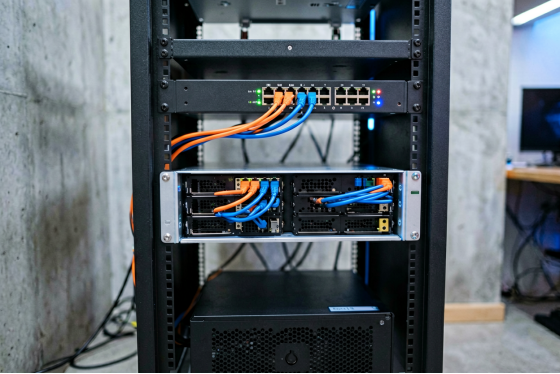
Small rack with a 2U server, managed switch and UPS in a cafe back room
Build it on one PC before you build it on forty
Do not convert the floor on a Tuesday afternoon. Get one machine booting, watch it for a day, then do the rest in an evening.
Start from a master machine
Pick one client, install Windows on it locally, and set it up the way you want every seat in the building to look. Drivers, the games, the launchers, the peripheral software, the desktop layout. Log into Steam and Riot and Epic and let them finish their first-run updates, because whatever state this machine is in when you capture it is the state forty machines will wake up in tomorrow. This is also the moment to strip the things you do not want: trial software, the second browser nobody uses, the update agent that pops a dialog at 3pm.
Upload the image, then point one client at it
The master gets uploaded and becomes the read-only image every other seat reads from. Now take one other machine, go into BIOS, and set network boot as the first boot device so it looks for the PXE server instead of its own drive. Leave its hard drive physically installed if you like. Nothing will be written to it.
If the client reaches the boot menu and loads Windows, the hard part is finished. The setup wiki walks through the DHCP side in more detail than this article can, and it is worth reading before you touch the server's network settings rather than after. You can download it and run it on one spare machine first to see where your own network puts up a fight.
Roll the same image onto machines that are not identical
Rooms grow in batches. Sixteen PCs from 2022, twelve more from last year, four that got new motherboards after a lightning strike. The PnP function handles this: one image adapts to different client hardware, so you are not maintaining three images and remembering which row got which one.
Set a restore point once the image is stable. CCBoot gives you create recovery, merge to last, and restore to last, which means an experiment that goes badly is a two-minute rollback instead of an evening.
Where the boot stalls, and what to do about it
Almost every failed first boot is one of five things.
UEFI and Legacy clients need different bootstrap files. If your room is a mix of new and old motherboards, group the machines and serve each group the boot file it expects. One file will not cover both, and the symptom is confusing: half the room boots perfectly and the other half throws a file-not-found that looks like a server problem.
Secure Boot in the client's firmware needs to be off before network boot behaves.
Spanning tree is the sneaky one. If the switch port does not have portfast enabled, the port spends about thirty seconds converging before it forwards anything, and the client's DHCP request has already timed out by then. This is the usual explanation behind "most machines start fine but two or three are random." Nothing is random. Those two ports are just slower to wake up. So enable portfast on every access port before you blame the image.
Crossing VLANs means the DHCP broadcast dies at the boundary unless you configure an IP helper address pointing at the PXE server. The client is shouting into a room where nobody is listening. CCBoot works across dual NICs, dual LAN segments, and VLANs, but the switch still has to forward the conversation.
Anti-cheat comes last and worries people the most. Set up Game Fix and Super Client the way the documentation describes, install the anti-cheat with Super Client turned on, and the configuration holds from then on. Do that in the right order once and you will not think about it again.
Can one PXE server really hold a whole floor?
More than people expect. The reference thin-client server in the education specification carries around seventy diskless clients on hardware that is not remotely exotic, and gaming venues run heavier images than schools do while still landing in the same neighbourhood. To be fair, a room full of 4K monitors playing recently released titles works a PXE server harder than a lab running a browser and an office suite, and the memory column below is where that difference gets paid for.
Sizing is mostly a memory question, so here is a starting point rather than a rule:
Seats | Server memory for cache | SSD tier | Server uplink |
up to 24 | 32 GB | one NVMe, image | 2 × 1GbE bonded |
25 to 48 | 64 GB | separate NVMe for | 10GbE |
49 to 96 | 128 GB or more | image on its own | 10GbE, plus a |
Past that, you stop scaling one box and start adding boxes. Multi-server load balancing is the supported path, and it also buys you something worth having on a Saturday night: the floor keeps running while you work on one of them. Multiple NICs on a single PXE server do a smaller version of the same job, spreading the boot storm across two or four physical links instead of funnelling it through one.
Bandwidth savings surprise most operators. Francis Tungpalan at GetPoint Gaming in the Philippines put it plainly: "We have about 5 online games that update every week, now we only update the server. Imagine the bandwidth we've saved!" Forty machines pulling the same patch over the same connection is a problem that simply stops existing.
Licensing runs per client PC, one key per server, and what a client PC costs to license is on the pricing page.
Questions that come up before the first boot
How many PCs do I need a license for?
One per client PC. Twenty clients, twenty PCs on the license. The PXE server itself is not counted as a client, so the number on your invoice is the number of seats on your floor.
Can I use the same license on a second server?
Each key belongs to one server. Moving to new hardware is a documented process rather than a purchase: reset the license on the old machine, then activate it on the new one.
What about data that must survive a reboot?
That is what personal disk support is for. The shared image stays read-only and disposable, and anything a user or an office needs to keep gets stored on the personal disk, which is not wiped when the write-back file is discarded. Windows domain login works alongside it, so a person's files follow their account to whichever seat they sit down at.
Can clients boot something other than Windows?
Multiple operating systems can be served to the same client, and the graphic boot menu is yours to arrange. A room that runs Windows for gaming during the day and something else for a class in the morning is a normal configuration, not a special project.
Point it at one test machine tonight
Olcay Taylan at TAY-NET Cafe in Turkey checked his drives six years into running a 35-PC shop and found bad sectors on twenty of them. His two options were buying twenty replacement drives or removing drives from the equation. He went diskless, and the part he mentions first is not the money: "I can update the games in one place and all the clients will get them."
That is the whole argument. Every disk in a client machine is a thing that will eventually fail, get infected, or drift out of sync with the other thirty-nine, and the fix for all three problems turns out to be the same fix.
Grab a spare PC, put it on the bench, and give yourself an evening. Build the master, upload it, set that one machine to network boot, and time it from power button to desktop. If the number looks good on one seat, it will look good on forty, and you will have a PXE server doing the work that used to be a walk down the row.