
The Valorant patch dropped Thursday night. Saturday is a birthday party booking, sixteen seats, paid in advance, and whoever opens the venue Friday afternoon has one shift to get forty machines onto the new build before the weekend crowd shows up. This is the moment most owners start searching for esports venue software, and the results they get back are strange: page after page of booking widgets and tournament brackets, as if the machines themselves were somebody else's problem.
They're not. They're the whole show.
A venue runs on two layers of software, and the lists you'll find online only ever talk about one of them. Sort out both and Friday afternoon stops being a race.
The two layers of esports venue software
The layer everyone writes about is the business layer. Bookings, hourly billing, memberships, tournament brackets, the report that tells you what Tuesday actually earned. It's real, you need it, and there are plenty of tools competing for the job.
Underneath it sits the layer almost nobody writes about: the machine layer. Its job is blunt. Every PC on the floor has to be running the same games, the same versions, the same drivers, every hour you're open, no matter what the last customer installed, downloaded, or broke. When people talk about why diskless boot took over esports floors, this layer is what they mean.
Here's the test for which layer a problem lives in. If the question is "who sat where and did they pay," that's business. If the question is "why is seat 12 on last week's patch," that's machines. The second kind of question is the one that ruins a Friday, because a booking widget cannot fix a version mismatch, and no bracket tool ever reimaged a PC.
Most venues buy the top layer first because it's what the search results sell them. The floor feels it later.
Diagram of the two software layers that run an esports venue
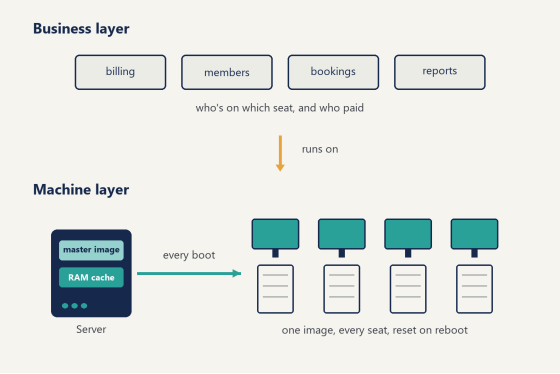
The machine layer: 40 PCs that stay identical
The old way to keep a floor identical is labor. Someone walks the rows, seat by seat, updating launchers, clearing whatever the last session left behind, praying the download doesn't stall on seat 14. At US wages that walk is the most expensive thing in the building, and it lands on exactly the person who's also making drinks and checking in members.
The machine layer replaces the walk with an image. In a diskless setup, no PC has Windows on a local drive at all. The server holds one master image with every game installed, each seat boots from it over the LAN, and a write-back cache absorbs whatever happens during a session. Reboot the seat and the cache is discarded. The machine that greets the next customer is byte-for-byte the machine you built, with nothing left over from the last one, no matter how creative they got.
Patch day collapses into one job. Update the master image, reboot the floor, done. Forty seats or four hundred, the download happens once.
Opening time gets the same treatment. A floor that boots from one server can cold-start every seat in the minutes before the doors open, and the server's RAM cache means the twentieth machine to ask for the same Windows files gets them from memory, not from disk. The practical effect is that "turn everything on" becomes a switch you flip on the way in with your keys, instead of the first twenty minutes of every shift. Small thing on paper. Very large thing in February, at 9:40am, when you open at ten.
CCBoot is the machine layer built specifically for this, trusted by over 30,000 customers, and a few of its details matter more on a real floor than on a spec sheet. One image serves mixed hardware through PnP support, which matters because no venue buys all its PCs in the same year (your 2021 seats and your 2026 seats boot the same master, and nobody maintains two images). The server caches hot game files in RAM with SSD cache behind it, which is what load times ride on when six people launch the same title at once. Personal disks give members storage that survives the reboot, so their configs and clips stay put while the system resets around them. And multi-server load balancing is there for the floors that outgrow one box.
Here's what that looks like from behind the counter, in the words of a venue owner who made the switch:
"We have about 5 online games that update every week, now we only update the server. Imagine the bandwidth we've saved!" — Francis Tungpalan, GetPoint Gaming, Philippines
Five weekly patches, one download each. That's the machine layer doing its job.
The business layer: who's on which seat, and who paid
Now the layer the search results love. It deserves a shorter section, honestly, not because it matters less but because it's the part you already knew you needed.
The checklist is stable across venues. Per-seat billing with hourly rates and member pricing. Prepaid balances and session tracking. A daily report you can read in one glance at close. Some way to control seats from the counter, lock one, message one, end a session remotely. And for game libraries, license pooling, so a venue with 15 copies of a title can float them to whichever seats need them instead of pinning one copy per PC.
That last one quietly changes the math on library size.
Membership mechanics earn their keep here too. American venues live on regulars, and regulars respond to structure: prepaid packages with better hourly rates, balanced top-ups, small reward systems that give a Tuesday-night crowd a reason to come back Thursday. None of this is exotic software. It just has to live on the same screen as the seat map, because the person applying for a member discount at 7pm is the same person watching four bracket check-ins and a food order. Tools that make the counter person alt-tab lose fights they should win.
You can assemble this from separate tools, or run it as one system. iCafeCloud, built by the same team as CCBoot and running in venues across 90+ countries, covers the counter side: billing, memberships, license pooling, reports, and seat control from one screen. The pairing matters less because of any single feature and more because the two layers are designed to be run by one person on shift, which in a US venue is exactly who's running them.
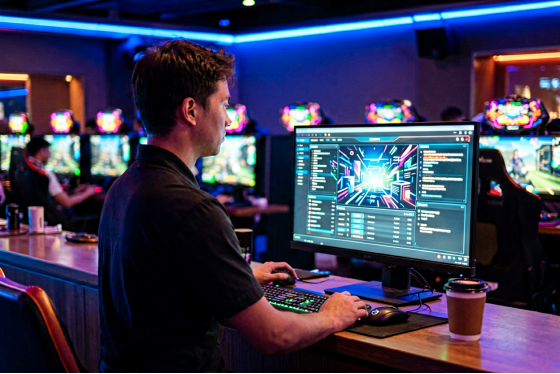
Venue operator managing bookings and billing from the front counter
What tournament day demands from your software
A regular weeknight forgives a lot. Tournament day forgives nothing, and it's the day your esports venue software either earns its keep or gets replaced.
Start with versions. A bracket with 32 players means 32 seats that must be on identical builds before check-in, because one seat on last week's patch doesn't fail quietly, it fails in front of a paying crowd with a stream running. With one master image this is a non-event: whatever the master runs, the floor runs. You verify once, not 32 times.
Then there's the reset between matches. Competitors change seats, and each new player deserves a machine with no leftover configs, no changed sensitivity, no logged-in accounts from the round before. A reboot that restores to clean state turns that reset into forty seconds of nothing. The alternative is a staffer with a checklist moving seat to seat while the schedule slips and the bracket admin glares.
And all of it happens under event-day staffing, which in most American venues means the same two people who ran Thursday. The software stack is what lets a 40-seat tournament run without hiring a crew: the machine layer guarantees the floor, the business layer handles check-ins and seat assignments, and the humans get to focus on the thing software can't do, which is keep a room full of competitors happy.
Party bookings ride the same rails. A Saturday group buyout is just a small tournament with cake. Sixteen kids arrive at once, sixteen seats need the same game at the same version with no login residue from the morning, and the parent paying for it all judges the venue on whether the first ten minutes feel effortless. The stack that survives a bracket survives a birthday, which is convenient, because in most US venues the birthday happens more often.
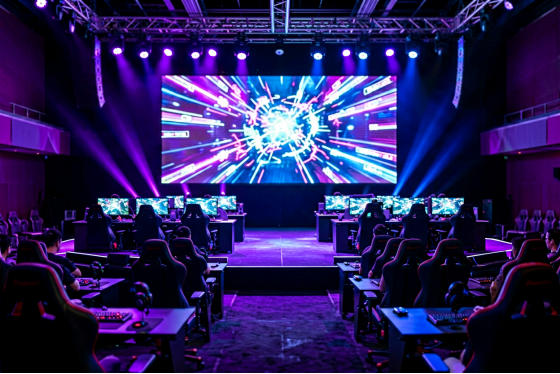
Esports venue stage area with competition PCs and a spectator screen
What does the stack cost per seat?
Esports venue software gets priced in ways that make comparison annoying, per seat here, per location there, "contact us" everywhere else, so here are plain numbers, checked against the official pricing page as of this writing. CCBootCloud runs $2.50 per PC monthly, or $2.00 per PC on annual billing. The CCBootCloud plus iCafeCloud bundle, both layers together, is $4.00 monthly or $3.20 annual per PC. The per-PC pricing scales with your license count, so you pay for the seats you have.
Put real numbers on a real room. A 40-seat venue on the annual bundle pays $128 a month for both layers. In a US market where a single technician's hour costs more than a day of that, the comparison isn't between this software and free. It's between this software and the payroll hours you're currently spending walking the rows, plus the seat revenue lost every hour a machine sits broken at $5 to $12 per hour per seat.
One update walk avoided per week roughly pays the bill. Most venues avoid several.
Questions owners ask before committing
The same handful of questions comes up in nearly every esports venue software conversation, so here are the straight answers.
Do the two layers have to come from the same vendor? No, and plenty of venues mix. The case for the bundle is operational rather than technical: one support channel, one login, and a counter workflow where ending a session and resetting the seat are the same motion. If you already run billing you like, the machine layer works underneath it just fine.
Will one image really cover PCs bought years apart? Yes, and this surprises people more than anything else in a demo. The PnP support resolves hardware differences at boot, so the RTX seats by the window and the older rows in back load the same master image and each machine comes up with its own correct drivers. You maintain one image, full stop.
What happens to a member's settings if every reboot wipes the machine? The wipe covers the system, not the person. Personal disk storage rides through the reboot, so a regular's crosshair settings, keybinds, and recordings are waiting for them at whatever seat they sit down at next. The machine resets. Their identity doesn't.
How much server do 40 seats need? Less than the number in your head. RAM is the resource that matters, because cache hit rate is what the floor feels, and a single well-fed server carries a mid-sized venue comfortably. Bigger rooms add a second server and split the load rather than buying one monster.
Is there a way to test any of this without betting the venue on it? That's what the next section is for.
Roll it out without closing for a week
You don't convert a floor in one dramatic weekend, and you don't need to.
Start with one spare machine and the free trial. Stand up the server on hardware with RAM to spare, build a master image from your best-configured PC with your full game library installed, and boot that one spare seat from it. Time the boot, launch your heaviest title, and let a trusted regular hammer it for an evening. That single seat tells you almost everything.
Then pick a dead window, a Tuesday after close works, and switch the floor. The seats themselves need almost nothing done to them, which is the quiet advantage of the diskless approach: the work lives on the server, not in forty separate chassis.
Two habits will keep it smooth for years. First, when a patch drops, update the master, then boot one seat and actually get into a match before you reboot the rest of the floor, because the thirty seconds it takes to confirm the anti-cheat is happy is the cheapest insurance in the building (patch day is not the day to discover a launcher wants a relog). Second, give the write-back cache its own SSD instead of sharing the image drive, so a full floor of writing at once never drags down game loads.
That's the whole rollout. One test seat, one quiet Tuesday, two habits.
Which brings us back to that Thursday-night patch. With both layers in place, Friday's version of the story is different: the master image updates while the venue sleeps, one seat gets a verification match over morning coffee, and the floor reboots itself onto the new build before the first customer walks in. Choosing esports venue software starts with respecting the layer the listicles skip. Get the machines right first. Everything above them gets easier.