

An owner with 44 seats outside Denver asked whether going cloud diskless meant Valorant would be loading over his internet connection. He had read four vendor pages that week, every one of them put "cloud" somewhere near the word "diskless," and he had already done the arithmetic on 44 stations pulling a 40GB game down the same pipe at 6pm on a Friday. The arithmetic was frightening. It was also the wrong arithmetic.
In a cloud diskless room, the disk traffic runs between your floor PCs and a server in your own back room, across your own switch. The game never crosses your WAN. What goes out to the cloud is the paperwork: your license, your configuration, the dashboard you pull up on your phone while you are out getting lunch.
Two pipes, not one. Only the thin one leaves the building.
The boot traffic never leaves your building
When a station with no drive in it wakes up, the first thing that speaks is the network card's own firmware. It shouts on the LAN asking who is in charge. Your server answers, hands over a small boot file, and a few seconds later Windows is coming up off a virtual disk that physically lives on the server's NVMe. Windows does not know the difference. The volume has a drive letter, it has free space, it just happens to be reached through a copper cable instead of a SATA port.
That link is the whole ballgame. Every station gets its own gigabit port, the server sits behind a 10-gigabit uplink, and the switch in between is doing the job a stack of 44 SSDs used to do.
Here is where sizing goes wrong. People test one machine, watch it come up in twenty seconds, and assume the other forty-three will behave identically. The real test is the room at opening time, when the attendant walks the row hitting power buttons and every machine in the place asks for the same Windows boot blocks inside the same ninety seconds. That burst is the only moment a diskless server genuinely works hard, and it is the moment worth measuring, because the first machine reads from the NVMe and the rest are mostly served out of RAM that is already holding those exact blocks.
Diagram showing cloud diskless boot traffic staying on the local network while only management data goes to the cloud
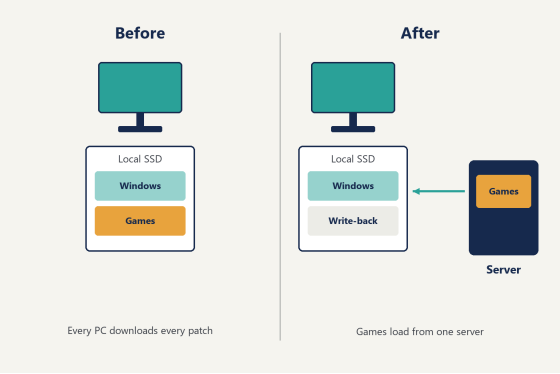
So which part is the cloud?
The control plane. Your license and its PC count, the server configuration, the state of every station on a page you can open from anywhere with a browser. Measured in kilobytes, not gigabytes.
Put another way, a cloud diskless deployment has two halves that never touch each other. One half is heavy, local, and made of disk blocks. The other half is light, remote, and made of settings.
That split is worth being precise about, because it decides what happens on a bad day. If your fiber goes down at 7pm, the switch and the server in the back room have no idea anything happened, and the floor keeps booting. Sessions do not care. The cloud side is for you, not for the machines.
CCBoot ships in two shapes and the difference is exactly this line. CCBootCloud keeps the license and the account side in the cloud, which is what you want if you check on the place from home or run more than one address. CCBoot Classic keeps all of it on the box in the back room. Either way the diskless boot system that runs underneath it is the same thing, moving disk blocks over your LAN, and it is what 30,000-plus venues are already running.
Two venues is where the cloud half starts earning its keep, because "which of my rooms is on the older image" stops being a phone call and starts being a column on a screen. It matters on hiring day too. A new weekend attendant does not need the server password to see that station 7 has been offline since Thursday, and you do not need to be in the building to tell them what to do about it.
Cloud diskless is not cloud gaming
Three products share a word and do entirely different jobs, and the confusion costs vendors sales every week.
Cloud gaming ships frames. The GPU is in somebody's datacenter, your PC is decoding compressed video, and your latency is whatever the round trip to Ashburn or Frankfurt happens to be tonight. Desktop-as-a-service is the same architecture wearing a business suit: the whole desktop runs remotely and you are looking at a picture of it.
Cloud diskless ships disk blocks, and only across your own LAN.
The GPU is still in the box under the desk, eighteen inches from the monitor, rendering locally at whatever frame rate the card can do. Nothing streams. A player sitting down at station 12 is playing on real hardware they could reach out and touch, and the only thing that changed is where the C: drive physically sits. That is why a cloud diskless floor feels the same as a floor full of local SSDs once the cache is warm, and why nobody at the counter can tell you which one they are looking at without opening a case.
What changes on the floor
Patch night, mostly. That is the honest headline.
You install the update once, on the master machine, and the rest of the room picks it up on reboot. No walking the row. No checking whether station 19 stalled at 84 percent while you were dealing with station 6. For a US lounge where one attendant covers forty-plus seats on a weeknight, that is the number that matters, more than the hardware savings people usually lead with.
The order matters more than most write-ups admit. Install on the master, shut the master down cleanly, merge the recovery point, and then reboot the floor. Get that sequence backwards and half the room comes up on yesterday's image while the other half is on today's, and you will spend Saturday morning working out why two machines that look identical cannot sit in the same lobby.
Every reboot also puts each station back to the image. Whatever a customer installed, whatever came in with a sketchy download, whatever registry damage an hour of curiosity produced, all of it lands in a temporary file that is discarded at power-off. Anything you genuinely want to keep goes on a personal disk, which survives on purpose.
One image can also cover a mixed room. Venues rarely buy all forty machines on the same day, so you end up with three or four hardware generations on one floor, and the plug-and-play handling means those variations boot from the same master instead of forcing you to keep a separate image per batch.
Two operators put it better than a feature list does. Said Werina at Gameffect in Sweden: "system-wide updates became way smoother, and sharing software between multiple PCs was no longer an issue." Francis Tungpalan at GetPoint Gaming in the Philippines: "We have about 5 online games that update every week, now we only update the server."
Billing, member time, and a pooled game license live one layer above all this, and that is iCafeCloud's department.
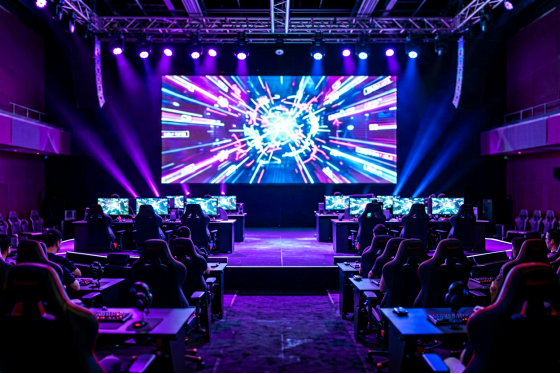
Rows of stations in a US esports lounge running from a single diskless boot image
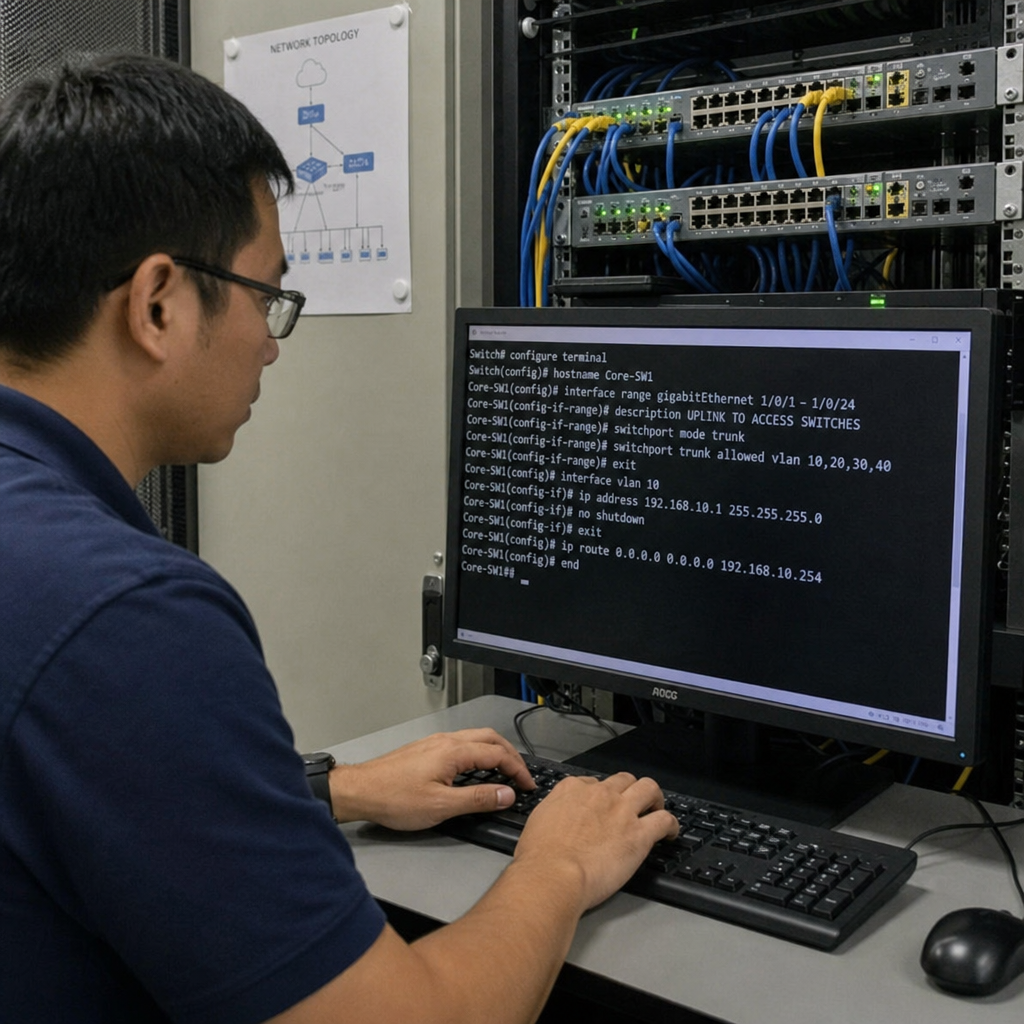
The server side of a cloud diskless build
Put the money in RAM before you touch the CPU. Cache is what the floor feels, and a mid-range Xeon with a lot of memory beats a fast chip that has to hit storage for every read. For a 44-seat room, 128GB is a comfortable starting point and it is the line item to protect when the budget gets squeezed.
Storage splits into two jobs. The master image sits on NVMe, something in the Samsung PM9A3 class, and the write-back cache takes a separate SSD because every station is writing its temporary changes there all evening. Recovery points give you the undo button: create one before a big patch, merge it when the patch turns out fine, roll back to the last one when a driver update goes sideways at 8pm on a Friday.
Networking is where cheap builds get into trouble. One gigabit port on the server for 44 clients is not enough headroom. Run dual NICs at minimum, ideally a 10-gigabit card such as an Intel X550-T2 feeding a managed switch, and if the room keeps growing you can spread the load across multiple NICs on one server or across a second server entirely. VLANs and dual LAN segments are supported for venues that keep the client network separate from the office, and Windows domain login works normally if you already run a domain for staff accounts.
(Turn off DHCP on the router before you start. Everyone gets there eventually. Getting there first saves an evening.)
If you want the specifics rather than the shape of it, the setup wiki walks through the DHCP handoff and the cache settings step by step.
Half-height rack in a venue back room holding a 2U server, NVMe bays, a 10-gigabit switch and a UPS
Does it hold up when the room is full?
This is the second question, right behind the bandwidth one, and it deserves an answer with numbers attached rather than a reassurance.
A warm cache does most of the work. The blocks Windows reads at boot, the shader caches, the map files for whichever five games your room actually plays, all of that gets requested by every station and ends up sitting in server RAM after the first few boots of the day. From there it comes back over the wire faster than a budget local SATA drive ever managed. In practice a cloud diskless station feels quickest on exactly the things players notice, which is login, map load, and alt-tabbing back into a lobby. The hardest part of the system is that ninety-second window opens, and the window closes before your first customer has his jacket off.
Writes run the other direction and they are all disposable. Whatever a session writes goes into the write-back cache on the server rather than into the image, which is the mechanism behind the clean machine on every reboot.
To be fair to the switch, it is doing more work in this design than in a normal shop, so watch it rather than the CPU graph. Cache hit rate and the server NIC at 5pm on a Friday tell you everything about headroom. Flat at sixty percent with a full room means you can add another row without touching the server.
Bookings are another place where a busy room shows its shape. When a team rents the back twelve stations on a Wednesday and wants a particular set of titles and settings, you build that as a second image and point those twelve at it. One reboot, not an evening of installs, and the room goes back to normal the same way on Thursday morning.
Running the numbers on 44 seats
Start with what you stop buying. A 1TB NVMe drive runs somewhere in the sixty-to-eighty-dollar range depending on the week (prices bounce around, so price it on the day you actually buy), and forty-four of them is a few thousand dollars that goes into GPUs instead. That is the visible half.
The invisible half is the drive failures you never get to schedule. Drives in a gaming center take a beating from shader compilation and weekly game updates, and in a room of forty-plus you are swapping a few every year, always on the day you are busiest. Diskless clients skip that entirely, and the parts that do wear out live in one box you can put on a UPS.
Then there is the subscription. Licensing is per PC per month, annual billing works out cheaper than monthly, and it scales with the room rather than with the number of locations, so check the purchase page for what a per-PC subscription costs right now and set that against the drive budget you were about to spend.
Power is a smaller line for a gaming floor, since the GPUs dominate the meter. It shows up much more clearly in school labs and training rooms, where the clients are small thin clients rather than gaming rigs and the saving runs as high as 40 percent.
Test it on one machine before the floor sees it
You do not need a maintenance window to find out whether this works for you. A cloud diskless bench test takes one evening and touches nothing your customers sit at.
Take a spare PC and any box with enough RAM to act as a temporary server. Build the master image on the spare, point one client at it, pull that client's drive, and let it PXE boot. Then compare the two things you actually care about: how long the machine takes to reach the desktop from a cold start, and how long a match map takes to load against the same game on a local SSD. Warm the cache first by booting it twice, because a first boot on an empty cache is not the number you will live with.
If the bench test looks right, do one row before the whole room. A row of six tells you more about your switch than any spec sheet will, and you can migrate a row at a time between busy nights. Download it and run it against one spare machine to see the boot time for yourself.
Back to the owner outside Denver. He is never going to push that 40GB game down his fiber on a Friday night. It sits on an NVMe drive twelve feet from the players, behind a switch he paid for, and it gets downloaded exactly once no matter how many seats he adds next year. The question a cloud diskless room leaves you with is how much RAM to put in the server before the next expansion, which is a considerably better problem than the one he walked in with.