
There's a specific moment when a venue owner starts shopping for centralized PC management for gaming centers, and it's usually the fortieth time they install the same game on the same floor. Not the first time, and not the tenth. Somewhere around forty, the math of doing anything once per machine stops being a chore and starts being a payroll line, and the search begins.
The trouble with that search is the vocabulary. Remote desktop, imaging, cloning, reboot-to-restore, diskless boot: the words blur together, every vendor claims the word "centralized," and most of the content out there was written for office IT departments that have never met an anti-cheat or an hourly seat turnover. So here's the map I wish every owner had on day one. There are four levels of centralization, each one fixes what the previous level left broken, and knowing which level you're on tells you exactly what to buy next.
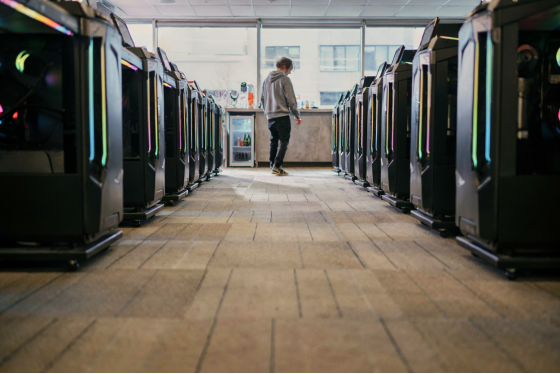
Owner walking the rows of a neighborhood gaming center
Everyone centralizes eventually
The forces pushing you are structural, not personal, and they don't care how organized you are.
A gaming center floor is dozens of high-spec machines that customers expect to be identical. The popular titles patch weekly, sometimes more. Seats turn over by the hour at typical US rates of three to eight dollars, so a machine that's down isn't a task, it's an outage with a dollar value. And the person responding to all of it is usually one staff member per shift, whose hourly cost is the biggest number in the building after rent.
Multiply those together and every venue arrives at the same conclusion: touching machines one at a time doesn't scale past the size where the business becomes worth running. The only question is how far you take the fix.
That's where the levels come in. Most venues climb them in order, not because the order is written anywhere, but because each level is the obvious next purchase from inside the previous one, and the tuition at each rung is a year or two of labor you only recognize as tuition afterward. Reading the whole ladder in advance is cheaper. That's the entire pitch of this article.
Level 1: remote hands
The first thing everyone tries is remote access: a remote desktop tool or an office-style management agent on every station, so problems can be handled from the counter instead of a walk to seat 23.
It's a real improvement, and it's worth doing on day one. Installing a driver from the front desk beats carrying a keyboard across the room, and checking a machine's state without leaving the till fits how a single-staff shift actually works.
Notice what it doesn't change, though. You still have forty separate copies of Windows, each accumulating its own settings and leftovers. Remote hands make you faster at visiting forty different machines. They don't make the machines any less different, and the number of visits keeps growing with the floor.
There's also a fit problem nobody mentions in the brochures. Office-style management agents were designed for fleets of spreadsheet machines, and a gaming floor is a different animal: anti-cheat software watches for exactly the kind of background agents those tools install, and an hourly turnover schedule leaves no maintenance window an office fleet would recognize. The tools work. The assumptions behind them don't quite. Level 1 is a better hammer for a problem that is slowly becoming about the nails.
Level 2: the golden image weekend
Level 2 is the first genuinely centralized idea: build one perfect machine, capture it as a golden image, and clone it to the whole floor. Anyone who has run a venue for a while has lived through a cloning weekend, and to be fair, the morning after one is glorious. Every station identical, every launcher fresh, the whole floor exactly as designed.
Here's the part only people who've done it repeatedly talk about: the drift starts again the next day. The image is a photograph, not a leash. Customers change settings, patches land unevenly, and within a few weeks the floor has diverged enough that you're scheduling the next cloning weekend, which is real hours of downtime on machines that earn by the hour.
The weekend itself deserves an honest description, because the word "weekend" is doing heavy lifting. Capture the image after the last patch lands (and one always lands Friday), push it machine by machine or row by row, chase the two stations that didn't take it cleanly, re-activate what needs re-activating, and reopen hoping nothing shipped an update while you worked. Cloning centralizes the rebuild. It doesn't centralize the running, so the work recurs on a calendar forever, and the calendar doesn't care that it was your day off.
Level 3: freeze the disks
Level 3 attacks the drift directly with reboot-to-restore software on each station's local disk. The machine takes a snapshot of its clean state, customers do whatever they do, and a reboot throws the changes away. Residue from the last session stops accumulating, which for a venue turning seats hourly is a genuine leap: the afternoon customer no longer inherits the morning customer's mess.
The day that still belongs to you is update day. The snapshot protects the machine from change, including the changes you want, so patching means unfreezing stations, applying the update per machine, then refreezing, multiplied by the floor and by however many titles patched that week. And the freeze has to be managed per seat, so the fleet is protected forty separate times rather than once.
Level 3 solves the customer half of drift and leaves the maintenance half in place. For US floors living on weekly Valorant and CS2 patch schedules, the maintenance half is the expensive half. It's also the half that lands on specific days you don't choose, which is how patch nights become staff overtime.
Centralized PC management for gaming centers, all the way
Level 4 asks a sharper question: why are there forty copies of Windows in the building at all?
In a diskless setup, stations keep their GPUs and their monitors but hold no local system at all. Every seat boots over the LAN from one image on a server in the back room. CCBoot is the diskless boot system behind that model at more than 30,000 customer sites, and the architecture collapses the previous levels' trade-offs into one mechanism, because there's nothing on the client left to drift.
Updates centralize the way Level 2 promised: change the designated master PC once, and every station picks it up on its next reboot. Cleanliness centralizes the way Level 3 promised: every reboot returns a seat to the clean image, wiping session residue, viruses included. The difference is that both happen at once, continuously, without a cloning weekend or an unfreeze cycle, because there's only one Windows and it lives on the server. Mixed hardware stays manageable too, since the PnP function lets one image serve clients with different specifications (useful when your front row is two GPU generations newer than your opening-day row). Data that should survive the wipe, like tournament configs or a coach's library, goes on personal disks and persists.
Customers notice the change sideways rather than directly. Every session starts on what is effectively a fresh install, with none of the accumulated junk that makes a six-month-old Windows feel tired, so the seats keep the snappy feel of opening week indefinitely. Nobody posts a review about it. They just stop having the vague sense that station 23 is the slow one, because there is no station 23 anymore, only the image.
Events get the same treatment through restore points. Create a recovery point before a tournament weekend's special loadout, merge to last when the new build proves out, restore to last if anything misbehaves, and the whole floor rolls between states as one unit instead of forty projects. That's the piece none of the lower levels can offer at any price, because they have no single place to roll.
Olcay Taylan of TAY-NET Cafe in Turkey made exactly this climb after twenty of his thirty-five machines developed disk problems: "Now, I can update the games in one place and all the clients will get them, no need for deepfreeze or manually updating the games." One sentence, both halves of the problem.
Two practical notes from the trenches. Turn off your router's DHCP server before configuring the boot server, because everyone collides with that step eventually and doing it on purpose saves an evening. And once you're running, the routine looks like the day-to-day playbook for running a diskless floor covered elsewhere on this blog: patch the master in the evening, reboot the floor, open the doors.
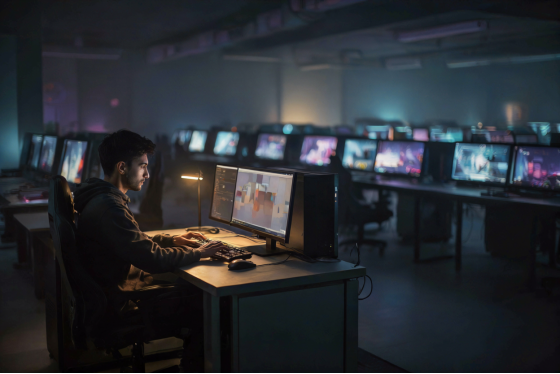
Technician updating the master PC that the whole floor boots from
Which level is yours?
Honestly, the levels aren't a ranking of owner intelligence. They're a ladder venues climb as scale makes each rung's leftover work too expensive, and the right rung depends on your floor.
Four levels of centralized PC management for gaming centers
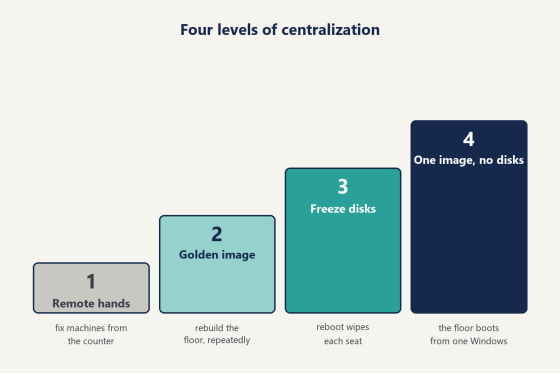
Level | What gets centralized | What still drifts | Your recurring job |
1. Remote hands | Your travel time | Everything on 40 | Visit machines, |
2. Golden image | The rebuild | Everything, again, | Cloning weekends |
3. Freeze disks | Session cleanup | Update day | Unfreeze, patch, |
4. One image, | The running | Nothing on the | Update one |
A stance, since a table refuses to give one: under ten machines, Level 1 plus a disciplined owner is perfectly livable, and plenty of small rooms run that way happily for years. From twenty seats up, the recurring labor of Levels 2 and 3 quietly costs more per year than jumping straight to Level 4, because every rung below full centralization leaves a per-machine chore that scales with the floor while your staffing doesn't. Venues in the 40-to-60 seat range, the standard US build, feel this hardest, which is why they're the classic diskless adopters. The broader benefits of centralized management apply at every rung, but the payoff curve bends steeply at the top one.
The climb between rungs is gentler than owners fear, too. Levels coexist during a transition: a floor can boot its newest row diskless while the older rows finish their season on frozen disks, and nothing about the mixed state breaks either side. Migrate row by row across a slow month and the customers never see the construction.
The server room is where Level 4 asks for its investment, and the priorities are simple: RAM first, since CCBoot serves the image from physical memory with an SSD cache behind it and cache hit rate is what the floor feels, then network lanes, with multi-NIC load balancing on one server or balancing across multiple servers as the standard configuration for a paid floor. Spec it once, generously, and the stations never need storage decisions again.
The money and the first step
The software line is small enough to state in a sentence: CCBootCloud runs USD 2.50 per PC per month, or USD 2.00 on the annual plan, so a 40-seat floor pays about USD 80 a month, verified on the per-PC pricing page as of this writing. Each PC in the license covers one client seat, the server itself doesn't consume one, and the count adjusts through the renew flow when the floor grows. Set that against the recurring jobs in the table above at a US hourly wage. A single cloning weekend, or one full unfreeze-patch-refreeze cycle across forty machines, costs more in labor than months of the license, and those jobs repeat. There's also a bundle with iCafeCloud at USD 4.00 monthly (3.20 annual) if you want the billing and membership layer handled by the same pair of products as the machines.
The first step doesn't involve the floor at all. Take one spare machine, download the free trial, and boot that single seat from a test server in an evening. Prove the boot. Prove a game launch. Prove the reboot wipes it clean. Then plan the migration, one row at a time if you like (your paying seats never notice the experiment). The setup wikis walk the path in order, and the live chat team remotely configures first servers with owners every day, which turns the scary part into an appointment. An evening is enough.
Then think back to that fortieth install. At Level 1 you'd have done it remotely, forty times. At Level 2 you'd have scheduled it for the next cloning weekend. At Level 3 you'd have unfrozen the floor first. At Level 4 it was one install on one master PC, finished before your coffee went cold, and that gap is the whole argument for centralized PC management for gaming centers: not doing the work faster, but arranging the room so the work happens once.