
Imagine a busy Friday night where a surprise 50GB game update drops, leaving thirty gaming rigs sitting useless until patched. Gamers already know how painfully slow massive downloads get, but multiplying that downtime across dozens of machines creates the ultimate manual update trap. In practice, operators easily lose twenty hours a week just clicking buttons and waiting on individual computers.
What if you could bypass this daily grind entirely by patching just one machine? This is not magic, but rather the foundation of centralized pc management for lan center operations. Instead of treating every PC like an independent island, you connect them to a single "Master Brain" server that holds all your games and operating files. Make one quick update on that main server, and every station in the building instantly follows suit.
In LAN centers, this approach is often delivered through diskless and centralized management platforms such as CCBoot, which are designed to help you manage OS and game content from a single point while keeping client PCs consistent and easy to restore.
Industry data reveals that moving to this central system shrinks maintenance time from grueling hours down to mere minutes. Controlling fifty PCs becomes as easy as managing your own personal desktop. Master this server setup, and you unlock the most effective strategy for reducing operational costs for LAN centers while keeping your customers happily playing.
Why 'Walking the Floor' is Killing Your LAN Center Profit
When patch day arrives for a massive new Fortnite season, manually logging into thirty different computers becomes a significant liability. While "walking the floor" with a USB drive feels productive, this manual approach quietly drains your budget through hidden labor expenses. Every minute spent clicking "update" on individual screens creates a direct "Cost per Station"-the exact dollar amount you pay staff just to keep games playable.
To see why automation is the absolute secret to reducing operational costs for LAN centers, calculate your annual maintenance expenses using this basic formula:
- Estimate the weekly hours spent updating PCs (e.g., 10 hours).
- Multiply by your hourly staff wage (e.g., $15/hour = $150/week).
- Multiply by 52 weeks to find your yearly cost (e.g., $7,800).
That alarming $7,800 figure ignores the "Opportunity Cost of Downtime"-the lost gaming revenue when a customer walks in, but a station is stuck downloading files. Once you add those lost sales to your labor expenses, the break-even point for buying proper IT asset management software usually happens within just two months. Eliminating this tedious busywork entirely starts by rethinking the hardware itself, leading straight to diskless setups.
The Library Method: How to Run 30 PCs Without a Single Hard Drive
Equipping a new gaming floor with thirty high-speed solid-state drives forces you to purchase expensive hardware that only creates more maintenance work down the line. When analyzing diskless vs local storage for gaming centers, removing those hard drives entirely shifts the operational dynamic.
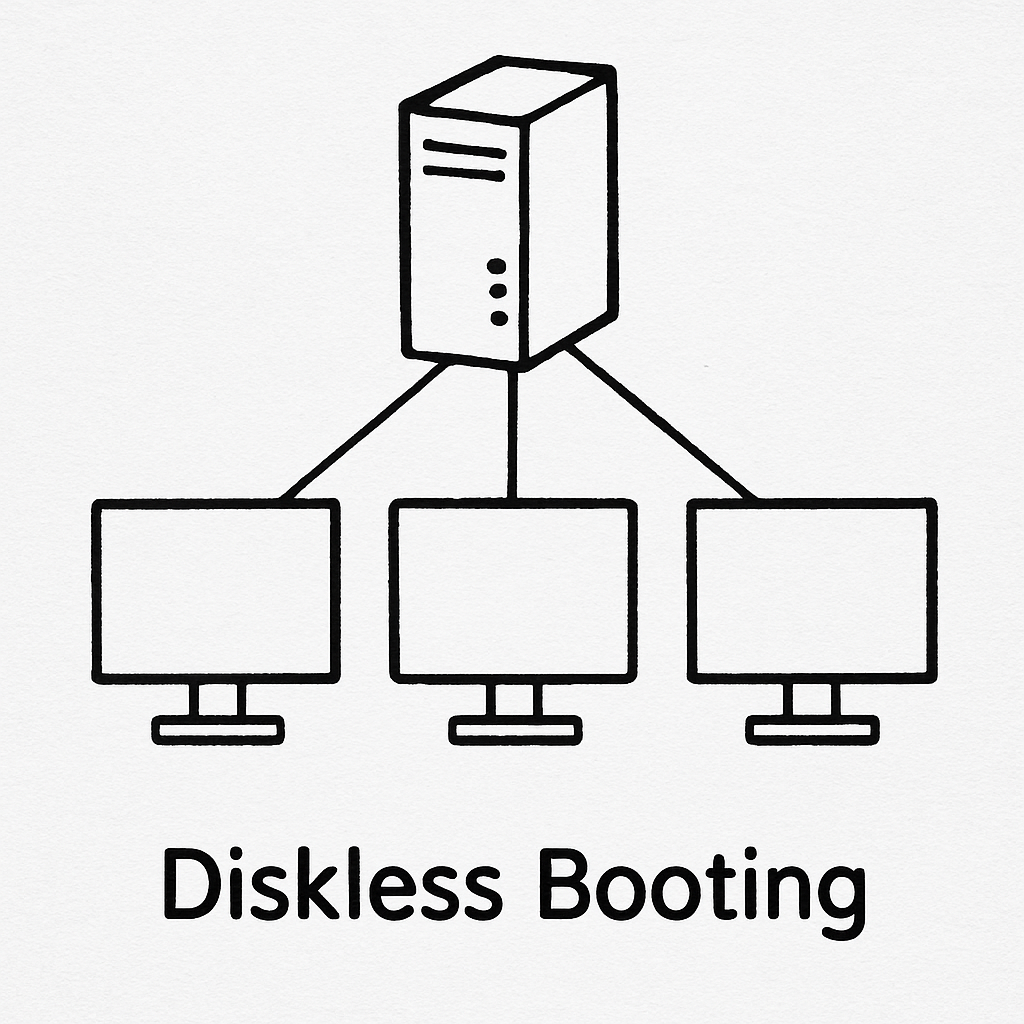
This "magic" relies on PXE (Preboot Execution Environment) technology, functioning exactly like a public library. Your central server acts as the main desk, and the empty PCs are the readers. Instead of owning permanent copies of Windows, your stations "borrow" the operating system over the network cable the moment they turn on. A proper PXE boot server setup for gaming means your stations only need a processor, memory, and a graphics card to run perfectly.
Behind this central desk sits your "Gold Image," which is a single, perfect master copy of Windows shared by every station. If a customer accidentally deletes a critical file or downloads a virus, you just restart that specific computer. It instantly forgets the mistake and pulls a fresh, clean copy from the master. Any solid diskless system implementation guide highlights this feature because it makes your floor practically indestructible.
In practical LAN-center deployments, diskless suites like CCBoot are commonly used to provide the PXE boot workflow, centralized image control, and rapid recovery behavior described above as a single integrated system.
Eliminating individual drives saves thousands in upfront costs while guaranteeing a consistent, lightning-fast player experience. Your network now handles the heavy lifting, paving the way for true automated patching.
Update Fortnite Once, Play Everywhere: Mastering Automated Game Patches
If a massive 50GB game patch drops at 4:00 PM on a busy Friday, downloading it individually on thirty computers instantly cripples your internet and keeps players waiting for hours. Instead, utilizing automated game update software changes everything. You download the patch exactly once to your central server. Because your PCs share that single master disk, every computer instantly sees the new files, reducing your overall internet bandwidth usage by over 90%.
Learning how to deploy game patches across network setups using this centralized method takes only a few minutes. Here is the standard 5-minute update workflow for any major title:
- Unlock: Set your central server to allow temporary changes to the master disk.
- Update: Turn on one single PC and download the game patch normally.
- Save: Turn off that PC and lock the changes on the server.
- Restart: Reboot the remaining computers to instantly apply the update everywhere.
Centralized platforms built for diskless operation (for example, CCBoot) typically implement this “update once” process by letting you control when the shared image is writable versus locked, so patches can be applied quickly without risking day-to-day image drift.
What happens to a player's customized mouse sensitivity or login info if that master disk is locked? This is handled by "write-back" data. When a customer opens a unified game launcher for internet cafes, their personalized, temporary settings are saved to a separate write-back file dedicated just to their current session. The core game files remain untouched. Once they leave and the PC turns off, that temporary data completely vanishes, maintaining absolute system integrity.
Bulletproof Your Business: How to Wipe Every Virus with a Simple Restart
When a customer clicks a shady link and downloads malware onto Station 4 in a traditional setup, you spend hours running antivirus scans or completely reinstalling Windows. However, thanks to the master disk lock, your system is already safe. The virus only infects the temporary data file, meaning a simple restart permanently deletes the malicious software and perfectly restores the PC.
Beyond stopping viruses, automatic session wiping guarantees absolute privacy for your players. When combined with centralized user authentication for esports centers, customers can log into their personal Steam accounts without fear. The moment their session ends and the PC reboots, all saved passwords and browsing history instantly vanish. Every player sits down to a flawlessly "fresh" computer, eliminating the sluggish system bloat that plagues normal desktops over time.
Implementing these robust security protocols for shared gaming stations saves countless hours of troubleshooting, but it relies on strong infrastructure with instantly accessible operating system files.
Avoiding the Data Jam: Optimizing Your Network for Diskless Gaming
When 30 gamers simultaneously turn on their PCs to load a massive game like Call of Duty, all that game data must travel from your central server through your network switches to reach the players. This massive data flow relies on high network throughput, which acts exactly like the lane capacity of a highway. If your network management relies on basic internet wiring, all that data is forced into a single lane, creating a digital traffic jam during peak hours.
To keep data flowing seamlessly, successful lounges install a 10Gbps backbone. This specialized high-capacity cable links your server directly to your switches, effectively adding ten extra lanes for heavy traffic. Yet, a wide highway is useless if the warehouse sending the cars is too slow to fill it. Therefore, gaming center server hardware specifications emphasize NVMe SSDs-ultra-fast storage drives that can instantly pull game files and flood that 10-gigabit connection. Optimizing network performance for diskless setups means carefully balancing these lightning-fast storage drives with a wide-open network path.
When properly built, a customer experiences the exact same instantaneous loading speeds they would on a traditional desktop. Your system handles gigabytes of data flawlessly behind the scenes without stuttering. With this seamless foundation laid, you can finally step away from the server room and control operations directly from the front desk.
The Remote Commander: Controlling Every Station from Your Front Desk
During a busy Saturday afternoon, a customer at station twelve might need help logging in. Instead of running across the floor, the best cyber cafe management systems let you handle it all from a single monitor. Using remote desktop administration for PC rooms, you can instantly take control of any screen to assist a guest without ever leaving your chair.
This centralized control completely streamlines your daily operations. A smart software suite combines everything into one dashboard. Here are the top 3 essential features to look for in LAN center management software:
- Unified Billing Integration: Seamless internet cafe billing and timer software automatically tracks purchased hours and locks screens when time expires.
- Wake-on-LAN: Send a simple network signal to remotely power on sleeping PCs the exact moment a customer pays at the counter.
- Automated Power Schedules: Cut your electricity bills by programming unused stations to shut down automatically at closing time.
If your blog is aimed at LAN centers exploring diskless operations, it’s also worth calling out how a purpose-built diskless platform such as CCBoot can act as the operational “control plane” for images, clients, and day-to-day updates-so front-desk staff spend less time troubleshooting and more time serving customers.
Mastering these front-desk tools transforms a chaotic room of hardware into a tightly orchestrated business.
Your Path to a 5-Minute Maintenance Week
You no longer need to be a frustrated technician running between screens. By embracing centralized PC management, you transform into a strategic business owner focused on growing your community. The return on investment is undeniable: replacing manual labor with automation means games are always ready to play. Maximizing this uptime is your best strategy for reducing operational costs for LAN centers and increasing daily revenue.
Set a 30-day goal to implement your first basic controls. Begin by auditing the hours spent on manual updates to uncover your true labor costs. Next, check your network readiness to ensure your existing routers and cables can handle server traffic. Finally, trial one management software platform on a small group of computers. Start simple, trust the technology, and watch your schedule open up so you can focus on creating an unforgettable gaming experience.
For LAN centers planning a diskless, centrally managed environment, explore CCBoot to see how a dedicated platform can support image management, rapid recovery, and “update once” operations at scale.