
Three people search for diskless software in the same week. One runs a 40-seat gaming floor and is tired of patching every machine by hand. One manages a school lab whose hardware budget shrank again. One does IT at a company where 60 desks need the same locked-down build.
They type the same two words. They are shopping for three different products, and at least one of them is about to buy the wrong one.
Worth sorting out before anybody compares feature lists, because the three categories cost money in different places and break in different ways.
Three products, one search term
Ask around and you will find the term stretched over three architectures that have almost nothing in common under the hood.
PXE diskless boot. The client machine has a CPU, RAM and a GPU, and no storage at all. It asks the network for an operating system at power-on and gets one. Windows runs locally, on that hardware, at full speed. The server holds the image. CCBoot sits in this category, and so does most software that markets itself with the word diskless.
Thin clients and VDI. Windows runs on a server. The box on the desk pushes pixels and takes keystrokes. It can be genuinely tiny because it does almost nothing, which is the appeal, and the moment forty people all open something heavy you find out how much host you actually bought.
Restore-on-reboot tools. Deep Freeze is the one everybody names. Each machine keeps its own drive and its own full install. The software takes a snapshot of a known-good state and rolls back to it on restart, so whatever a user did that session evaporates.
All three give you a machine that looks the same every morning. That is the only thing they share.
| PXE diskless | Thin client / VDI | Restore on reboot |
Where Windows | on the client | on the server | on the client |
Inside the client | CPU, RAM, | minimal, often no | a full PC with its |
One update | one image | one host | every machine, |
Suits | rooms that change | light, uniform | one machine you |
Read the third row again, because that is where most of the money is.
Two of these architectures let you change something once. The third does not, and people who buy diskless software expecting that behaviour from a rollback tool are unpleasantly surprised about six weeks in.
And the reverse mistake happens just as often. Someone reads up on diskless software, likes the sound of one central image, then buys thin client hardware because the marketing language overlaps almost word for word. The first person to launch something GPU-bound on a box with no GPU discovers the difference. Two approaches that read as adjacent in a brochure feel nothing alike at a desk.
What happens when there is no drive
The sequence is short enough to hold in your head, which matters when you are deciding whether you can support it.
Power on. The network card broadcasts a question: who am I, and where do I look? Your server answers with an IP address and points the machine at a bootloader it can download over TFTP. That bootloader is tiny and does one job, which is knowing enough to attach an iSCSI target.
Here is the part that surprises people. To Windows, that iSCSI target does not look like a network share or a mapped drive. It looks like a physical disk bolted to the motherboard. That is why software installs normally, why games behave, and why the whole approach works at all instead of collapsing the first time something demands direct disk access.
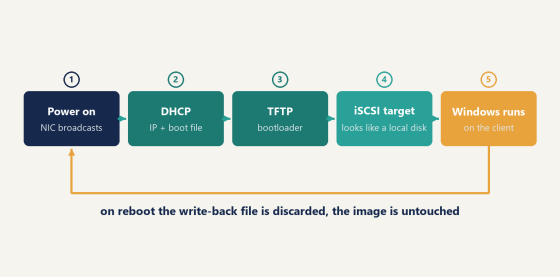
Boot sequence of a diskless workstation from power on to Windows loading over the network
Then there is the write-back file. Every client gets a private scratch area for anything it tries to write, since forty machines cannot all edit one shared image. Temp files, browser caches, whatever a user drags to the desktop, it all lands there. Reboot and it is discarded, and the machine is back to the image byte for byte.
Not everything should evaporate, though. Personal disk covers that gap by handing each user a slice of storage the reset never touches, so saved work and per-player settings persist while the system volume stays exactly as you built it. (Schools almost always want this on. Gaming floors frequently want it off on purpose, so every session starts from nothing.) You decide per deployment which data earns the right to survive.
Speed comes from caching rather than from the network being fast. A server with enough RAM keeps the hot parts of the image in memory, so the fiftieth machine to boot a title is served from RAM rather than from disk. Good diskless software lets you tier that across memory and SSD and shows you the hit rate, which is the number worth watching once you are live.
Does the frozen-state approach do the same job?
For one specific problem, yes, and it is cheaper to set up. If all you want is for machine 12 to forget what the last user did, a rollback tool handles that on day one with no server and no network work.
It does not solve the other problem.
Say a title pushes a 90GB patch. Under a rollback tool, all 38 of your machines still hold their own copy of that game, so all 38 have to pull the patch down, and you have to unfreeze them first or the update disappears at the next restart. Then refreeze. The rollback protected the baseline. It did nothing about the fact that you own 38 separate baselines.
That is the split, and it is not really a close call. Rollback tools answer "keep this machine clean". Diskless software answers "keep these machines identical, and let me change all of them at once". Venues usually discover they wanted the second one after a year of doing the first.
So the practical way to choose is to count copies. One copy of Windows that many machines boot, or many copies that each need their own attention forever. In practice everything else about diskless software follows from that single decision, including the parts of it that are inconvenient.
Drives themselves are the other half of the argument, and operators underrate this until it bites. Olcay Taylan, who runs TAY-NET Cafe in Turkey, put it plainly after checking his hardware: 20 of his 35 drives had bad sectors. His options were buying 20 replacements or going diskless, and he went diskless. Storage in a machine that runs eight hours a day under constant read load is a consumable, and every failure costs a seat plus your afternoon.
Four rooms where diskless software pays off
The pitch changes depending on who is asking, which is why generic feature lists land so badly.
Gaming floors and esports venues. The draw is patch night and the reset. One master machine takes the update, the floor reboots, everybody is current. Industry writeups put the US count somewhere north of 600 rooms, most of them past the 40-seat mark where this arithmetic starts paying. Anti-cheat adds a wrinkle worth reading up on separately, since kernel-level systems need a little extra handling on a network-booted client.
School and training labs. Cost per seat is the whole conversation. Client machines skip the drive entirely, and CCBoot's education material puts the power saving as high as 40 percent, which shows up on a district utility bill in a way it never does at a 20-seat business. A single server handles roughly 70 diskless clients. Summer reimaging stops being a project and becomes an afternoon. If you are pricing this out for a lab, the education setup and its thin client spec has the hardware side worked out already.
Corporate desktops. Different priority again: a uniform, auditable build. Every machine boots the image you approved, and personal disk keeps user data that has to survive the reset. Domain logins work normally, so the diskless part stays invisible to the people using it. That combination is the usual reason enterprise deployments end up here rather than on VDI.
Render farms. Nodes are interchangeable by design, so an architecture built around one identical image needs no selling at all. Adding capacity means plugging in another box and letting it pull the same environment every other node is already running.
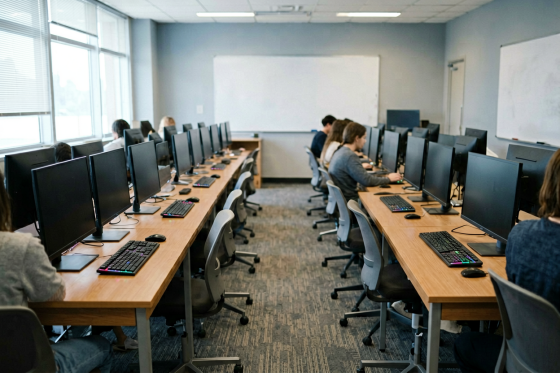
Rows of identical workstations in a US school computer lab during class
One image covering hardware that does not match is the piece that makes all four practical. PnP handling detects what a client actually is at boot and supplies the right chipset and GPU drivers, so a room assembled over four years off three different motherboards still runs from one image. Without that you would maintain an image per hardware revision, and the whole idea would fall apart on contact with a real purchasing history.
What it actually costs to run
Licensing is per PC per month. USD 2.50 monthly, or USD 2.00 if you pay annually, which is the same 20 percent break most of this market offers. A 40-seat room on annual billing is USD 80 a month. The per-PC pricing covers bundles too, if you want billing and license pooling alongside it.
Against that sits the storage you stop buying, and it is recurring rather than one-time, for the reasons TAY-NET ran into above.
Part of that saving goes back into the server, and it is money well placed rather than a hidden cost. Three lines carry the load there, and the next section covers how to spec them.
Comparison of patching every workstation separately versus updating one server image
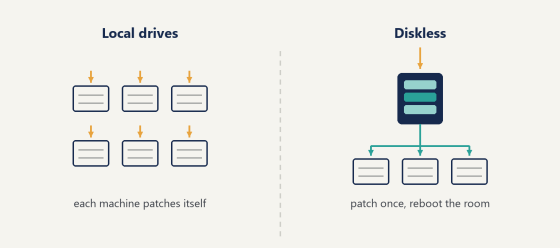
The curve also bends in your favour as the room grows. Every seat you add is one more license and no extra work on patch night, so the effort stays flat while the machine count climbs. A 60-seat floor takes the same evening a 20-seat one does, which is the part that surprises operators coming from local drives.
Labour is the line nobody puts a number on and the one that usually decides it. Whether patch night costs you four hours or twenty minutes compounds every single week of the year. Run that out across a season and the licensing for diskless software vanishes into the rounding error, which is about the point where most operators stop thinking of it as a purchase and start thinking of it as overhead they were already paying in evenings.
Getting the server right
Diskless software puts more weight on one machine than a conventional room does, and speccing that machine deliberately is what separates a floor that feels quick from one that feels vague. Three lines carry almost all of it.
RAM comes first, by a wide margin. Cache is what the room actually feels. With enough memory, the fiftieth client launching a popular title is served straight out of RAM rather than off a disk, which is how a well-fed cache ends up beating local storage on load times instead of merely matching it. Watch the cache hit rate once you are live. It is the one number that tells you whether the server is comfortable.
The write-back volume is second. That single device absorbs the scratch writes of every active client at the same time, so it wants genuine high-endurance enterprise NVMe. Sized properly it drops out of your attention entirely, which is exactly what you want from it.
Networking is third. Gigabit to each seat is the baseline, 2.5Gbps is better where the client boards support it, and the server side wants 10GbE into a managed switch. Flow control and IGMP snooping earn their keep on that switch during the morning boot storm, when forty machines all want the same image within the same two minutes.
(Turn the DHCP server off on your router before you start. Everyone arrives at this eventually, and arriving there first saves an evening.)
Get those three right and the rest of the deployment is mostly configuration. Where diskless software repays the effort fastest is the room that changes often: several live titles, patches landing weekly, hardware bought across a few different years. The more moving parts on the floor, the more one central image is worth.
Try it on one box
Take a machine you can afford to have offline, pull its drive, and let it boot from a server. Install something demanding, reboot it a few times, and watch what survives and what gets wiped. Half an evening tells you more than any comparison table, this one included.
If that single client behaves, the architecture holds at forty. Put the trial on one spare box and find out which of the three products you were actually looking for. If the answer turns out to be diskless software, you will know it by the end of the evening instead of after the purchase order.