
Saturday, tournament day, and three of your forty-eight stations have a sheet of paper taped to the monitor. PC 22 has a drive that clicks. PC 31 caught a Windows update at the worst possible moment on Thursday and has been rebooting in circles ever since. PC 37 is probably fine, but nobody has had twenty spare minutes to find out. Six percent of your seats are earning nothing on the busiest day of the month, and that is the specific problem PXE boot for LAN centers is good at deleting.
The drive will still click. It just will not be inside the machine any more.
What a LAN center actually spends its week on
Monday through Thursday, the floor is half empty and the money comes from bookings: a coaching group, a corporate afternoon, two kids' birthday parties, a league night that fills one row. Friday evening the doors open and stay open. Revenue is seat hours, nothing else, and a station that cannot be sold at 9pm on Saturday is worth less than a station that was never bought.
Staffing is where this gets sharp. Most venues this size run on one person at the counter, sometimes two on weekends, and that person is selling drinks, sorting a headset that stopped working, and running the bracket for the 6pm tournament. Nobody is walking the row with a USB stick during business hours. Maintenance happens in the window between closing and sleeping, and every hour that window grows is an hour taken from somewhere real. The venues that survive their third year are usually not the ones with the best hardware. They are the ones where the technical work stopped scaling with the seat count.
Then there is the patch calendar, which no operator controls and every operator plans around. Valorant, CS2, Dota 2, Overwatch 2, Fortnite, each on its own schedule, several of them large, one of them always landing the night before your busiest day.
And the room is no longer one thing. A modern venue sells seat hours to walk-ins, sells the whole floor to a league on Wednesday, keeps a console corner for people who do not want a keyboard, and rents a quiet room to a coach who brings their own students. Four products, one set of machines, four different ideas about what should be installed.
Why PXE boot for LAN centers is not an office rollout
An office rollout is a gentle thing. Two hundred identical desktops, staff drifting in between 8:40 and 9:20, everybody launching a browser and a mail client, and if a machine takes an extra twenty seconds nobody writes it down.
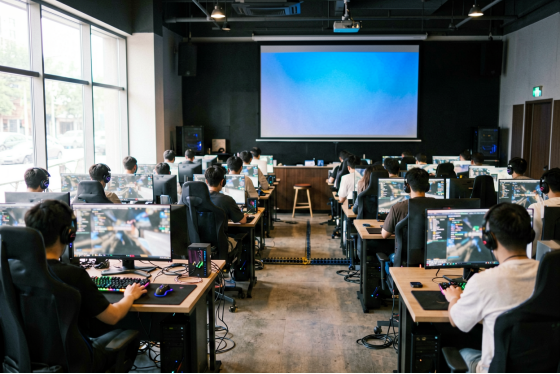
Your floor does the opposite. Forty-eight machines with real GPUs power on inside the same two minutes because the doors just opened, and every one of them reads the same few hundred gigabytes of game library in almost exactly the same order. Spiky, and identical. That shape is the best possible input for a cache: the first client pulls those blocks off the server's storage, and every client after it gets them out of memory, which is why a well-fed server serves the fortieth machine faster than the first.
CCBoot is built around that shape. The mechanics underneath are the ordinary PXE chain, and there is nothing exotic about them: the network card asks the LAN what to boot, a small bootstrap file arrives, the client mounts a volume that lives on the server, and Windows comes up from there. What matters for a venue is not the chain. It is that all forty-eight seats are reading one image, so there is exactly one copy of your floor to look after.
Writes go somewhere harmless. Each station gets its own scratch file for the session, and when the machine reboots that file is thrown away, so whatever a customer installed, broke, or dragged onto the desktop at 8pm is gone by 8:04.
This is the part that makes PXE boot for LAN centers behave differently from the same technology in a school or an office. A lab wants machines that are clean at nine in the morning. A venue wants machines that are clean forty times a day, between one paying customer and the next, without anybody deciding to make it happen.
A LAN center at full capacity during a weekend tournament
Where the hours go now
Four things eat a technical week in a venue, and it is worth being specific about what each one turns into.
Drives fail. Not dramatically, just steadily, and always in the machine somebody booked. Olcay Taylan at TAY-NET Cafe in Turkey went looking six years into running a 35-PC shop: "I checked my harddisk and 20 out of 35 harddisks had bad sectore and other issue." Twenty replacement drives, or no drives. He picked no drives, and so have plenty of venues that already made the switch.
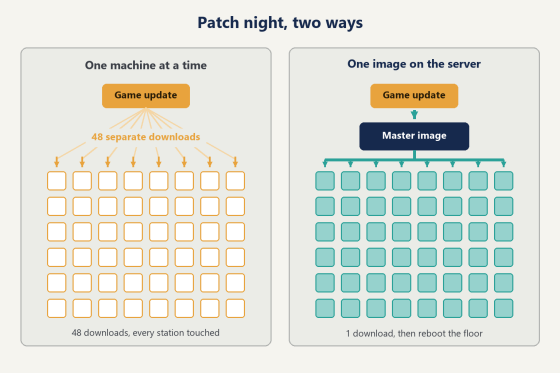
Patches are the second. A weekly update across forty-eight machines is forty-eight downloads over one connection, forty-eight progress bars, and one of them stalling at 84% while you are trying to close. With one master image, it is one download and a reboot of the floor.
Third is the customer who breaks something. A launcher gets logged out of, a mod gets installed, a settings file gets mangled, somebody's little brother finds the display scaling. On a diskless floor this stops being a support ticket, because the fix is a reboot and the reboot was going to happen anyway.
The fourth is the quiet one: drift. Sixteen PCs bought in 2022, twelve more last year, four rebuilt after a lightning strike, and eighteen months of small manual fixes applied to some of them and not others. One row has an old graphics driver because updating it broke something once. Two stations still have a codec pack from a problem nobody remembers. Nobody plans drift. It arrives.
(and it shows up in the worst way, as a customer at station 29 saying the game runs badly here but fine at 14, which is a complaint you cannot answer and cannot reproduce)
Diagram comparing updating 48 PCs one by one with updating a single master image
Rolling it out without closing for a day
Do not convert the floor on a Tuesday afternoon. The rollout order for PXE boot for LAN centers is boring on purpose: it takes about a week of evenings and never costs you a sellable session.
One master machine, one evening
Take one client and build it the way you want every seat to look. Windows, drivers, the launchers, the games, the peripheral software, the desktop layout. Sign into Steam and Riot and Epic and let them finish their first-run updates, because the state this machine is in when you capture it is the state forty-eight machines will wake up in tomorrow morning.
The minute that image is stable, set a restore point. CCBoot gives you create recovery, merge to last, and restore to last, and from then on every new game you add is a merge rather than a gamble. Skip this step and the next installation that goes badly costs you the whole image.
Then a row, then the floor
Convert one station and leave it running for a full day. What you are watching for is not whether it boots, because it will. You are watching how it behaves at 8pm when the room is busy and the server is being asked for everything at once. That is the only test that means anything.
Then a row of eight, ideally the row that is furthest from the door and books last. Eight machines is enough to see the difference between a server that is comfortable and a server that is working hard, and it is small enough that you can keep an eye on every one of them through a full weekend. Then the rest. You can put it on one spare machine first if you would rather not touch a sellable seat at all, and the setup wiki covers the server side in more detail than any article should.
Mixed hardware is not a reason to maintain three images. The PnP function adapts one image to clients with different specifications, which matters more in month nine than it does in week one. (six months from now you will not remember which row got which build, and with one image you will not need to)
Which seats should not be identical?
Almost every article about diskless floors assumes the floor is uniform. Yours is not.
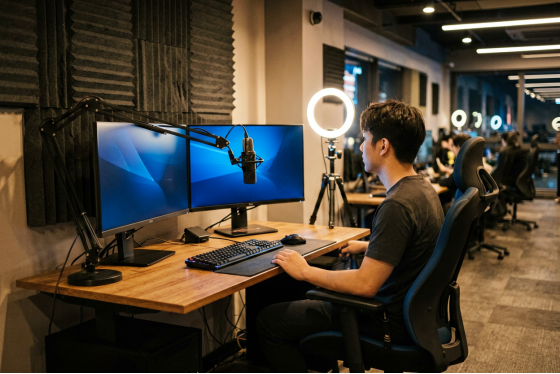
The front desk machine holds your bookings, your shift notes, and the spreadsheet nobody has replaced yet. The tournament admin station holds brackets mid-event. A streaming corner has OBS scenes somebody spent an afternoon arranging. A coaching station has demo files and VOD clips that a paying customer expects to still be there next Tuesday. None of those four machines wants to wake up factory fresh, and treating them like the other forty-four is how a venue loses a bracket halfway through a Saturday.
Personal disk support is the answer for that handful of machines. The shared image stays read-only and disposable, and anything that needs to survive lives on a personal disk that reboots do not touch. Windows domain login works alongside it, so a coach's files follow the account rather than the chair.
The console corner and the classroom are a different case again. Multiple operating systems can be served to the same client, and the graphic boot menu is yours to arrange, so a room that runs Windows for gaming on Saturday and boots into something else for a Tuesday morning class is a configuration, not a project.
A streaming and coaching station set apart from the main rows of a gaming center
What moves on the P&L
The case for PXE boot for LAN centers usually gets made on drives, and drives turn out to be the smallest part of it.
Still, start there. Client machines no longer need storage of their own, so a recurring purchase stops, and the replacement cycle behind it stops with it. To be fair, it is the line that scales hardest in your favour, because every seat you add from here on is a seat that never needed storage in the first place.
Bandwidth is the one that surprises operators. Francis Tungpalan at GetPoint Gaming in the Philippines put it plainly: "We have about 5 online games that update every week, now we only update the server. Imagine the bandwidth we've saved!" Forty-eight machines pulling the same patch through one connection is a cost and a bottleneck at the same time, and it stops existing rather than getting smaller.
Then labour. One person can update, maintain, and roll out software across the whole floor, which does not mean firing anybody. It means the person you already pay spends Friday evening selling seats instead of standing behind row three.
And the budget you free up has an obvious home. Money that was going into a drive for every station goes into GPUs, monitors, or server memory, and memory is the one that customers feel, because cache hit rate is what makes a busy floor feel fast. Licensing runs per client PC with one key per server, and what a client PC costs to license is on the pricing page.
Questions LAN center owners ask first
Can customers tell the difference at the seat?
In practice they notice boot time and nothing else, and boot time usually improves once the cache is warm, because the second machine onward is being served out of server memory rather than off any disk. Games load from the same image every session, so a station behaves the same on Saturday night as it did on Monday morning.
How do I work on the server without closing the floor?
Run more than one. CCBoot supports load balancing across multiple servers as well as multiple NICs in a single server, which is standard practice for a venue that sells seats, and it means maintenance on one box happens while the room keeps running. Multiple network cards do a smaller version of the same job by spreading the opening-hour boot storm across several physical links.
Can different rooms run different images?
Yes, and most venues end up doing exactly that once they realise they can. The tournament room, the console corner, and the classroom can each be pointed at the image that suits them, with the boot menu deciding what a given client sees. (a competition image with nothing on it but the tournament title and the anti-cheat is worth building once and keeping)
Where do I get help during setup?
The wiki covers the server configuration step by step, and support is reachable directly through the contact page if something on your network behaves in a way the documentation did not predict. Local resellers handle some regions and can configure the server for you.
Start with the row nobody is sitting in
Honestly, the hardest part of this is not technical. It is deciding to spend three evenings on infrastructure during a month when the floor is already busy, which is every month.
So make it small. Take the row that books last, the one sitting empty every Wednesday, and convert one machine in it. Build the master, capture it, point that station at the server, and then leave it alone through a full weekend and watch what it does when everything else is loading at once.
If that seat holds up on Saturday night, the other forty-seven will too, and PXE boot for LAN centers stops being an idea you read about and becomes the thing that killed the paper signs taped to your monitors.