

It's 5:40 on a Friday. The Valorant patch dropped an hour ago, and a league team has the back two rows booked for seven. In a 40-seat LAN center where every PC carries its own SSD, somebody is about to spend the next hour walking the aisles and watching progress bars. In a room built around a diskless server, the patch goes onto one machine in the back office, the floor reboots, and every station comes up on the new version before the first player sits down.
Nobody walks into a gaming center to admire the diskless server in the office closet. The seats get the attention and most of the budget. The box in the back decides whether they feel fast.
What the box in the back room is doing all day
A client PC on a diskless floor has the usual GPU and CPU. It has no drive. When someone presses power, the network card asks the LAN for an address and a boot file, pulls down a small loader, and then attaches a disk that physically lives on the server, over iSCSI. Windows can't tell the difference. It sees a normal drive and boots from it. (If you want the packet-by-packet version, this walkthrough of how the PXE handoff works covers it.)
From that moment on, the diskless server is doing three jobs for every seat at once.
It reads. Every time a player launches CS2, the game's blocks come off the server instead of a local SSD, and during the evening rush that means dozens of machines asking for different parts of different games in the same second.
It writes. Windows never stops writing: logs, shader caches, temp files, browser profiles, the settings someone changed on station 14. Those writes land on the server in a separate file for each client, never on the master image, so the other 39 machines never see what station 14 did.
It forgets.
On reboot, that per-client write file is thrown away and the station starts again from the clean master. Malware, a surprise browser toolbar, a player who dragged the taskbar to the top of the screen: all of it is gone the next time the PC restarts.
That combination is what Olcay Taylan went looking for at TAY-NET Cafe in Turkey. "I checked my hard disk and 20 out of 35 hard disks had bad sectors and other issues," he wrote. "I had two ways to fix this, buy 20 new hard disks or use a diskless server. And I chose the latter. Now, I can update the games in one place and all the clients will get them." His room runs on CCBoot's diskless boot system, the same software more than 30,000 customers use to boot their rooms.
Four storage jobs, and why each gets its own drive
When a brand-new diskless floor feels sluggish, the cause is nearly always the same: everything was put on one big drive. Forty machines reading games and forty machines writing temp files end up in the same queue, and the whole room pays for it at 8pm.
CCBoot's requirements split a diskless server's storage by role, and it's worth knowing what each role does, because once you know the workload you know what kind of drive to buy.
Image disk
This holds the Windows image the clients boot from. It gets hammered during boot storms, when every seat powers on at opening time, and is fairly quiet the rest of the day. A SATA SSD of 512GB or more does the job, and the example builds in the CCBoot wiki uses a Samsung 870 EVO here.
Game disk
The library. Your whole catalog sits on this drive, and it's the one players actually feel when a map loads or a lobby starts. Plan on 2TB or more of NVMe. Anything larger than 2TB should be initialized as GPT rather than MBR, and it's easier to do that on day one than after the drive is full. The wiki's 30 to 40 seat build puts online games on a Samsung 980 Pro 2TB and adds optional SATA drives for the rest of the catalog.
Write-back disk
Every client's writing goes here. The workload is small, random reads and writes, all day, from every seat at once, which is exactly the kind of traffic where random IOPS matters and sequential speed barely does.
Use two or more separate SSD or NVMe drives of around 512GB each, and do not put them in RAID. Honestly, that sounds backwards the first time you hear it. RAID 0 on SSDs mostly raises sequential throughput, which write-back doesn't need, while CCBoot already spreads client writes across multiple write-back disks on its own, so two independent drives give you better write performance than the same two drives striped together. They also keep working independently. Past 20 seats, two write-back drives is the starting point, not an upgrade.
RAM cache, and when you still want an SSD cache
Server memory is the cache the floor actually feels. The hottest blocks, like the Windows boot files and the Valorant client that thirty people launch at 7pm, get served straight from RAM. CCBoot supports both a physical memory cache and an SSD cache. If your game disk is already NVMe or a quality SSD, skip the SSD cache. It earns its slot when the bulk of the library sits on slower SATA storage.
A few settings get skipped constantly. Format every data drive (everything except the Windows partition) with a 32K allocation unit, because games that stutter on 4K units stop doing it on 32K. Set SATA mode to AHCI in the BIOS. And if you do build a RAID 0 anywhere, build it in Windows Disk Management instead of the BIOS.
Diagram of a diskless server with image, game, write-back and cache drives feeding client PCs
How big a diskless server do 20, 40 or 80 seats need?
Buy memory first, network second, CPU last. A Core i5 is plenty of processor for a gaming floor, because the server spends its day moving blocks around rather than computing anything. Memory and the network port are where money turns directly into load times.
These figures come from the current CCBoot wiki, which publishes both minimum requirements and full example builds for each size of room:
Seats | Server RAM | Write-back drives | Server-side | CPU in the |
10 to 30 | 32 GB | 1 up to 20 | 2 × 2.5GbE or | Core i3-12100 |
30 to 70 | 64 GB | 2 NVMe | One 10GbE | Core i5-13400 |
70 to 100 | 128 GB or | 3 NVMe | 10GbE, two | Core |
100 to 200 | 128 GB DDR5 | 3 NVMe | 10GbE, or | Core |
Most American gaming centers land somewhere between 20 and 60 stations, so the first two rows cover the majority of rooms. If your catalog leans heavily on big AAA installs, or you run tournaments where every seat loads the same map at the same moment, memory is the line to round up. In practice it's the one upgrade to a diskless server that every station on the floor feels on the same night.
Past about 100 seats you have two good layouts. One heavy server with 128GB of DDR5 and several NVMe drives, as in the wiki's 100 to 200 seat build, or two servers sharing the load. CCBoot supports both single-server multi-NIC load balancing and multi-server load balancing, so the choice comes down to your rack space and how you like to schedule maintenance.
Get the network right before you buy more RAM
Plenty of slow floors have a perfectly good diskless server sitting behind a badly set up network. The clients are fine on 1GbE or 2.5GbE ports. It's the server side that carries forty streams at once, and a handful of settings decide whether it can.
- The 10GbE card goes in the first full-length PCIe slot. Lower slots on consumer boards are often wired x4, and the card will run slower there without telling you.
- Turn off DHCP on the router before anything else.
- On a smart switch, disable flow control, since it drags diskless boot speed down. Disable it on the server's NICs too, before teaming them, because you can't tune them individually afterwards.
- CAT6 for the runs. CAT5e is fine for a small room of 10 to 20 seats.
Managed and unmanaged switches both work. If nobody on staff enjoys switch menus, an unmanaged gigabit switch is plug-and-play with nothing to configure, and that's a perfectly good choice for a single-floor venue.
The DHCP one deserves its own sentence. The CCBoot server hands out addresses along with the boot information, and when the router also answers, some clients take the router's reply, never learn where the boot file is, and sit at a black screen while the rest of the row boots normally.
If you team several 1GbE ports, choose Adaptive Load Balancing in Windows Server and then check the speed the team reports. Four 1Gbps ports should show 4Gbps. If Windows says 3Gbps, one of the cables is bad (usually a crimp), and replacing it gets you the missing gigabit back.
CCBoot also runs over dual NICs, dual LAN segments and VLANs, which is handy when a venue wants its tournament stage on a separate segment from the open floor.
Keeping the whole room running from one server
Build the diskless server for a paying floor so that no single part can decide how the evening goes. Most of that happens in choices you make on day one, long before anything is under load.
The write-back layout already does a lot of the work: independent drives, balanced by CCBoot, with no RAID set in the middle. Buy drives with high random IOPS for write-back and game storage. The wiki's builds use Samsung 980 Pro and 990 Pro NVMe, and this machine is the wrong place to shop by price per terabyte.
Put the server and the core switch on a UPS. Leave antivirus off the server itself, since scanning adds disk activity that shows up as lag on the clients, and the clients are cleaned on every reboot anyway. Give the server a case with real airflow and drives facing outward so a swap takes two minutes.
For rooms that run leagues or grow past 70 seats, a second server with load balancing is the standard layout. Boot storms get split across two sets of drives, and the floor has headroom for the nights when every seat is booked.
Open server chassis with several SSDs in a LAN center back room
A normal week: patches, rollbacks, saved files
Most of the value of a diskless server shows up in ordinary weeks, not on launch day.
Monday morning is the quiet slot, so that's when new titles get installed. One install on the server and the game appears on every station after a reboot, which is how a release that goes live at noon can be on the whole floor by the time the after-school crowd shows up.
On Tuesday Riot ships a patch. You update the game once on the server, the stations pick it up on their next reboot, and nobody walks the rows. Francis Tungpalan at GetPoint Gaming in the Philippines put it plainly: "We have about 5 online games that update every week, now we only update the server. Imagine the bandwidth we've saved!" Bandwidth is rarely the pinch for a US venue. The hours are.
Wednesday brings a GPU driver that makes one title crash on launch. Before you installed it, you created a recovery point, so now you restore to last and the image is back to Monday's state in a few minutes. When a change turns out fine, you merge to last and move on. No reimaging.
On Thursday the manager wants the front-desk PC to keep its files and a few regulars want their settings to stick. Personal disk handles that: data you choose survives the reboot while everything else still resets, and for business setups it works alongside Windows domain logins.
Friday, six new stations arrive with a different motherboard than the rest of the floor. CCBoot's PnP lets the same image boot machines with different specs, so they join the existing image instead of getting one of their own.
Saturday night somebody installs something they shouldn't. Reboot. Gone.
Licensing follows the seats, not the server. A 40-station floor needs a 40-PC license, and per-seat licensing runs USD 2.50 per PC per month, or USD 2.00 per PC per month on annual billing. Billing, memberships and game license pooling are a separate job that iCafeCloud handles, and the two can be bought as a bundle.
Busy LAN center on a Friday evening with rows of occupied gaming PCs
Put a trial server together this month
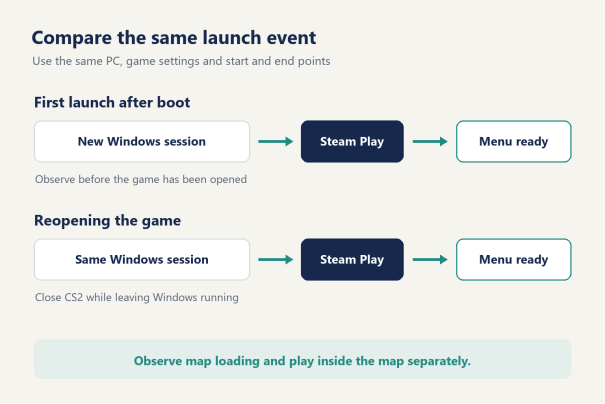
You don't need the final hardware to find out how your floor will feel. Take a spare desktop with an NVMe slot and as much memory as you can find, download the free trial, give it separate drives for Windows, the image and the games, and point three to five stations at it. Time for a cold boot. Load a map in whatever your regulars play most, then do it again with all five stations launching together. Write the numbers down. A stopwatch and a notebook beat a synthetic benchmark here, because what you're measuring is what a player at station 22 experiences when the whole row clicks Play.
Those numbers, plus the table above, tell you what the production diskless server needs. The setup wiki walks through DHCP, disk configuration and building the first image, and it's also where the current build sheets for each room size live.