

An owner in Columbus signed the lease on his second space in March. Twenty-eight seats, good corner, three miles from the room he already had. The equipment quote took him an afternoon. The staffing question took him four months, because the one person who could rebuild a station worked at the first address and could not be in two buildings on a Friday night, which is a scheduling fact that no amount of equipment budget fixes.
That is the wall most gaming centers hit on room number two. It looks like a hardware problem and it is a people problem.
Cloud-based boot moves that wall, and not mainly by making the machines cheaper, although it does that too. It moves it by changing what a station is. When nothing on the floor has a drive in it, a seat stops being an individual machine that somebody has to know personally and turns into a line of configuration that anyone with the login can change from a browser.
Same hardware. Different job description.
The part of cloud-based boot that actually moves
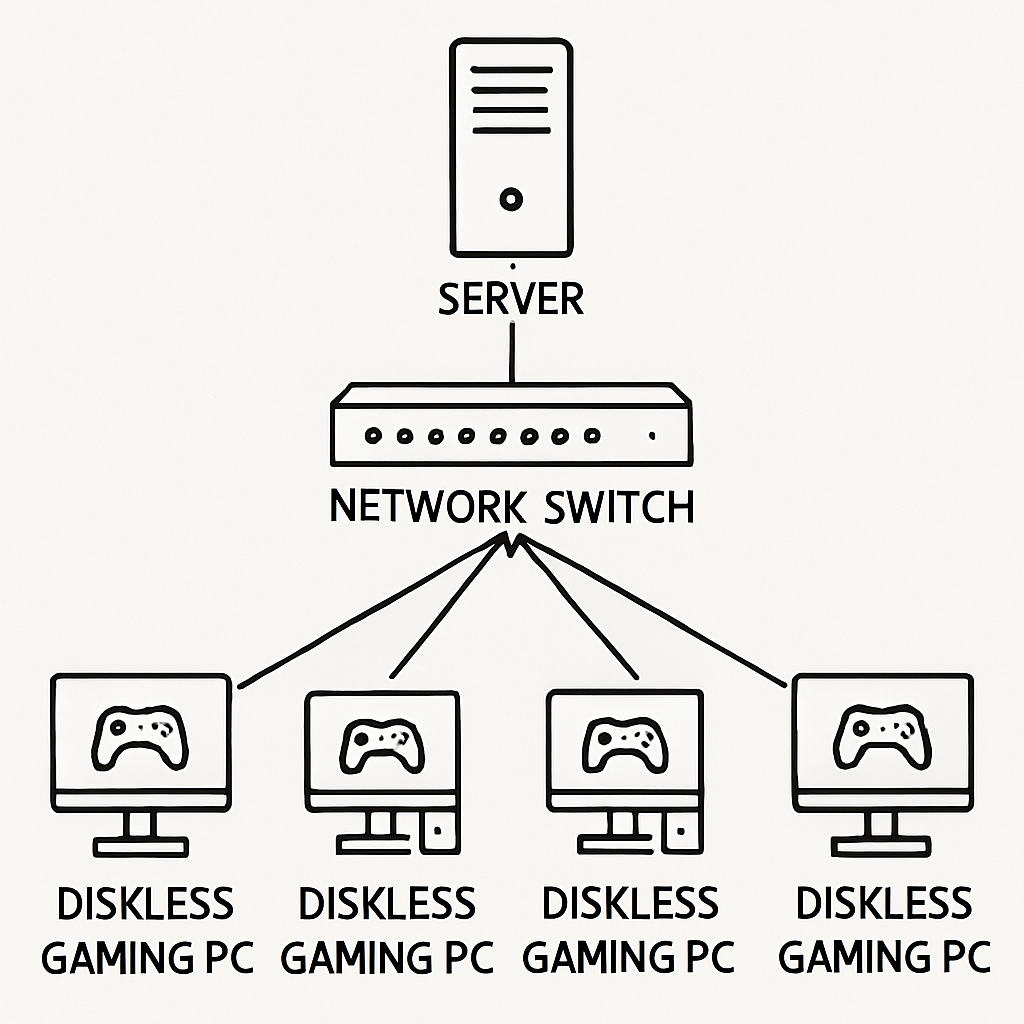
Down to the mechanics for a second. A station with no drive powers on, its network card asks the LAN who is in charge, your server answers with a small boot file, and a few seconds later Windows is coming up off a virtual disk that physically lives on the server's NVMe. Drive letter, free space, everything where Windows expects to find it. A cable is doing the job a SATA port used to do.
None of that traffic leaves the building. What goes out over your internet connection is the light half: the license and its PC count, the server configuration, a status page you can pull up on your phone from the parking lot. Kilobytes, not gigabytes.
CCBoot comes in two shapes and the difference sits exactly on that line. CCBootCloud keeps the license and the account layer up in the cloud, which is the version you want if you check on the place from home or run more than one address. CCBoot Classic keeps all of it on the box in the back room. Underneath either one, the diskless boot system doing the heavy lifting is the same thing, moving disk blocks across your own switch, and it is already running in more than 30,000 venues.
The mechanics are the boring part. What the arrangement does to your week is the interesting part.
Diagram of one master boot image serving two venues over their own local networks
A station stops being a machine
This shift takes a while to sink in, and it is the whole point.
On a floor with local drives, station 14 is a thing in the world. Its own Windows install, its own six months of accumulated junk, its own version of the Valorant client that may or may not match station 15 after somebody clicked something at 11pm on a Saturday. You maintain it one at a time because it is one of a kind. Forty of those, each drifting away from the others at its own speed, is the reason patch night runs past two in the morning and the reason nobody wants to be the person holding the keys.
Under cloud-based boot, station 14 is a name, a MAC address, and a pointer to an image. That is the entire identity.
So you can change what a seat is without touching the seat. Say a 16-team bracket is booked for Saturday afternoon and the publisher drops a patch Thursday night. Make a restore point on the image before the event, run the floor off that for the weekend, merge it back on Sunday, and every machine in the bracket is on the same build from the first match to the last. Nobody is crouched under a desk comparing version strings while eight players wait and a parent films it.
The same trick covers the daytime bookings that pay rent between peaks. A high school esports club at 4pm wants a locked build with the tournament titles and nothing else on it. A summer coding camp two weeks later wants a completely different set of software, and the club still wants theirs untouched. Both are images sitting on the same server, assigned per station, applied on the next reboot. A room on cloud-based boot can be three different products in a week without anybody carrying a USB stick down the row.
Mixed hardware stops being a filing problem too. No one buys forty machines on a single purchase order, so by year three you are looking at three GPU generations and two motherboard revisions on the same floor (which is normal, not a sign you did anything wrong). The plug-and-play handling in CCBoot lets those boot from one master image instead of making you keep a separate image per purchase batch, and that is the thing that quietly decides how a venue ages.
And every restart wipes the slate. Whatever a customer installed, whatever came down with a "free" skin changer, whatever an hour of curiosity did to the registry, all of it lands in a temporary write-back file that is discarded at power-off. Anything you genuinely want kept, member profiles and saved configs, goes on a personal disk that survives on purpose.
Rows of gaming stations in a US esports lounge on a weekend evening
Opening the second room
Go back to Columbus.
What he shipped to the new address was twenty-eight barebones machines with no drives in them, one server, a switch, and a UPS. The image travelled as a file. Everything the first room had learned about drivers, anti-cheat, game installs and desktop layout arrived with it, which meant day one at the second address looked like day four hundred at the first one instead of looking like starting over from a Windows ISO.
That is the part the hardware savings conversation usually skips. The expensive thing about a second location in the United States is not the PCs. It is the second person who knows how to fix them, at American wages, on a Friday night, and cloud-based boot is how one technical person ends up covering two buildings without living in a car.
His weekend attendant at the new room does not have the server password and has no reason to want it. What she can see is that station 7 has been offline since Thursday, which is a fact he can act on from his kitchen table before he decides whether it is worth driving over. Managing machines from one place is most of the difference between a small chain and two shops that happen to share a logo.
This model scales a lot further than most owners picture while they are staring at their second lease. Selçuk Dere, who runs venues in Turkey, put it on the CCBoot site plainly enough: "I have 1619 PCs and 67 Cybercafes that use CCBoot, I had no problem at all." Sixty-seven rooms run that way.
The first week at the new address mostly ran on a phone. He watched the Saturday opening from the old room, saw twenty-six of twenty-eight stations come up and two sit there doing nothing, and worked out from the pattern that both dead ones hung off the same block of switch ports. A twelve dollar patch cable fixed it. Nobody drove anywhere, and nobody closed the station for the night. That is a small story on its own, but it is the shape of most weeks once a cloud-based boot is running two rooms, because the problems that used to need a person standing in front of a machine turn into something you can read off a screen from anywhere. The venue that grows is usually the one whose owner stopped being the bottleneck.
Billing, member time and a shared game license pool sit one layer above all of this, and that is iCafeCloud's department rather than the boot layer's.
So what happens on Tuesday a machine dies?
A power supply dies at 6:40 on a Tuesday evening with twelve people in the room. On a floor with local drives that is a repair job: pull the drive, hope it survived the event, find the machine, rebuild whatever did not come back.
A dead station on cloud-based boot is a swap. Roll the spare out of the closet, plug in power and the network cable, press the button.
The detail that makes it a two-minute job instead of a twenty-minute one is preparation you do on a slow afternoon, long before you need it. Register the spare's NIC MAC address on the server ahead of time and give it the station name it is going to inherit. Then when it goes under desk 9 it comes up as desk 9, with desk 9's image and desk 9's settings, and the customer who was mid-match sits back down at the same seat number looking at the same screen. Do that once for every spare you own and you never think about it again.
There is a quieter version of the same benefit that shows up far more often. A station acting strange gets a restart instead of a diagnosis. Ninety seconds later it is on a clean image and you are back to whatever you were actually doing. In practice that is where the hours go on a normal week, not on dramatic failures but on the dozen small ones a busy floor produces between Friday and Sunday.
What to put the money into
Money goes into memory first. That is the one call to get right, ahead of the CPU, ahead of clock speed, ahead of most of what a vendor wants to talk about on a spec sheet. When the attendant walks the row at opening and forty machines ask for the same Windows boot blocks inside the same ninety seconds, the first one reads from the NVMe and the rest come out of RAM that is already holding those exact blocks. Cache hit rate is what a cloud-based boot floor feels as "fast", and RAM is what buys cache hit rate.
For a 40 to 60 seat room that means going as high on server memory as the board will take before you spend anywhere else (vendors love steering this conversation toward clock speed, and clock speed is not where the room's feel comes from). CCBoot uses physical memory and SSD cache together, so the drive behind the RAM matters as well. Something rated for sustained writes, a Samsung PM9A3 or similar, is the right shape of part for the image and write-back area, because write-back traffic from a full floor never really stops.
Then the path between the server and the seats. Gigabit to every station, a 10-gigabit uplink out of the server, and a switch that stays composed when the whole room powers on at once. An Intel X550-T2 in the server with something like a TP-Link TL-SG3428 in the rack covers a room this size comfortably. Multiple NICs in one server can share the load, and past a certain seat count you can spread the floor across more than one server, which is also how venues build a hot spare into the design instead of bolting one on later.
If your front desk and back office already live on a Windows domain, domain login works the way you expect, with each user's data landing on the personal disk.
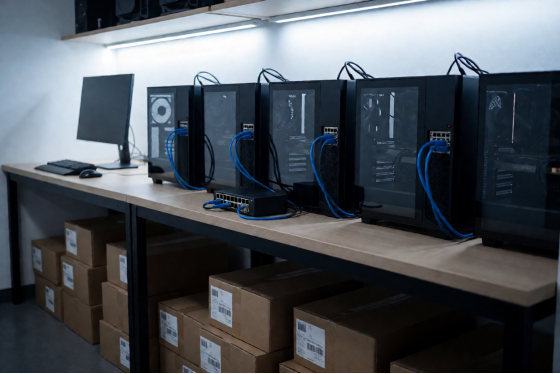
A single rack server and switch in the back room of a gaming center
What a seat costs per month on cloud-based boot
Licensing is per client PC and the numbers are published, so the arithmetic is short.
Plan | Monthly billing | Annual billing |
CCBootCloud | USD 2.50 /PC/month | USD 2.00 /PC/month |
CCBoot Classic | USD 2.50 /PC/month | USD 2.00 /PC/month |
CCBootCloud + iCafeCloud | USD 4.00 /PC/month | USD 3.20 /PC/month |
The Columbus room, twenty-eight seats on annual billing, comes to 56 dollars a month. A 44-seat lounge is 88. Sixty seats is 120 dollars, which is less than one Friday evening on one station at the 5 to 12 dollars an hour a US venue charges. You can check the per-PC pricing against your own seat count, and paying annually works out to a 20 percent discount over monthly.
Set against that, the drives you stop buying. A 1TB SSD per seat has been running somewhere around 55 to 70 dollars at retail lately, so twenty-eight seats is roughly 1,700 dollars that stays in the budget and goes into GPUs instead. Component prices move constantly, so take those drive figures as a reference point rather than a quote and price your own basket before you put a number in front of a partner. The license side of cloud-based boot is the part you can plan around, because it is published and it is per seat.
Two more lines usually get left out of the comparison, and honestly they add up faster than the drives do. One is the time an attendant spends imaging a replacement machine, which stops existing when the image lives on the server. The other is what a drive failure costs you in an evening, counted in the seat that was empty and the customer who went somewhere else.
The line nobody puts in a spreadsheet is Sunday nights. Valorant, League of Legends, CS2, Fortnite and Overwatch 2 do not politely take turns with their patch weeks, and one person with one image handles a month of that without a second technician on payroll.
Prove it on one row first
Take six machines out of your floor, ideally the six nobody sits on on a Wednesday afternoon, and point them at a spare box with as much RAM as you can find in the building. Build one image on a master, boot all six at the same instant, and watch two numbers: how long the last of the six takes to reach a usable desktop, and what the cache hit rate does while they get there. That is the test that predicts how a cloud-based boot will behave in your room, because one machine booting on its own tells you nothing about what happens at four in the afternoon.
If those six behave, the other thirty-four will.
Download it and point one row at a spare server, give it an evening, and then run the same Saturday you always run. What cloud-based boot changes is mostly measured in the things you did not have to do.