

Thirty-six stations, one weekend, doors open Monday at noon. That is the shape of a cloud diskless boot rollout that goes well, and the thing that decides whether it goes well is almost never the software. It is the order you do things in. Get the sequence right and one person finishes Sunday evening with time to spare. Get it wrong and you spend Saturday night putting drives back into machines you had already closed up.
Olcay Taylan at TAY-NET Cafe in Turkey went through this at almost exactly this scale: "I checked my hard disk and 20 out of 35 harddisks had bad sectors and other issues. I had two ways to fix this, buy 20 new harddisks or use a diskless server. And I chose the latter."
Nothing below needs a second pair of hands or a closed Monday.
What to have on the shelf before Friday
The server is the only part worth agonizing over, and the agonizing should be about memory rather than clock speed. Cache is what the floor feels. For 36 stations, 128GB is a comfortable starting point, and it is the line item to protect when something has to give.
Storage splits into two jobs. The master image lives on NVMe, something in the Samsung PM9A3 class, and the write-back cache gets its own SSD because every station will be writing its temporary changes there all evening.
The rest of the list is short:
- A 10-gigabit card such as an Intel X550-T2, or dual gigabit NICs if the budget says so, feeding a managed switch rather than the unmanaged box that came with the router.
- One clean PC to build the image on. It does not have to match the floor exactly, since the diskless boot system doing the work here handles hardware variation on first boot, but closer is easier.
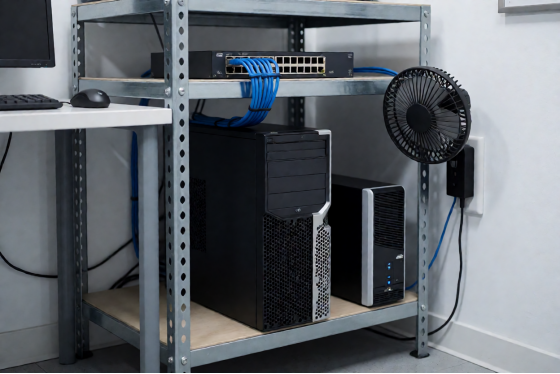
- A UPS for the server. The stations can lose power all day without consequence now, and the server cannot.
- A marker and a cardboard box for the drives you pull out, labeled by station number. Six months from now somebody will ask where they went.
Also grab the NIC driver for your floor machines and put it on a USB stick before Friday. You will want it during image build, not after, and hunting for it at 11pm on a laptop tethered to your phone is a bad hour.
Two things people forget until they need them. The first is a short list of every hardware variation on the floor, written down: how many machines have which GPU, which ones came from the batch with the different motherboard, which two have the odd network card. A cloud diskless boot image handles those variations on its own, but knowing the shape of your room turns a confusing symptom into an obvious one. The second is the admin password for the switch (nobody has logged into it since installation day, and it is never written on the label the way you remember it being).
Friday night: build the master image
This is the long stretch of the weekend and the only part that genuinely takes an evening. Everything a cloud diskless boot floor runs on gets decided here, so it is worth the hours. Budget four and you will probably use three.
Install Windows on the master, not on the room
Take the clean PC, install Windows on its local drive, and treat that machine as the only computer in the building that matters tonight. Drivers first, all of them, including the network card for the floor hardware even if the master itself uses a different one. Windows updates next, run to completion, because doing them later means doing them on the image with everyone watching.
Then the housekeeping nobody enjoys. Power settings so the stations never sleep. Auto-login for the session account. Whatever wallpaper and shortcuts your floor uses. Turn off the notification that asks customers to finish setting up their PC.
Games, drivers, and the order they go in
Games go on after Windows is fully settled, not alongside it. Valorant, CS2, League of Legends, Fortnite, whatever your five regulars are, installed and launched once each so the first-run files land inside the image instead of downloading on every station later.
Anti-cheat is the step with an actual order to it. Install it after the games, with Game Fix and Super Client turned on, and let it register once inside that state. Do that and it holds across reboots for the life of the image.
When everything is in, upload the image to the server and stop touching the master. From here it is a build machine and nothing else. Any change to the floor happens on it, deliberately, followed by a merge, which is a different thing from someone installing Discord on it Tuesday afternoon because it was the closest keyboard.
The upload itself is dead time, so use it. Decide now whether any station needs a personal disk, which is the piece of storage that survives a reboot instead of being wiped with everything else. Staff machines and the two behind the counter usually want one. Tournament stations usually do not, because the whole appeal of the thing is that a player leaves and the seat resets itself to Friday's state.
Write down what went into the image while it is still fresh. Game versions, driver versions, the date. In three months, when you are deciding whether a problem is new, that note is worth more than your memory of a Friday night.
Technician building a master image on a bench PC with the side panel off
Where does the cloud part of cloud diskless boot fit?
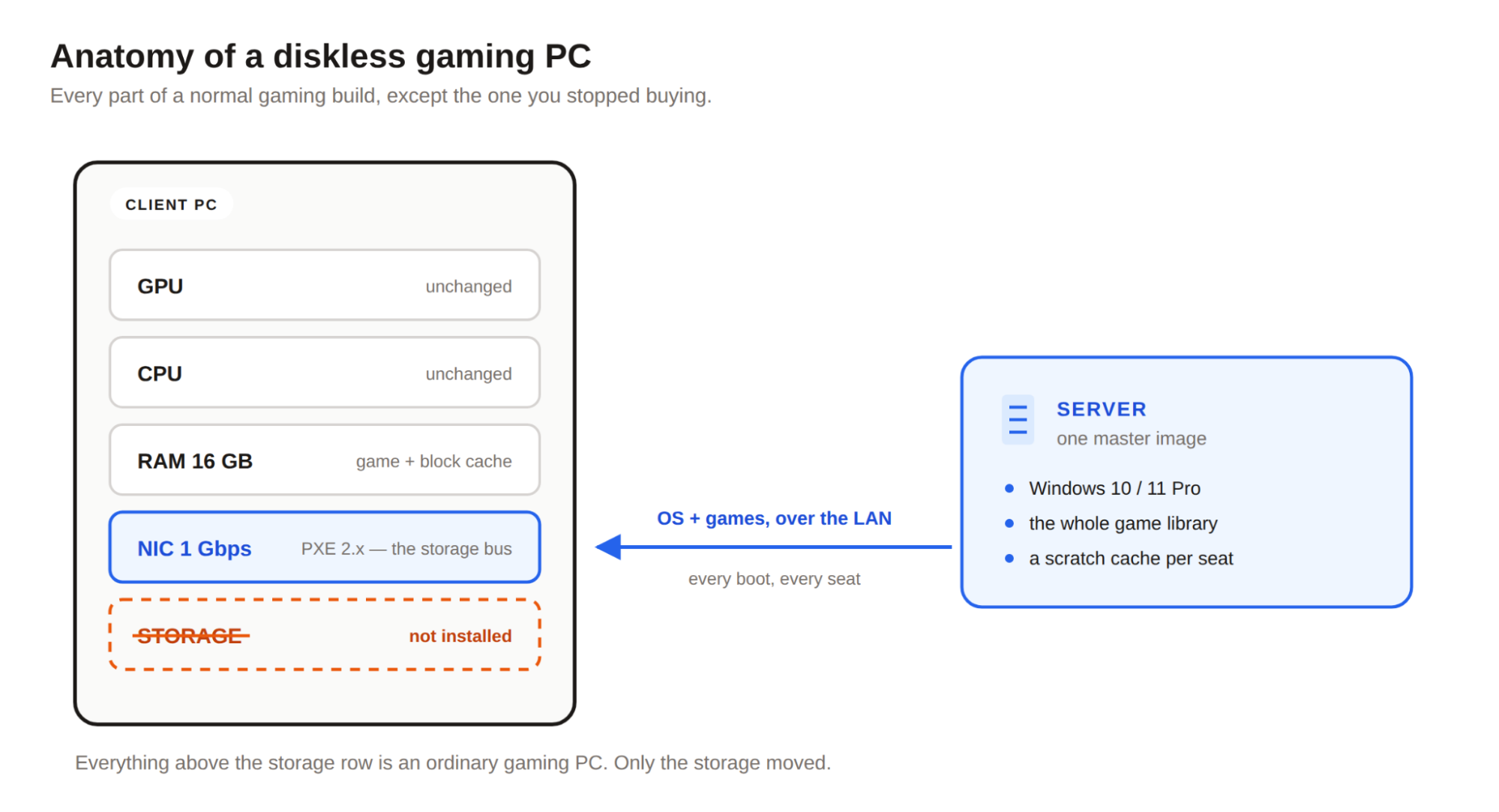
Not in the boot path. That is worth saying plainly, because people assume the setup pulls something down from the internet every time a station powers on, and it does not. The image sits on the NVMe in your back room and the disk traffic never leaves your switch.
What lives in the cloud is the account side. Your license and its PC count, the server configuration, and a page showing every station's state that you can open on your phone. Set the PC count to 36 tonight and it is done.
In practice the useful moment comes Sunday, when you are on the floor with a screwdriver and you can see stations reporting in without walking back to the server every ten minutes.
It keeps paying afterwards in smaller ways. A weekend attendant can look at the same page and tell you station 7 has been offline since Thursday without needing the server password, and if you open a second address next year the two rooms show up side by side instead of as two phone calls. CCBoot ships this as CCBootCloud, and the same company has been doing the underlying diskless boot for more than 30,000 venues, so the part of the weekend that scares people is the part with the most road behind it.
Saturday morning: point one row at the server
Pick a row of six at the back of the room. Not the good seats by the window, and not one machine on its own, because a single station tells you almost nothing about your switch and a row tells you most of what you need to know.
Go into BIOS on the first station and do three things. Enable network boot. Move the NIC to the top of the boot order. Check whether the machine is running UEFI or legacy, and make sure that matches what the image was built as.
Now the part worth doing in this order: boot the machine over the network with its drive still installed. If something is wrong with the boot order or the DHCP handoff, you find out while the local Windows is still sitting there as a fallback, and you can put the machine back into service in thirty seconds. Once you have watched it reach the desktop from the server, power down and pull the drive.
First boot on each new station runs plug-and-play against the image, so a row assembled from three different purchase years still comes up on the same master. Give the first one a couple of extra minutes and do not interrupt it.
Then do the other five, and when all six are done, shut them all off and power them on together. Six machines asking for the same blocks in the same fifteen seconds is a small version of Monday at noon, and it is the first real measurement you get. If you want the protocol-level detail of what those machines are actually saying to each other, the walkthrough of the PXE handoff for gaming centers covers the DHCP and iSCSI side properly.
Five-step chain of a cloud diskless boot from power-on to Windows loading
The traps that eat an evening
Nearly every cloud diskless boot rollout that stalls on the first weekend stalls on one of five things, and none of them is exotic.
Turn DHCP off on the router before anything else. Everyone arrives here eventually. Arriving first saves a Saturday.
Keep UEFI consistent. If the image was built in UEFI mode, every station boots UEFI, and a machine set to legacy will sit there doing nothing informative. Check it per station during the row test rather than discovering it on machine 29.
The NIC driver has to be inside the image, not on the master's local disk. This catches people who build on a machine with an Intel card and roll out to a floor with Realtek.
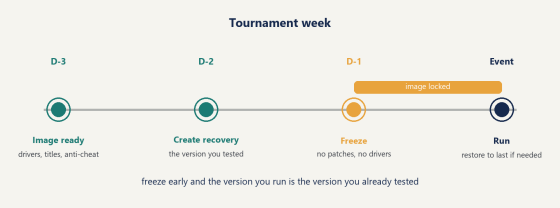
Patch nights follow one sequence, and it is worth taping to the wall: install on the master, shut the master down cleanly, merge the recovery point, then reboot the floor. Backwards, and half the room comes up on yesterday's image while the other half is on today's, which shows up as two machines that cannot sit in the same lobby and look identical from the outside.
One more that costs an hour if you miss it: launchers left on auto-update inside the image. Steam, Epic, Riot's client, all of them will happily start updating themselves on 36 stations at once the first evening, which looks exactly like a network problem and is not one. Set them to manual on the master before you upload, and patch them the same way you patch everything else.
Create a recovery point before any large update and merge it once the floor has run a night on it. That gives you a one-click way back to Friday's known-good state, which is the thing that makes a Tuesday driver update a normal event instead of an evening. The wiki has the UEFI boot page and the cache settings if you want the exact screens.
Sunday: move the rest of the floor
Rows, not machines. Do six, power them up together, watch them land, then move on. Moving a floor to cloud diskless boot is repetitive by Sunday, which is the sign it is going correctly.
The stations by the door are the ones customers ask for by number, so leave them until you have three rows behind you and the routine is boring. Realistically the second row takes half as long as the first and the fifth takes about eight minutes, most of which is cable management and the screws.
Keep the pulled drives in that labeled box. Some venues put two of them back into staff machines for the office side, and the rest are perfectly good spares for anything else in the building.
So the last hour is the one worth spending on something other than screws. Build a second image while the floor is quiet, cloned from the first, with whatever a tournament booking needs on it. Wednesday night, when a team rents the back twelve stations and wants a specific set of titles, you point those twelve at the second image and reboot them. One reboot, not an evening of installs, and Thursday morning they come back to the house build the same way.
By mid-afternoon you should be looking at a floor where the only spinning parts are in one box in the back room, and where installing something on all 36 stations means installing it once.
How to tell the cloud diskless boot rollout worked
Three numbers, and none of them is "it feels fast."
The first is the cold-start burst. Shut the whole floor down, then power all 36 stations inside a minute the way a Monday opening actually happens, and time how long until the last desktop is up. That burst is the hardest the system ever works, and it is the number to write down, because you will want to compare against it after the next expansion.
The second is the cache hit rate on the server. Once the floor has run a full evening, most reads should be coming out of memory rather than off the NVMe, which is exactly why the room feels the way it does. The third is a stopwatch on a map load, run against the same game on a machine with a local SSD, so you have your own comparison instead of somebody's benchmark. Take all three on the first Friday, not on the quiet Sunday you finished, because a room with thirty-six people in it is the only honest test of anything you built this weekend.
Then leave the stations alone for a week and watch what does not happen. No reimaging, no walking over with a USB stick, no machine quietly falling behind the others on a patch, because every one of them came up this morning from the same file (which is, in the end, the entire trick).
Watch the server NIC graph at 5pm the following Friday too. Flat and unbothered with a full room means you have headroom for another row, and that is the point at which you size the next license against per-PC pricing for the seats you actually run.
To be fair, most rollouts produce one machine that misbehaves on the first pass. It is nearly always the boot order or a UEFI mismatch on that one box, it takes four minutes in BIOS, and it does not come back.
A row of gaming stations with empty drive bays after the rollout
Monday at noon, the doors open and nobody notices anything except that station 14 no longer takes ninety seconds to get to the desktop. That is the whole point of a cloud diskless boot weekend. The change your customers see is nothing, and the change you see arrives on the next patch night, when a 90GB update is one download and a reboot instead of a lap of the room with a checklist. Download it and build the image on one spare box before you commit a weekend to it, so the only unknown left by Friday is how fast your switch is.