
It's Tuesday night. Valorant just shipped a patch, your venue opens at noon tomorrow, and forty stations need the update with the anti-cheat intact on every one of them. The person responsible for all of it is whoever opens the shift. That scene is esports PC management in miniature, and how long it takes is decided by a single architecture choice: whether your rigs run forty separate copies of Windows, or one.
Most owners meet this problem the hard way first, walking the rows at midnight watching progress bars. This is the playbook for the easy way.
Rows of identical gaming stations in a US esports lounge
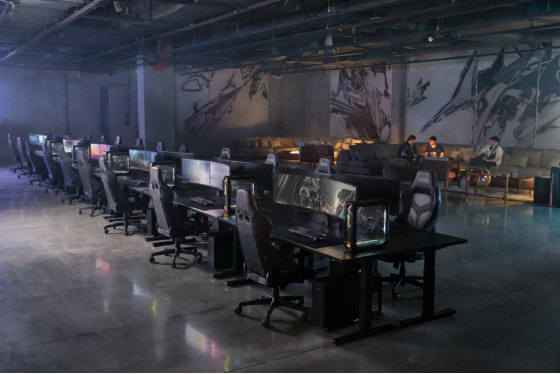
Esports PC management has one enemy: drift
Forty machines leave the build bench identical. Ninety days later, no two are the same.
One station has a GPU driver, a well-meaning customer updated mid-session. Another kept a launcher logged into somebody's account. A third has an overlay that hooks the anti-cheat in a way nobody will diagnose until a tournament weekend, at the worst possible moment. None of these are failures exactly. They're drift, the slow divergence of machines that were supposed to stay the same, and drift is what actually eats a venue's labor budget. "Station 23 stutters" is a support ticket with no reproduction steps and forty possible causes.
Drift is also expensive in a specifically American way. US venues run lean crews, often one person on a weekday shift, and that person's hours are the priciest line in the budget after rent. Every hour spent diagnosing station 23 is an hour not spent selling memberships or running the Discord, and unlike a GPU purchase, that cost repeats every single week. Industry startup guides put a 40-station build in the low-to-mid six figures, and owners routinely report that the surprise wasn't the build cost, it was the upkeep hours.
The usual response is discipline. Checklists, a reimaging calendar, a wipe rotation. Discipline loses to a busy Friday.
The venues that stay identical don't try harder than everyone else. They change the architecture so drift has nowhere to live. That's the whole job of esports PC management, properly understood: not fixing machines faster, but removing a machine's ability to become different in the first place.
One image, forty machines
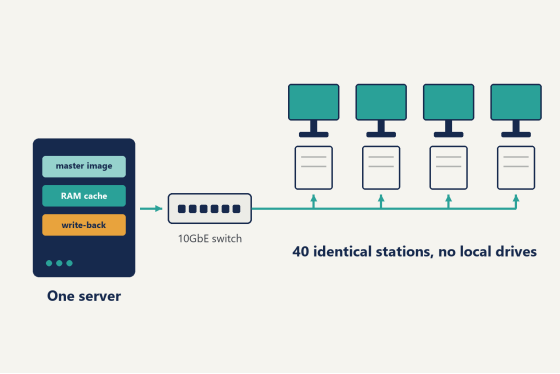
The mechanism is diskless boot. Stations keep their GPUs, their RAM and their monitors, but they carry no local Windows installation at all. Each one boots over the LAN from a single system image held on a server in the back room. Forty seats, one operating system, one copy of every game.
Watching it work for the first time is oddly convincing. A station powers on, asks the network where its operating system lives, and pulls Windows from the server the way a browser pulls a page. Thirty seconds later it's at the login screen, indistinguishable from a machine with a local drive, except that this particular Windows is the same Windows every other seat is running, byte for byte, because it literally is the same image.
CCBoot is the diskless boot system built around that model, in use at more than 30,000 customer sites. The day-to-day workflow runs through one designated master PC: make a change there, and every other station picks it up on its next reboot. Install a new title once. Adjust a Windows setting once. The rest of the floor synchronizes itself while you do something better with your evening.
Mixed hardware doesn't break the model. The PnP function lets a single image serve client PCs with different specifications, which matters for venues that grew in waves: the front row you bought this year and the older row from your opening month boot from the same image without separate maintenance tracks. In practice this is the feature that saves multi-generation floors from becoming three small venues in a trench coat.
One setup tip that earns its place in any guide: turn off the DHCP server on your router before you configure anything. The boot process needs the CCBoot server answering those requests, everyone collides with this step eventually, and colliding with it on purpose saves an evening of head-scratching.
Diagram of esports PC management with one image booting many stations
What does patch day look like?
Short version: it looks like one download.
Valorant, CS2, League of Legends and Fortnite all patch on their own schedules, which in a forty-copy world means forty downloads, forty chances for one machine to stall at 84%, and a staff member playing progress-bar roulette before open. In the single-image world, the master PC updates once, you reboot the floor, and every station is patched and byte-identical before the first customer badges in. The bandwidth saving is nice. The real win is that nobody touches forty keyboards.
Anti-cheat deserves its own paragraph, because it's the part esports floors worry about most. The working rule: do anti-cheat installs with Super Client enabled, following the Game Fix plus Super Client two-step in the docs. Configured that way once, the anti-cheat survives reboots and patches long-term, and your Valorant rows stop being a source of morning surprises. There's a longer discussion of why diskless suits esports floors elsewhere on this blog if you want the full argument.
Patch timing becomes a calendar habit rather than a scramble: master updates in the evening, floor reboots at close or before open. Ten minutes. Honestly, the strangest part after switching is the silence where the maintenance window used to be.
The habit scales to the ugly weeks too. A season launch that drops a massive client update, a new title the community suddenly demands, a driver release that fixes stutter in one game: each is still exactly one change on one machine. The floor doesn't know the difference between a routine Tuesday and a chaotic one (your reboot ceremony is identical either way), and that predictability is worth more to a schedule than any single saved hour.
Between customers, between events
A reboot returns a station to the clean image. Whatever the last customer installed, logged into or misconfigured is gone, and the next customer sits down at the machine you originally built. Viruses and spyware go the same way, wiped with the rest of the session's residue. For a venue turning seats over every hour at the usual US rates of three to eight dollars, that's housekeeping running at the speed of a restart, on every seat, all day, without a policy document or a staff reminder in sight.
It also quietly solves the privacy conversation. Customers log into Steam, Riot and Discord accounts all day, and the honest answer to "does the next person see my stuff" becomes a clean no, because the state their session lived in stops existing at reboot.
Events are the same trick at a larger size. A tournament weekend usually wants a different loadout than open play, and restore points make the switch procedural: create a recovery point before you experiment, merge to last when the new build proves out, restore to last when something misbehaves. Rolling a whole floor to a known-good state stops being a weekend project.
Some data should survive the wipe, and that's what the personal disk is for. Coach VOD libraries, league configs, a staff account's working files: park them on personal disks and they persist across reboots while everything else resets.
Operators who run this daily tend to describe the change less in features and more in what stopped happening to their week. "As a gaming centre, system-wide updates became way smoother, and sharing software between multiple PCs was no longer an issue. It also eliminated any possibility of malware," says Said Werina of Gameffect in Sweden. "I would recommend it to anyone needing a diskless solution like this for their gaming centre."
The hardware that keeps up
The server room earns more of your attention than any single station, and the priorities are specific.
RAM first. CCBoot serves the image out of physical memory plus SSD cache, and cache hit rate is what the floor actually feels when twenty stations load the same map at once. For a paid floor, put the budget into server memory before you touch the server's CPU column on the spec sheet. The processor mostly watches.
Then the network path. Gigabit to every seat is the baseline, and the server side wants more lanes than one: CCBoot supports multi-NIC load balancing on a single server as well as load balancing across multiple servers, and paid venues should treat a balanced pair with a standby as the standard grown-up configuration. It's the same logic as owning a spare mouse, scaled up (nobody plans around a Friday without one).
Storage on the server follows the cache logic. Fast NVMe drives under the SSD cache layer keep the image serving briskly once memory is doing the bulk of the work, and this is a place where US venues have an easy time, since the parts are a normal online order away rather than an import project. Spec the server once, generously, and the stations themselves stop needing storage decisions at all.
Two more capabilities matter to specific venues. VLAN and dual-LAN support means the gaming floor can share a building with the office network without the two seeing each other, which landlords and co-located businesses appreciate. And Windows domain support matters to the college esports programs adopting the same architecture: students log in with domain accounts and keep personal data on personal disks while the lab machines stay identical underneath.
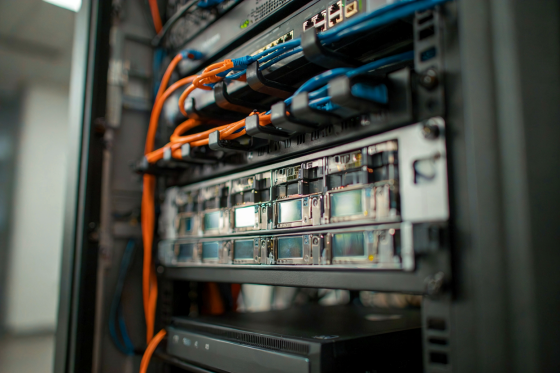
Server rack powering a diskless gaming floor
The line item next to your labor bill
Against the numbers above, the esports PC management budget itself fits on one line.
CCBoot is billed per client PC, in USD.
Plan | Monthly | Annual (20% off) |
CCBootCloud | USD 2.50 / PC / month | USD 2.00 / PC / month |
CCBootCloud + | USD 4.00 / PC / month | USD 3.20 / PC / month |
A 40-station floor on the annual plan runs USD 80 a month. Set that against what US venues actually spend on the problem it replaces: at typical hourly wages, a single staffed evening of walking rows and reimaging machines costs more than the month of software. The current numbers live on the per-PC pricing page. The bundle row adds iCafeCloud, the billing and membership layer, so the machines and the money can be managed from the same pair of products, and at US hourly rates of three to eight dollars a seat, the arithmetic on both lines stays comfortable.
Three questions every new floor asks
Once the model clicks, the esports PC management questions get practical in a hurry. These three come up in nearly every first conversation, so here are the short answers up front.
How many licenses do I need?
One per client PC. The server itself doesn't count against the license, so a 40-station floor buys a 40-PC license, and you can adjust the count later through the renew flow when the floor grows (most floors grow).
Can one license cover two servers?
Each license key pairs with a single server. Moving to new server hardware is routine: ask support to reset the license, then activate it on the replacement machine, and the floor boots from the new box the same afternoon.
Do I have to figure the first install out alone?
No, and you shouldn't. The wikis walk the whole path in order, and the live chat team will remotely configure the server with you, which is the fastest route for a first-timer. There are also local value-added resellers in many regions if you'd rather have someone in your time zone on the phone.
Try it on one spare machine tonight
The sensible path is the small one. Take one spare machine, point it at a test server, and see the boot happen before you commit the floor to anything. An evening is enough to know, and the spare machine approach means your paying floor never notices the experiment happened at all. Prove the boot, prove one game launch, prove the reboot wipe, and scale from there with the nervousness already spent.
Download the free trial and walk through the setup wikis, which cover the DHCP handoff, image creation and the cache settings in order. If you'd rather not do the first server alone, the live chat team remotely configures servers with you, which turns the first install from a research project into an appointment.
Then picture the same Tuesday from the top of this article. The patch ships. The master PC downloads it once while you close out the till. The floor reboots in one pass, forty stations come up identical, and the doors open at noon with nobody having touched a single row. That's what esports PC management looks like when the fleet runs on one image: less a nightly battle, more a switch you flipped once, months ago, that's been quietly winning ever since.