
Most comparisons of PXE boot server software make one quiet mistake: they line up tools that were never competing in the first place. Search the term and you'll get WDS tutorials, FOG Project threads, iPXE documentation, and diskless boot vendors all mixed together on the same page, as if they were four brands of the same thing. They're not. Two of those copy Windows onto a local drive once and then step aside. The others boot your PCs from the network every single morning, for years.
Pick from the wrong category and the brand you pick barely matters.
So before weighing features or prices, sort the field into its two real categories. That one decision does most of the choosing for you.
Two jobs that get called the same name
PXE itself is a small thing. A client PC powers on, its network card asks the DHCP server for an address, the DHCP reply includes the name of a boot file, and the client pulls that file over TFTP and runs it. That handshake takes a couple of seconds, and if you want the packet-level detail there's a separate walkthrough of how a PXE boot server actually hands off control.
Everything interesting happens after the handoff, and that's where the category split lives.
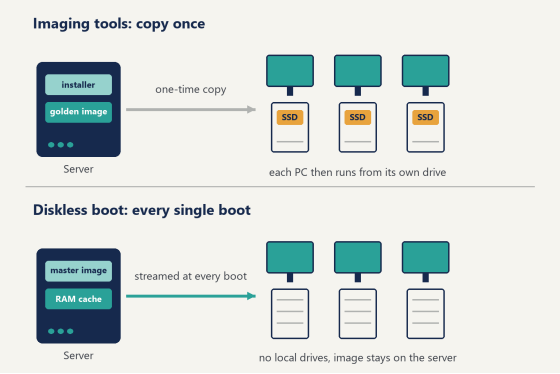
Category one is deployment, sometimes called imaging. The boot file loads an installer or an image-restore environment, a golden image gets written to the client's local drive, the machine reboots, and from then on it runs Windows from its own SSD like any normal PC. The network was a delivery truck. It dropped off the OS and drove away. WDS and FOG Project live here.
Category two is diskless boot. The boot file doesn't install anything. It connects the client to a virtual disk on the server, usually over iSCSI, and Windows runs from that server disk for the entire session. Every seat in the room is reading from one image. There may be no local drive at all. The network isn't a delivery truck here, it's the road the machine drives on all day. This is where CCBoot and other diskless systems live.
A school lab that gets reimaged between semesters wants category one. A gaming center that patches Valorant, CS2, and Fortnite every week wants category two. Same PXE handshake at power-on. Completely different life after it.
Diagram comparing OS imaging deployment with diskless PXE network boot
The roll-your-own route: iPXE, FOG, and a weekend of configs
The open-source path has two well-worn names. iPXE is a bootloader, a very good one, with its own scripting language. It can chainload menus, boot over HTTP instead of TFTP, and attach an iSCSI target. FOG Project is a full Linux-based imaging server: it captures a golden image from a master PC and pushes it out to a room full of machines, with a web interface to manage the queue.
Both are free, and both have real communities behind them. If your idea of a good Saturday is a dnsmasq config file, this route will treat you well.
Just know what you're signing up for. Nothing here assembles itself. You'll be setting up DHCP scope options 66 and 67 by hand, running a TFTP daemon, and reading boot logs when a client hangs on a blinking cursor. And you'll hit the classic wall almost immediately: if your router is already handing out DHCP, its replies will race the PXE server's replies, and clients will get an IP address with no boot file name attached. Turn the router's DHCP off, or configure it to forward the boot options. Everyone arrives at this eventually. Arriving at it on day one saves you an evening.
One more trap that catches mixed rooms. Legacy BIOS machines and UEFI machines ask for different boot files (undionly.kpxe versus ipxe.efi, in iPXE's case), so your DHCP server has to read the client's architecture field and answer accordingly. Miss that and half the floor boots while the other half sits at a black screen, which is a confusing afternoon the first time you see it.
For a hobby lab, a homelab rack, or a school with a Linux-comfortable tech on staff, this route is genuinely fine. It's flexible in ways commercial tools aren't, and the price is right.
Windows Deployment Services: the one already on your server
If you run Windows Server, you already own a PXE deployment tool. WDS is a built-in role. Add it through Server Manager, import a Windows image, and clients can PXE boot into the installer over the network. Pair it with the Microsoft Deployment Toolkit and you get driver injection, unattended installs, and task sequences that join each machine to the domain as it finishes.
This is the standard answer for corporate IT, and inside its lane it's a good one. A 200-desk office that reimages laptops on a three-year cycle, an IT department that wants every new hire's machine built the same way, a university rolling Windows 11 across a building over the summer. That's WDS territory.
Notice the shape of the job, though. WDS hands Windows to the local drive and its work is done. What happens on that drive next week is a separate story, handled by whatever patching and management stack the organization runs. Deployment tools deploy. That's the whole contract.
Which is exactly why a venue that changes daily needs the other category.
Diskless boot software: when PCs run from the network all day
Now the second category, the one built for rooms where the software on the machines changes constantly and downtime is lost revenue.
In a diskless setup, the server holds one Windows image with every game and application installed. Each client boots from it over the LAN. Whatever a user writes during a session goes to a write-back cache, and a reboot throws that cache away, so the machine that boots at 10am is byte-for-byte the machine you built, no matter what got downloaded, installed, or clicked at 9pm the night before. Game patch day stops being a walk down the row. You update the master image once, reboot the floor, and every seat is current.
CCBoot is purpose-built PXE boot server software for this category, and it's been at it long enough to be trusted by over 30,000 customers. A few of its design choices matter more in practice than any spec sheet suggests. Its PnP support means one image serves mixed hardware, so the 2019 GTX seats and this year's RTX seats boot the same master. The server caches hot data in physical RAM with an SSD cache behind it, which is what game load times actually ride on. Multi-NIC and multi-server load balancing are built in for bigger floors, and a personal disk feature gives regulars a place to keep settings and files that survive the nightly wipe. There's also a graphic boot menu with multi-OS support, and the rest of what ships in the box is on the full feature list.
Two pieces of hard-won advice for anyone building the server side. Put your budget into RAM before you touch the CPU, because cache hit rate is the thing the floor can feel. And give the image and the write-back cache separate SSDs, so forty seats writing at once never fight the reads.
The network deserves the same respect. A gigabit port per client is table stakes, but the server's uplink is where floors get starved, so feed the server with a 10GbE card or bond two NICs and let the load balancing spread the morning rush across them. The difference shows up at exactly one moment: 4pm on a Saturday when thirty seats cold-boot within the same ten minutes. Plan for that moment and everything else is easy.
Here's how one gaming centre owner described the switch:
"As a gaming centre, system-wide updates became way smoother, and sharing software between multiple PCs was no longer an issue. It also eliminated any possibility of malware, as our users are utilising our services without interruption, this means a great deal." — Said Werina, Gameffect, Sweden
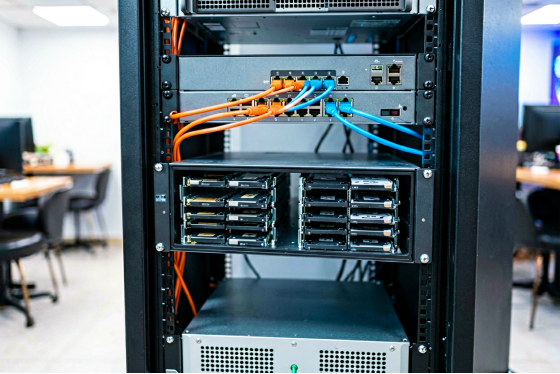
Server and network switch that boot every client PC over the LAN
A side-by-side look at PXE boot server software
The four names above, sorted by what they actually do:
Software | What it does | Where Windows | Best fit |
iPXE (plus your | Open-source | Wherever you | Homelabs, custom |
FOG Project | Captures a golden | Local drive after | School labs, |
WDS + MDT | Microsoft's | Local drive after | Corporate fleets, |
CCBoot | Diskless boot | On the server, | Gaming centers, |
One table, one takeaway: the first three finish their job at deployment. The fourth is the only one still working at closing time.
Which one fits your room?
Match the tool to how often your machines change, not to feature counts.
A computer lab that stays frozen for a semester, then gets rebuilt during break? Imaging is the honest answer. FOG if there's no Windows Server license around, WDS if there is. Run the deployment twice a year and don't think about it in between.
A domain-joined office fleet is WDS and MDT territory too, for the same reason. The build is the event. The months after the build belong to other tools.
A gaming center or LAN center is a different animal. In the US that usually means 20 to 60 seats, heavy GPU builds, and members paying somewhere between $5 and $12 an hour, with party bookings stacked on weekends. The catalog moves constantly. Valorant, League of Legends, CS2, Fortnite, Overwatch 2, and every one of them patches on its own schedule, sometimes the night before your busiest day. Imaging tools have no good answer for that cadence, because redeploying 60 seats for one patch is nobody's Tuesday.
The other American reality is staffing. Most venues run one person on shift, and that person is making drinks, handling memberships, and resetting a tournament bracket at the same time. A 38-seat room where each seat needs 25 minutes of hands-on updating is a math problem with no good solution. One master image and a reboot is the whole fix. It's also why the reboot-restore behavior matters beyond viruses: nobody on shift has time to figure out what the last user did to seat 14.
For that room, diskless isn't a variant of imaging. It's the category doing the actual work.
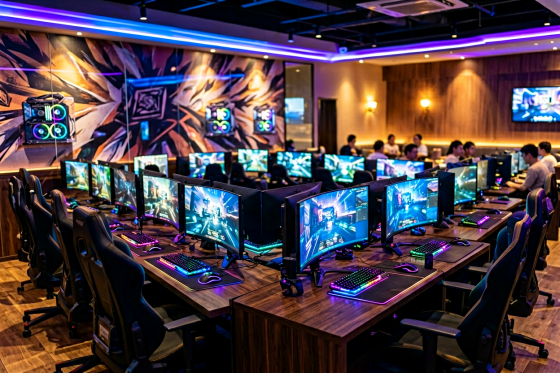
Rows of gaming PCs booting from a PXE boot server in a US gaming center
Questions that come up every time
A few things people ask in their first week of running PXE boot server software, whichever tool they picked.
Does the PXE server replace my router's DHCP? No, and this is the single most common point of confusion. There should be exactly one DHCP authority on the LAN, and it needs to hand out the boot options. Either the PXE software's own DHCP service runs and the router's is switched off, or the router keeps the job and gets configured to pass options 66 and 67 through. Both work. Running both at once is the thing that doesn't.
How big a server does one floor need? Smaller than most people fear. RAM does the heavy lifting, so a mid-sized room is well served by a single machine with generous memory and a pair of SSDs, and larger venues scale out rather than up, adding a second server and letting load balancing split the seats between them. Start from your seat count and the size of your game library, not from a spec sheet written for someone else's room.
What happens to a player's own files if the machine wipes itself every reboot? That's what a personal disk is for. The restore covers the system volume, so the OS and games reset to the master image, while each user's designated storage rides through the reboot untouched. Regulars keep their configs, their sensitivity settings, their recordings. The machine stays disposable. Their stuff doesn't.
Can I move my license to a new server later? Yes. A key maps to one server at a time, and when you upgrade hardware you reset the license and activate it on the new box. Takes a few minutes.
Try it on one machine first
Whatever category you land in, prove it on a single spare PC before touching the floor.
Flip that machine to UEFI network boot, power it on, and watch the screen. You should see it get an IP and name a boot file within a few seconds. If it reports no boot filename received, that's the DHCP conflict from earlier, and fixing it now costs minutes instead of a bad launch night.
For the diskless route, the test is just as small. Download the free trial of CCBoot, install the server on any decent machine with RAM to spare, upload an image from one master PC, and boot one client from it. Time the boot. Launch the heaviest game you carry and time that too. Those two numbers will tell you more than any review. When the numbers convince you, the per-PC pricing runs $2.50 per PC monthly, or $2.00 on annual billing, so a 40-seat room can put real money toward the server hardware that feeds it.
Choosing PXE boot server software gets a lot easier once you stop asking which product is best and start asking which category your room lives in. Machines that get built once want a deployment tool. Machines that change every week want a server that never stops booting them. Decide that first. The rest is a test PC and an afternoon.