
PXE boot software has become a core tool in modern network management. It lets computers boot from a network interface instead of a local drive. That reduces storage needs, cuts manual work, and makes large device fleets easier to manage.
For IT teams, the value is practical. PXE boot software speeds up system setup, keeps machines consistent, and helps with remote support. Tools like CCBoot show how PXE boot server software can support both speed and control in one package.
Introduction to PXE Boot Software
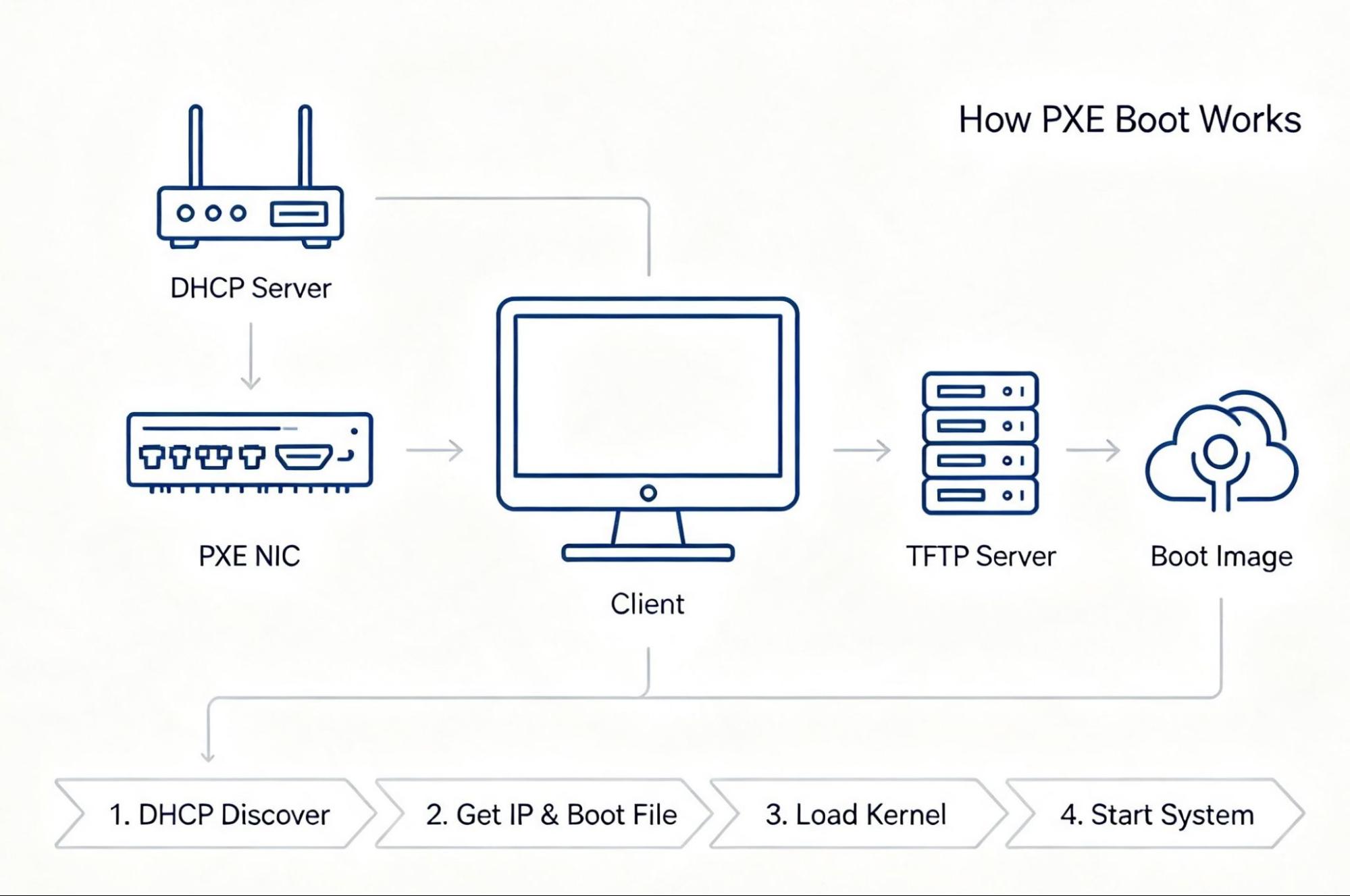
PXE, or Preboot Execution Environment, is a network boot method. A device can start an operating system over the network rather than from a disk. This is a major win for diskless boot and for sites that want less hardware per PC.
That capability is valuable for IT infrastructure. By removing the need for physical storage, PXE makes system management and upkeep easier. It also improves network reliability.
PXE boot software also helps teams keep systems in sync. Updates, images, and recovery steps can all come from one place, which makes it easier to manage many machines without repeating the same task on each one.
Core uses include:
- Diskless booting for lower hardware needs.
- Central updates and maintenance.
- Stable setups across mixed systems.
Why PXE Boot Software Matters
PXE boot software is useful in both small and large networks. It can help remote offices, training labs, and data-heavy IT rooms. It is key for managing far-flung networks and for teams that need fast response times.
A few main reasons stand out:
- Less time spent on manual setup.
- Lower running costs by using existing resources.
- Better control over boot and update tasks.
Key Benefits of PXE Boot Software
PXE boot software improves network work in several ways. It can lower cost, reduce errors, and make daily tasks easier. It is also helpful when teams must support many devices at once.
1. Easy OS Deployment
Deploying operating systems across many devices can be slow. PXE boot software makes this process much easier. IT admins can push OS images fast and avoid the pain of setting up each machine by hand.
This helps in three ways:
- Less manual setup on each device.
- Faster installs and updates.
- Lower need for on-site support.
PXE boot also cuts down on routine work. Once the process is set, systems can be loaded with less effort and fewer delays. That leaves IT staff free to focus on higher-value tasks.
2. Lower Costs
PXE boot software offers strong cost savings. It reduces the need for local storage, install media, and some hardware parts. That means less spending on devices and less time spent on upkeep.
Key cost gains include:
- Lower hardware needs.
- Less use of physical media.
- Lower running costs by using existing resources.
PXE boot is also useful because it works with the network gear a company already has. Instead of adding more tools, teams can make better use of what is in place.
Use benefits include:
- No need for a new network build.
- Smooth fit with current systems.
- Better use of current IT assets.
3. Better Management and Maintenance
PXE boot software makes management and maintenance more direct. IT teams can handle updates, images, and recovery steps from one central point. That helps reduce errors and keeps work moving.
Main gains include:
- Faster system updates.
- Quicker recovery after failures.
- Easier routine maintenance.
Central software updates are especially useful. Admins can update one image and push it to many devices. This central setup keeps updates uniform and on time.
That also reduces security risk and user disruption. Systems stay aligned, and users face fewer surprises during patch work.
4. Scaling and Flexibility
PXE boot software is built for changing needs. As a company grows, its IT plan must grow too. PXE boot can scale with that growth and still stay simple to manage.
Benefits include:
- Support for many operating systems.
- Flexibility to scale up resources as needed.
- Support for both large and small networks.
PXE boot works well in mixed environments too. It can support Windows, Linux, and other system types. That makes it a good fit for teams that run more than one platform.
It also adapts well to change. PXE boot's flexibility fits changing needs, so teams can expand without a full rebuild of their setup.
5. Stronger Security
Network security is a major reason to use PXE boot software. By centralizing the boot flow, teams can set tighter rules and reduce risk. That helps protect both systems and data.
Security gains include:
- Safe control of boot steps.
- Protection from unauthorized access.
- A more secure network overall.
A secure boot flow matters a lot. PXE boot ensures only verified systems can launch. That helps block bad actors during startup and keeps the network safer.
Data safety also improves. Central control, encrypted traffic, and activity checks all help protect sensitive work.

CCBoot as a PXE Boot Solution
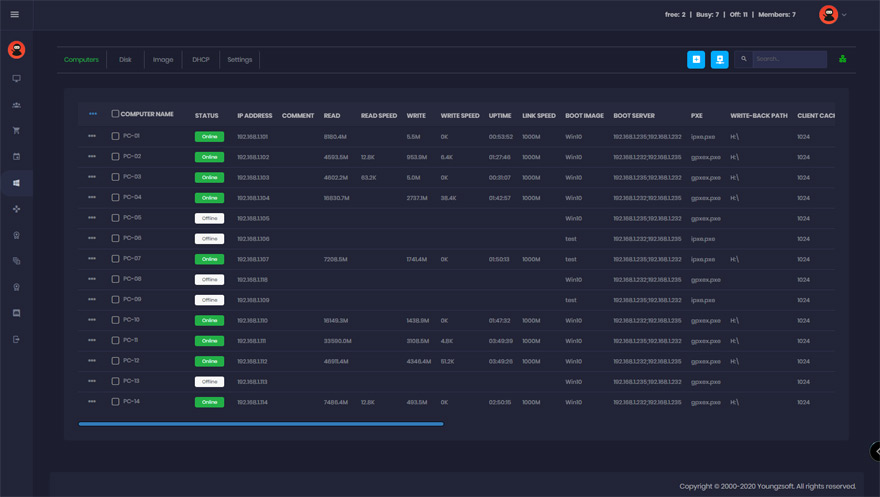
PXE boot software has many forms, and CCBoot is one of the best known. As a PXE boot server software option, it gives teams a clear way to manage diskless boot setups with less effort.
CCBoot is aimed at efficient IT work. It can lower hardware demand, support backup and recovery, and help teams manage devices from one place. For many groups, it is a practical fit for daily network tasks.
Overview of CCBoot
CCBoot is a leading PXE boot server software choice for IT teams. It supports diskless network booting and helps make resource use more efficient. That is useful in larger setups where speed and control matter.
Notable features include:
- Support for many OS environments.
- Fit with current network structures.
- A simple interface that eases daily work.
These parts make CCBoot easier to use for deployment and upkeep. It is built to reduce friction in common admin tasks.
Unique Features of CCBoot
CCBoot stands out because it focuses on performance and control. Its diskless boot design lowers hardware reliance and can reduce maintenance work.
Key features include:
- Virtual machine support.
- Central backup and recovery.
- Remote boot for far-flung networks.
These features help teams keep IT work steady across many sites. They also make it easier to plan for growth and future change.
Conclusion
PXE boot software has become vital in modern network management. It helps teams lower cost, speed up deployment, improve maintenance, and tighten security. For many businesses, it is a simple way to make IT work more efficient.
Summary of Benefits
The benefits of PXE boot software are varied:
- Cost Savings through lower hardware needs.
- Better Security through central control.
- Faster Deployment with fewer manual steps.
Together, these gains make network management smoother and more reliable.
Final Thoughts on PXE Boot Server Software
Investing in PXE boot server software can support changing business needs. It helps IT teams stay productive, handle issues faster, and keep systems ready for growth. PXE tech keeps improving, so these gains should continue as networks grow and change. Teams that adopt PXE can stay competitive, and their networks become more agile and secure.
Q&A
Question: How does PXE boot software reduce the need for local storage devices?
Short answer: PXE boot software lets computers start and load an operating system over the network. Because of that, they do not need a local hard drive or other storage media to boot. This makes diskless boot possible and can lower hardware costs.
Question: Why is PXE boot especially useful for large or far-flung networks?
Short answer: PXE boot supports central setup, updates, recovery, and remote booting. IT teams can manage many systems without going to each machine in person. That makes it useful for remote offices and large device fleets.
Question: What security advantages does PXE boot software provide?
Short answer: PXE boot improves security by keeping boot control in one place and by helping ensure that only verified systems can launch. It also supports central access rules, encrypted communication, and checks for suspicious activity.
Question: How does CCBoot fit into PXE boot network management?
Short answer: CCBoot is a PXE boot server software solution that supports diskless booting, central backup and recovery, virtual machine support, and remote booting. It helps teams cut hardware use while improving deployment, upkeep, and scale.
Question: Can PXE boot software support mixed operating system environments?
Short answer: Yes. PXE boot software can support different operating systems, including Windows and Linux. That makes it useful for teams that manage mixed platforms and want the same deployment and update flow across all of them.