
2026-02-12
bios, gigabyte, iommu
The following explains how to disable Pre-Boot IOMMU in Gigabyte BIOS, and what to do if the setting is missing.
- Update the Gigabyte motherboard to the latest BIOS version.
- If Pre-boot IOMMU is enabled, the client PC may fail to boot and become stuck during the boot process.
- To fix this problem, go to:
- Settings - IO Ports - Control IOMMU Pre-boot Behavior, and set it to Disable. (Figure 1)
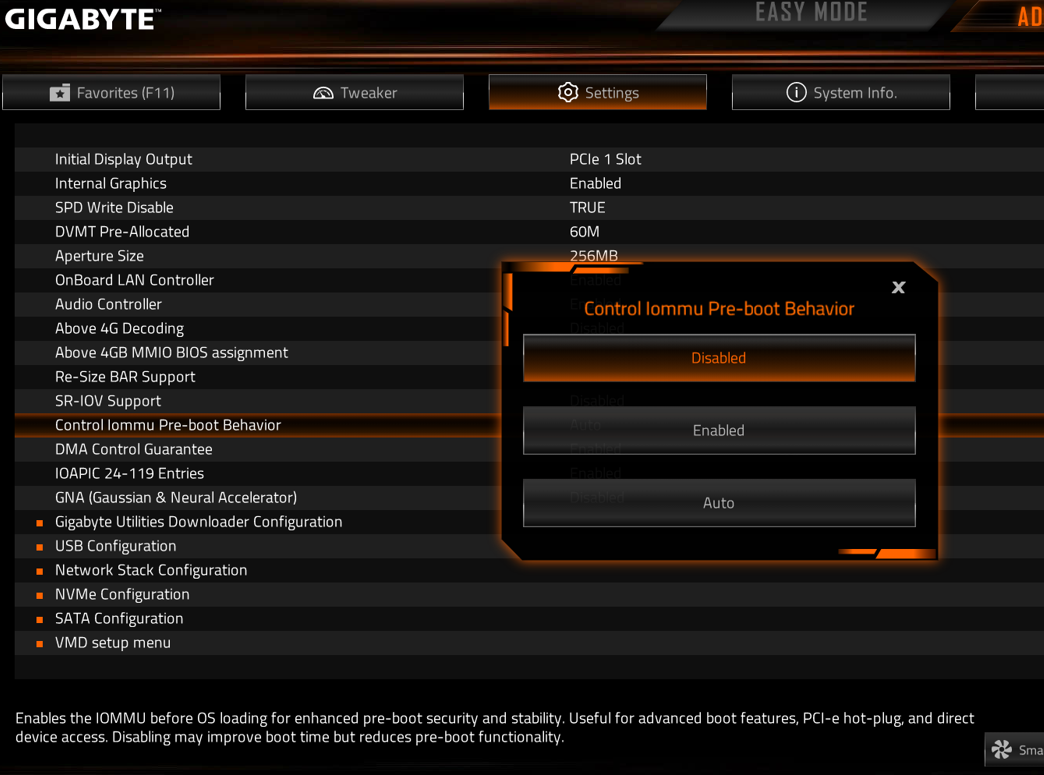
Figure 1
- Gigabyte has already included the Pre-boot IOMMU behavior setting in the latest BIOS updates. If you notice that your motherboard BIOS is missing this option, please contact our support team at t.ccboot.com and provide the motherboard brand and model, along with the BIOS version you are using.
- Example:
Gigabyte Technology Co., Ltd. B650M GAMING WIFI Rev. 1.0
BIOS: F39