
2026-03-21
ssd, nvme, write back
The following guide explains how to improve the stability and lifespan of SSD writeback disks under heavy workloads by ways such as TRIM scheduling and over-provisioning to prevent performance degradation and crashes.
- Constant high write workloads can quickly exhaust all available clean NAND blocks on modern TLC/QLC SSDs. In such conditions, the SSD is forced into aggressive garbage collection, which significantly increases write amplification, causes latency spikes, and in some cases may even trigger firmware instability or crashes.
- To mitigate this, two simple but highly effective measures should always be applied.
- *Scheduled Re-TRIM*
TRIM is a command that informs the SSD which blocks contain deleted or unused data, allowing the controller to recycle those blocks in advance instead of during active writes.
Command (run as Administrator)
defrag X: /L /U /V - (Replace X: with the writeback disk drive letter) - For example, using a Samsung 9100 Pro 2TB as a single writeback disk serving around 100 client PCs, the workload is extremely high. In this scenario, running TRIM every 1 hour is recommended to maintain stability and prevent performance degradation.
In lighter environments, such as
-Fewer client machines
-Lower overall disk write activity
-Multiple writeback disks distributing the load
The pressure on each SSD is significantly reduced. In these cases, running TRIM once per week or once per month is generally sufficient, as the SSD has enough idle time and free blocks to manage garbage collection effectively on its own.
- *Over-Provisioning (OP)*
Reserves unallocated space for the SSD controller to use for garbage collection, reducing write amplification and extending lifespan. - Universal method:
1.Shrink the partition so that a portion of the disk (e.g., 10–28% of total capacity) remains unallocated.
-Kingston recommends OP to improve both performance and endurance
-Samsung Magician allows direct OP configuration on supported SSDs
2.Run the defrag /L command once afterward to inform the firmware.
Even 6% OP can double performance and lifespan 28% OP can extend lifespan x5.(Figure 1)
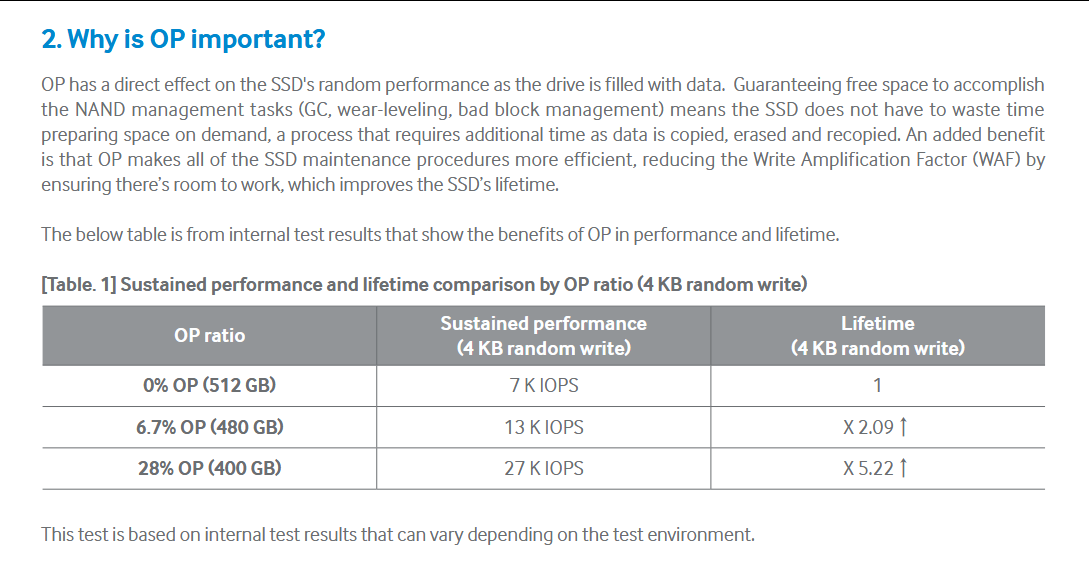
Figure 1