
2026-01-14
enable, core, isolation
This section describes how to enable Core Isolation and Memory Integrity in Windows, which are necessary for compatibility with FACEIT anti-cheat and to address VBS-related issues.
- Enable Super client on the client PC
- Open Windows Security by clicking the shield icon in the taskbar notification area or searching for it in the Start menu.
- Select "Device security" from the left-hand sidebar.
- Under the "Core isolation" section, click "Core isolation details."
- Toggle the switch for "Memory integrity" to the On position. (Figure 1)
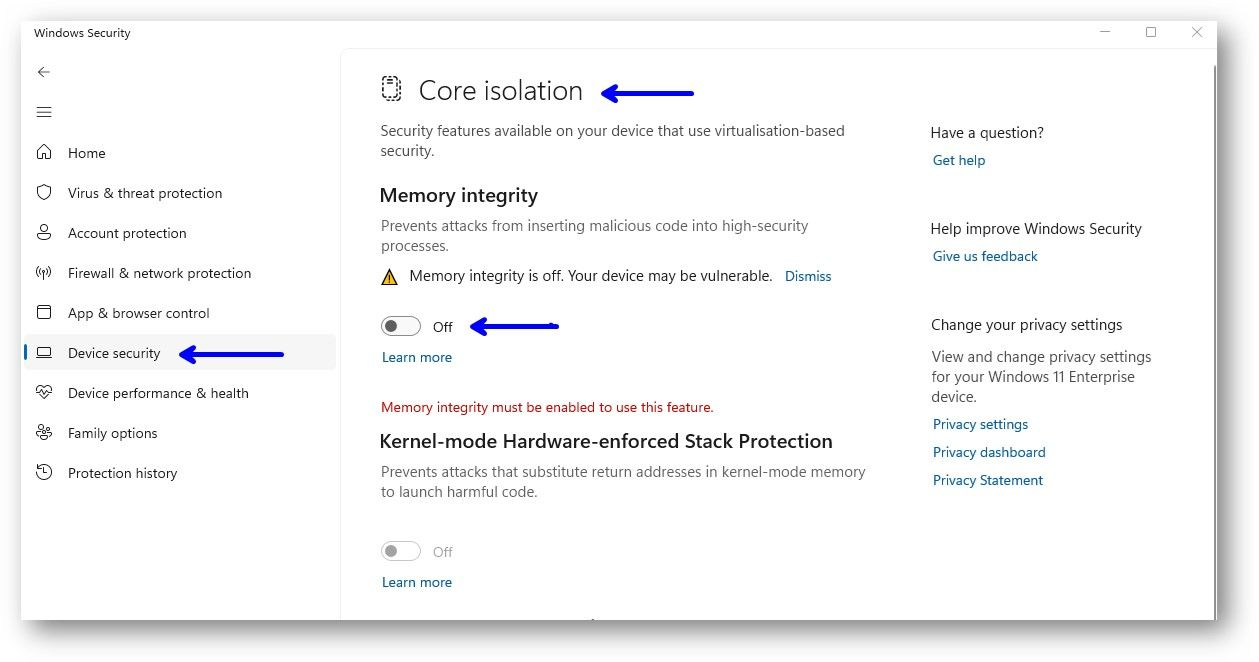
Figure 1
- If prompted, restart your computer to complete the enabling process.
- If the switch is grayed out or unavailable, you may need to update your system drivers, particularly for any incompatible older drivers listed in a prompt, or check your BIOS/UEFI settings for required virtualization features like SVM, VT-x, or SLAT.
- If the process completes successfully, shut down the PC, disable Super Client, and save the changes.
Faceit Error with Core isolation
- If you still encounter a Faceit error on a high-ELO account even after enabling Core Isolation, enable Super Client and run the registry commands below through Command Prompt (CMD).
reg add
"HKLM\SYSTEM\CurrentControlSet\Control\DeviceGuard" /v "EnableVirtualizationBasedSecurity" /t REG_DWORD /d 1 /f
reg add
"HKLM\SYSTEM\CurrentControlSet\Control\DeviceGuard" /v "RequirePlatformSecurityFeatures" /t REG_DWORD /d 1 /f
reg add
"HKLM\SYSTEM\CurrentControlSet\Control\DeviceGuard" /v "Locked" /t REG_DWORD /d 0 /f
reg add "HKLM\SYSTEM\CurrentControlSet\Control\DeviceGuard\Scenarios\HypervisorEnforcedCodeIntegrity" /v "Enabled" /t REG_DWORD /d 1 /f
reg add "HKLM\SYSTEM\CurrentControlSet\Control\DeviceGuard\Scenarios\HypervisorEnforcedCodeIntegrity" /v "Locked" /t REG_DWORD /d 0 /f