

A shared Windows image is sometimes treated as the home of every game on a diskless PC. For Valorant on diskless PCs, the useful distinction starts with storage: the VALORANT game files belong on the game disk. Windows comes from the system image, and Vanguard's installed system components belong to that Windows environment.
Those locations give maintenance a defined scope. A game content update goes to the game disk. A change to an installed Windows component follows the image maintenance process when it needs to persist. The same maintenance window can include both, with a separate result to confirm for each.
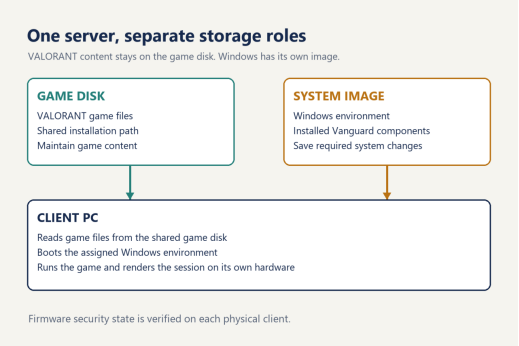
The game disk holds the VALORANT installation
The game disk is the shared source of the VALORANT installation in this arrangement. Game content resides on the server and is presented to the client PCs through the diskless system. Each station reads the content it needs while running the game. Centralized storage brings the installation into one managed location, which is where the administrator maintains those files.
The Windows image has a separate purpose. It supplies the operating system environment from which the station starts. Its maintenance concerns Windows, installed system components and the settings intended to be retained in that environment. Keeping the game installation on the game disk makes the destination of a content patch clear before anyone opens an image for editing.
This distinction is useful when documenting a CCBoot diskless boot system. A deployment record can identify the assigned Windows image alongside the game disk and the VALORANT installation path. An administrator reading that record should be able to locate the game content without inspecting the image's contents or guessing which drive contains the current installation.
The path matters. Use the installation path actually configured for the venue, rather than copying a drive letter from an unrelated example. The shared disk seen by a station and the server's storage arrangement should be described clearly enough that the next administrator can identify the same installation.
After a content update, rebooting the client PCs is part of making the updated game disk state available for verification. The useful observation comes from a station that has restarted and opened the installed game, with the server update already complete. An open session from before the update describes the earlier state.
Separate game disk and Windows image for Valorant on diskless PC
One update can involve different maintenance targets
The word "update" describes an event, but it does not identify everything that changed. A maintenance entry becomes more useful when it names the affected object. Game content, installation information and Windows components can have related roles in the same launch, while retaining different maintenance destinations.
Object | Where it belongs | Maintenance focus |
VALORANT game files | Shared game disk | Complete the content update at the configured installation path |
Installed Vanguard system components | Client Windows environment | Preserve required system changes through image maintenance |
Riot installation information | Relevant AppData and ProgramData locations | Maintain the documented links and installation recognition |
Firmware security settings | Each physical client PC | Verify the required state on that hardware |
This classification also gives a handover note a useful vocabulary. "Game disk content updated, client restart verified" describes one result. "Vanguard system change saved, normal image boot verified" describes another. An entry can contain both when both kinds of work occurred.
For Valorant on diskless PC, assigning each change to its destination is more informative than counting how many update dialogs appeared. A launcher can present several activities in sequence. The maintenance record should follow the files or system components being changed, then the observations made after the work.
Vanguard belongs to the Windows environment
Vanguard provides the anti-cheat environment used by VALORANT. Its installed system components are part of the client Windows environment, so an installation or update that changes those components has a different persistence requirement from a content patch on the game disk.
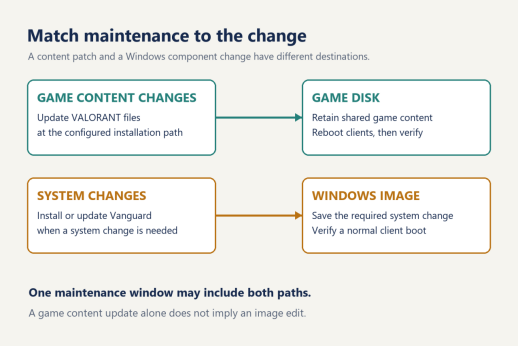
CCBoot's VALORANT guidance uses Super Client for saving the relevant installation changes into the system image. The documented process includes completing the installation, following the requested restart, checking the result, and then shutting down and saving the image through the maintenance workflow. That procedure addresses the Windows change made on the maintenance client. The VALORANT game installation remains on the game disk.
The scope follows the change. A routine game content patch calls for maintaining the shared content and checking it from a restarted station. When Vanguard also installs or updates a system component that must be retained, the maintenance window includes that image work. The presence of a new game patch alone does not establish that a Windows image change occurred.
There is a useful distinction between installation and verification here. The maintenance session is where an intended system change is made and saved. A subsequent normal client boot shows what the assigned image provides during ordinary use. Recording those separately makes the result easier to interpret when another shift takes responsibility for the floor.
The same distinction applies to the restart request. A restart completes the stage requested by the installer; the ordinary boot after image maintenance provides evidence that the saved environment contains the intended change. The record should identify which restart was observed, the assigned image, and whether the game then opened successfully.
This is maintenance planning rather than a fixed description of Vanguard's loading behavior. The current installation prompts and publisher guidance determine the relevant actions. Recording the actual component change keeps the procedure tied to the environment being maintained.
Separate maintenance paths for game content and installed Vanguard system components
Launcher information connects the client to shared content
The game folder contains the shared game content. The launcher also uses installation information when recognizing and opening that content. These are related pieces of a working installation, and documenting both gives a clearer description than recording only the location of the executable.
The Game fixes documentation describes links between server and client AppData and ProgramData folders for supported applications, including Riot. That explains why a maintenance discussion may include these Windows locations even though the game itself is stored on the game disk. The links concern the relevant application information associated with the installation.
The distinction remains important when a launcher displays Install after shared content has been updated. Existing game files and the launcher's recognition of them are separate observations. The maintenance record should retain the configured path and the launcher result. Moving the game into the Windows image would change the intended storage arrangement rather than explain those observations.
The current documentation points to the corresponding management component for the detailed Game fixes configuration. Menu names should be matched to the component in use. The practical relationship to retain is specific: shared content has an installation path, launcher information helps the client recognize it, and installed anti-cheat system components have their own Windows maintenance process.
Game fixes belongs in that relationship. Treating its linked folders as the entire VALORANT installation would hide the game disk's role and make later update notes harder to follow.
Shared files still run on individual client PCs
The station runs the game. Its processor and graphics hardware execute and render the session while game content is read from the shared disk. A storage diagram should show that execution taking place at the client, alongside the Windows environment that has booted there.
Client security state belongs in the same picture. Riot's Vanguard security requirements, checked in October 2026, describe requirements that depend on system configuration. They cover features such as TPM, Secure Boot, Memory Integrity and IOMMU. The relevant requirement is the one applying to the actual station, using the current publisher guidance and any specific prompt.
Shared game files give those stations a common content source. Each physical PC still has its own firmware configuration, which should be checked on that hardware. A shared image assignment identifies the intended Windows environment; the running station provides the observed security state.
Planning updates for Valorant on diskless PC
Consider a content-only maintenance example. The administrator completes a VALORANT patch at its existing game disk path during a scheduled maintenance window. Once the update is complete, the stations are restarted and the game is checked from the ordinary client environment. The recorded change is to shared game content, and the observation concerns the content available after restart. No image edit is implied by that example.
A second example includes a Vanguard system change. Shared content is maintained at the same game disk location, while the required Windows component installation is completed through the image maintenance process. After the saved image is available, the ordinary client boot and game session are verified. This example has two destinations because two types of change occurred. These examples describe planning categories, rather than reported tests at a particular venue.
For a gaming center, the distinction helps define the maintenance window and shift handover. The person taking over needs the game path, any image change, and the observed client result. A concise record might state that shared content was updated, name the image if it changed, and identify the station or hardware group checked after restart. A second hardware group gets its own observation.
Rows of gaming stations with a maintenance worker preparing the room before opening

The commercial planning can stay separate from those technical observations. Venue owners can consult current CCBoot licensing options when budgeting the deployment. The CCBoot download and trial provides the software for evaluating the intended storage arrangement and maintenance workflow. Evaluation notes should describe the configuration actually used and the result observed on its client PCs.
For an environment needing a configuration review, discuss the current client configuration with support using the game disk path, image assignment and relevant observations. That gives the discussion a concrete starting point: which object was changed, where that change was retained, and what the client did afterward.
Centralized storage, clearly assigned maintenance
The shared Windows image in the opening assumption becomes easier to describe once the game disk has its own place in the explanation. For Valorant on diskless PC, the game installation stays on that game disk. Windows component changes are retained through the appropriate image workflow, and client settings are verified on the station where the game runs.
The resulting maintenance record names the object being maintained. A game patch has a content destination; an installed system component has a Windows destination. Those names give the next shift a record of the work completed.