

When I evaluate a diskless boot server, I start with the work it must handle across the room. The useful question is how the proposed system serves the PCs your customers will use, with your game library and your opening routine. A specification sheet becomes much easier to judge once those conditions are written down.
That is the purchase I would organize: a defined workload, an observed demonstration, and a clear handover. Each gives the next one a purpose. The workload tells the supplier what to build, the demonstration shows how it behaves, and the handover gives your staff a repeatable way to operate it.
The hardware quote should follow that conversation.
Put the room's workload on paper before requesting quotes
Give every supplier the same description of your gaming center. Include the number of stations, your current wired network, the games customers request, and how the room fills during a normal session. Mark any equipment you intend to retain.
For a planning example, consider 40 PCs with a separate group reserved for private events. That is an illustrative layout, not a customer case. The event group may start the same game together while walk-in customers choose different titles. Ask the supplier to account for both patterns.
Local operating practices help make that description concrete. California's Bakersfield eSports Center lists hourly play, day passes and membership. Its games include Fortnite and Valorant, as well as Counter-Strike 2. Those are examples of the sessions and titles a US venue might plan around, rather than a national ranking.
Write down the staff tasks too: preparing the room, publishing updates, restoring a known image, and retaining approved user files. A diskless boot server proposal should explain how those jobs will be carried out.
What a diskless boot server demonstration should prove
I would ask for a demonstration plan before approving the equipment list. A supplier can then explain which parts of the proposed installation are represented in the test, including client hardware, network links and game storage. Keep that explanation with the results.
The architecture needs only a short introduction. CCBoot's diskless boot software lets client PCs start from centrally managed storage, with a shared image and support for memory and SSD caching. The client PC's processor and graphics card execute the game. This division gives the demonstration two separate subjects: delivering the operating system and game files, and running the game on the station itself.
Establish a repeatable starting point
Choose a station that represents the machines on your floor. Record its hardware group, the image being used, the game version and the network connection. Use the same starting conditions when comparing proposals. A different game build or a different group of client PCs changes the meaning of the result.
Agree on the finish line. For startup, that might be a responsive desktop with the required venue applications ready. For a game, it might be a playable practice session after the launcher has completed its work. Start and stop the timer at the same points each time.
Keep the definitions beside the numbers.
A desktop appearing on screen and a station being ready for a paying customer are useful observations, but they describe different stages. Recording both makes the test easier to interpret later, when the purchasing discussion has moved beyond the person who watched it.
Bring several stations into the same test
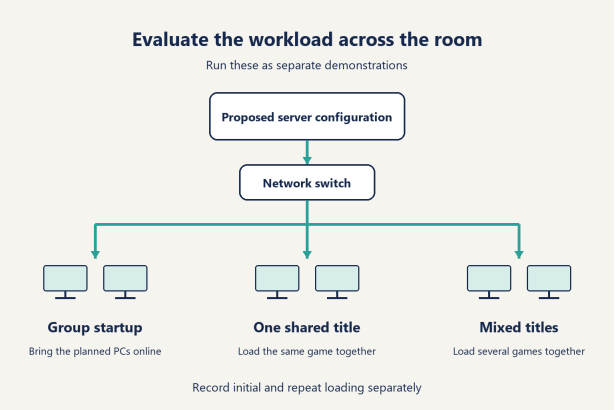
After establishing the single-station result, repeat the startup with the number of PCs you expect to bring online together. That number should come from your operating plan. If staff start the room in groups, demonstrate those groups. If an event calls for a larger simultaneous start, include it as a separate run.
A diskless boot server should be evaluated against that agreed workload. Record the first and last stations to become ready, along with any stations that need another look. The spread helps explain what customers and staff would experience across the room.
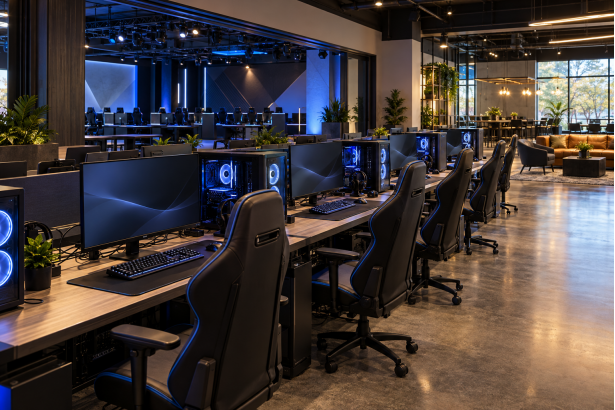
Then use the PCs. Open the applications your staff needs at startup, check the expected drives, and confirm that the operating system remains responsive while the other stations finish loading. A photograph of multiple desktops is useful for documenting the run, but the observation sheet should say what was actually tested.
Test a shared title and a mixed selection
Start the same game on a group of stations. This represents a team practice or a private event using one title. Note when each PC reaches the agreed point, and keep launcher sign-in or online matchmaking waits separate from local loading observations.
Follow that with a mixed run. For example, assign Fortnite to one group, Valorant to another, and a different installed title to the remaining PCs. These are example workloads. Select the actual games with the supplier so the run reflects your venue's library and current game requirements.
The same-title and mixed-title runs answer different purchasing questions. The first shows how the proposed system handles repeated demand for common files. The second gives a view of several parts of the library being read together. Both belong in the evaluation when both occur in your business.
CCBoot supports physical memory and SSD caching. Ask the supplier to identify whether each result comes from an initial load or a repeated run after relevant data has been cached. Preserve both observations. Repeat loading is a useful part of the demonstration, and clearly labeling it makes the result usable.
Keep an observation sheet you can compare
Use a short record rather than a supplier's headline speed claim. The following is a blank evaluation framework, not a set of benchmark results. Fill it with observations from the proposed configuration.
Operation | Conditions to hold consistent | Result to record |
One station starts | Client group, image, network path | Desktop ready and required applications ready |
Planned group starts | Number of PCs and startup schedule | First station ready, last station ready, exceptions |
Group launches one title | Game build and agreed start point | Time to the agreed playable stage |
Groups launch different titles | Same game selection and group sizes | Readiness across each group |
Previously used title loads again | Clearly stated cache conditions | Repeat result, kept separate from initial loading |
Stations restart after a change | Published image and expected behavior | Version, reset behavior and retained test files |
Agree how results will be judged before running the demonstration. Your opening routine may allow staff to prepare groups in sequence, while a scheduled competition may require a whole area ready together. Put the relevant expectation in writing rather than adopting a universal startup target from an unrelated installation.
If a demonstration uses fewer stations than the proposed room, ask how the supplier will verify the completed installation at the intended load. Record that later verification as a delivery task with an owner. The smaller test can establish the workflow, while the completed-room test supplies the evidence for the larger configuration.
Use the results to settle the specification
Bring the observation sheet back to the quote. Ask the supplier to connect each proposed component to the workload it serves. A recommendation for more memory should be explained alongside the caching plan, while a network change should identify the affected link and the operations that use it. Keep those explanations short enough for the venue manager to understand.
Then mark which tests must be repeated if the proposed configuration changes. Switching a client hardware group, changing the network path or selecting a different storage arrangement gives you a reason to revisit the relevant observation. The goal is a configuration supported by a record that still describes it.
I would accept a diskless boot server recommendation when the workload, proposed equipment and observed behavior can be read together. That gives a buyer something concrete to compare, and gives the supplier a precise description of the installation being requested.
Judge the update process across the whole room
For a diskless boot server purchase, the update demonstration deserves its own appointment. Ask to follow a change from preparation through validation to ordinary client PCs. That sequence tells you what the administrator does and what the next shift should expect to find.
CCBoot's product documentation describes updating a master PC and having other PCs receive the updated environment after reboot. Its image management and recovery features also include restore points. Those are practical capabilities to build into the demonstration: publish an approved change, confirm its appearance elsewhere, and show how the operator returns to a retained state.
Use a small, visible change that your staff can recognize. It could be an approved application update or a desktop item in the shared environment. Write down the expected result first. Ask the supplier to identify which managed content is being changed and how that content reaches the client stations.
Then move away from the machine used to prepare the change. Restart an ordinary station and inspect the result there. If your room contains different hardware groups, include a representative of each in the agreed verification. CCBoot's PnP feature supports creating one image for clients with different specifications, giving the supplier a capability to demonstrate against your actual mix.
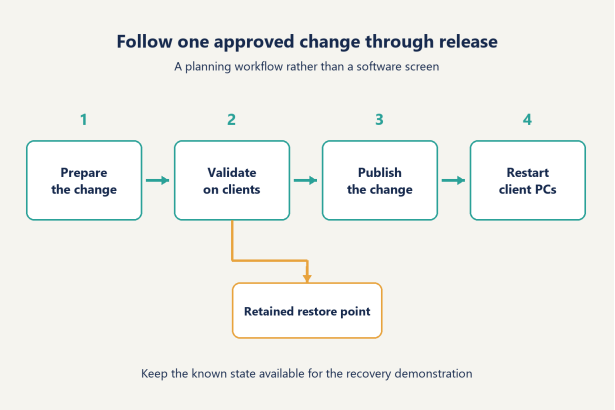
I would also ask the person who will maintain the system to explain the release sequence back to the supplier. That reveals whether the handover is usable. A purchasing manager may see a convincing demonstration, while the employee responsible for the next update still needs to know which image is current and which checks to perform.
Keep a brief release note. Identify the approved change, the image or content version, the stations checked, and the person authorizing wider use. This is a recommended operating record, not a claim that the software generates every part of it automatically.
For a gaming center with day passes and private bookings, the timing belongs in the plan as well. Decide when staff will prepare updates, when the changed environment will be checked, and which restart window makes it available for the next session. A staff member should be able to answer, "Which version should these stations be using now?"
Ask for the recovery demonstration while the same example is still fresh. Have the supplier identify the retained restore point and show the approved recovery procedure. Check the resulting environment on a client PC. Keep this record alongside the successful update, so the staff member has seen both directions of the workflow.
The purchasing evidence is the completed cycle. A diskless boot server evaluation becomes much more useful when it follows a change all the way from preparation to ordinary stations and back to a known state.
Decide what resets and what stays with the user
Define the data policy before staff start populating the shared environment. Give each kind of content a clear destination. That makes the restart demonstration straightforward: everyone knows what should return to its published state and what has been assigned persistent storage.
I would divide the planning discussion into three groups. The first is the approved environment the venue publishes, such as its applications and desktop setup. The second is a visitor's temporary session activity. The third is data the venue has deliberately chosen to retain. Use examples your staff can recognize, rather than an abstract discussion about persistence.
CCBoot restores the system after reboot and includes personal disk support for data intended to survive a restart. Ask the supplier to demonstrate these together. Put an identifiable test file in the agreed temporary location and another in the configured persistent location, then restart the station and check each expected outcome.
Be specific about the location. A test file has a name, a folder and an expected result. That small amount of detail gives your staff something they can repeat during handover or after a planned configuration change.
Game-related data needs the same treatment. List the settings, saves or other files you intend to retain, and have the supplier identify their agreed storage arrangement. Validate the examples with the actual application. Keep account sign-in, publisher cloud saves and files stored on the venue's system distinct in the discussion, because each has its own behavior.
There is no need to make an assumption about every title in the library. Select the cases that matter to your service and record what has been checked. For a private training group, that might mean retaining approved practice files. For general walk-in use, it may mean returning the station to the venue's published starting environment between sessions.
If domain accounts are part of the proposed installation, include them in the same demonstration. CCBoot supports Windows domain login and personal disks. Ask the supplier to show the intended user accessing the intended persistent location, then verify it again after restart.
The result should fit on a simple staff instruction: approved shared content is published through the update process, session changes follow the reset policy, and retained files go to the designated location. Include one example of each. That is enough to make the policy teachable without turning the purchasing guide into an application-by-application storage manual.
Plan the next expansion while the design is still on paper
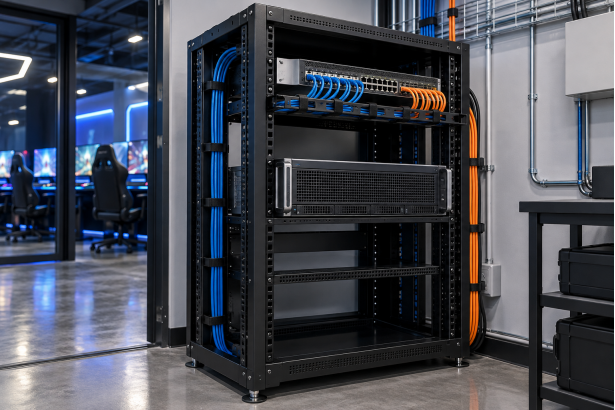
Ask what changes when you add another group of stations. A diskless boot server proposal should connect that future workload to the quoted network and storage, including the caching arrangement. Request a drawing that distinguishes equipment needed for the current room from the next planned addition.
For a smaller, single-area venue, I would concentrate on a clear baseline: a known client group, a documented network path, and the demonstrated startup and game-loading routine. Preserve those records. They provide a reference when adding stations or replacing part of the game library.
For a venue with separate public and event areas, organize the evaluation around how those areas are used together. An event may create a concentrated demand for one title while the rest of the room continues with mixed games. Ask for the proposed network links and any segmentation to be shown on the drawing, then use the relevant combined workload during verification.
CCBoot supports VLANs and multiple LAN segments, as well as load balancing with multiple network adapters or multiple servers. Have the supplier explain which supported arrangement is being proposed, why it suits the layout, and how the additional area will be included in the later evaluation.
For a larger installation with several operating areas, give each area an owner in the plan. Identify who maintains its client hardware, who publishes the shared environment, and who confirms readiness before a booking. Physical expansion and operational expansion need to be discussed together when several people will share the work.
These are planning categories, rather than fixed product capacity bands. A room's game selection and simultaneous activity belong beside its station count. Keep the workload assumptions attached to the proposed configuration so that a later buyer can understand what the original recommendation covered.
I would reserve the most detailed expansion discussion for the change you already expect to make. If the next purchase is another event area, work through that area. If the next change is a larger game library, ask how storage and the evaluation will be updated. A specific next step produces a more useful answer than a promise that the design can grow indefinitely.
Ask for a handover your staff can use
Include handover requirements in the purchasing discussion. The following are suggested deliverables to agree with the supplier, rather than a statement of what every CCBoot purchase automatically includes.
Handover item | What it should identify | Person to assign |
Configuration record | Client groups, network layout and storage roles | Supplier and venue administrator |
Image and release record | Current approved environment and update checks | Employee responsible for updates |
Recovery instructions | Retained state and demonstrated recovery steps | Venue administrator |
Data policy | Reset locations and designated persistent storage | Venue manager |
Evaluation record | Agreed workload with observations from completed-room verification | Buyer and supplier |
Support arrangement | Contact route and responsibility for follow-up work | Venue manager and supplier |
Ask a staff member to use the proposed instructions while the supplier is present. Have that person find the current image record, explain the next planned update, and locate the support contact. Revise any unclear wording before accepting the handover.
The budget should show hardware, network work, installation services and software authorization separately, using USD for your local comparison. For software, use the current per-PC licensing options when preparing the quote. Keep the licensed client count aligned with the planned installation.
For current hardware models and a configuration matched to your workload, ask CCBoot support about a current configuration. Send the room description and network drawing with the request. Those give the recommendation a concrete starting point.
Keep the accepted records where the next person maintaining the venue can find them. The supplier's explanation should remain useful after the purchasing conversation ends.
Questions buyers ask before signing off
Does the server render the games for the PCs?
The client PCs use their own processors and graphics cards to run games. The server supplies centrally managed operating system and game storage. Include representative client hardware in the demonstration so the loading observations and the game session both relate to the stations you plan to use.
How do I judge a supplier's proposed client capacity?
Ask what workload the proposal covers: station count, simultaneous startup, game selection and network layout. Match those assumptions to your operating plan. A demonstration and completed-room verification under the agreed conditions give you evidence for the proposed capacity. Retain the observations with the configuration record so future changes can be assessed against the same starting point.
What should the quote cover besides the server?
Request separate lines for client-side work, networking, storage and software licensing. List installation and the agreed handover separately too. Include any planned verification after all stations are connected. This makes it easier to see who supplies each part and who will confirm that the complete room is ready. Have the supplier identify optional future additions separately from equipment required for the initial opening.
How should I organize an evaluation before committing?
Prepare the room description and agree on the operations to demonstrate before arranging the trial. For a diskless boot server evaluation, use the same observation sheet for startup and game loading, then add update and data-retention checks. Name the person who will record the results and the person who will explain the configuration. You can download CCBoot for the evaluation and use that plan to organize a discussion around the work your venue needs to perform.