

How can you tell whether a faster game launch will hold up in the next test? Start with a loading event that you can repeat, then keep a record of what happened before it. A useful CCBoot game disk performance test makes the start point, cache preparation and participating PCs visible alongside the result.
The procedure below produces your own baseline. Its five-round recommendation is a practical starting point for a small maintenance session, not an official certification standard. The record sheets are deliberately empty: measured seconds belong to your chosen game running on the equipment under test.

Gaming center workstations arranged for a controlled loading test during a maintenance session
Define the CCBoot game disk performance test
Choose a scene that is easy to load again. A local save or a repeatable training area works well when it offers the same starting position and a clear moment at which control returns to the player. Complete installation and updates before measuring that event. Sign in and finish any required first-run preparation too.
Write down the timing boundaries. For example, start when you confirm loading a particular save and stop when the character responds to a prescribed movement. Keep the save and graphics settings fixed. Use the prescribed movement to check readiness on every run. A visible menu alone may appear before the scene is ready, so choose the endpoint with care.
You can also measure launcher-to-menu time, but keep that as a separate interval. It includes different work. Login prompts, remote services and initial shader preparation may affect that interval, while a saved-scene load follows another path through the game. Give each result a name that describes what you actually timed.
The CCBoot diskless boot system provides centrally managed disks to client PCs. Your elapsed loading time captures the whole selected operation on that client, including work performed by its processor and graphics system. Read it as a player-facing measurement. Use disk and network observations to investigate the storage path without attributing every second to one device.
Keep the timer method fixed.
A video recording lets you revisit the start and finish events. Use the same capture method and settings throughout, since recording on the test PC can add work. If you use a handheld stopwatch, record sensible precision and allow for the operator's reaction time. Changing measurement methods halfway through creates a new comparison.
Record the setup before the first timed run
Prepare an environment sheet before launching the game. Record enough information for another operator to repeat the procedure after a maintenance change. The actual software and driver versions belong in your local record, even though there is no universal version combination to prescribe for every gaming center.
Field | Your test record |
Game build / fixed scene | To complete |
Client group / image / graphics settings | To complete |
Game disk and installation path | To complete |
Server storage / RAM / cache settings | To complete |
Client cache and shader preparation | To complete |
Network path and negotiated link speeds | To complete |
Timing events, tool and recording settings | To complete |
Preparation sequence and participating PCs | To complete |
Background tasks and server restart history | To complete |
Use two explicit labels: first load after client restart, and repeat load in the same client session. A client restart describes the action you performed. It does not establish the state of every server, operating-system or persistent cache in the path. Note whether the server remained running and whether another PC had already read the same game.
Preserve the normal cache configuration while establishing the baseline. If you choose a warm-up procedure, write down the scene, participating PCs and number of preparatory loads, then repeat that preparation before each measured batch. Mark warm-up activity separately. In a shared library, another client reading the same files can change the starting conditions for the next group.
Schedule a controlled maintenance window. Complete planned downloads and updates first, then record any background activity that continues during the session. Do not change the game build between the baseline and the follow-up measurement. If that happens, label the new build and start a new comparison.
For an evaluation involving additional client PCs, check the current per-PC licensing options while defining the participating group. Keep the same licensed test group for each configuration you compare.
Repeat the same load on one PC, then across several
Run the single-client test first with the preparation sequence already written down. Its purpose is to establish how that client behaves under the chosen conditions. The concurrent test then adds several clients requesting their scenes together. Treat these as separate test conditions, with separate results.
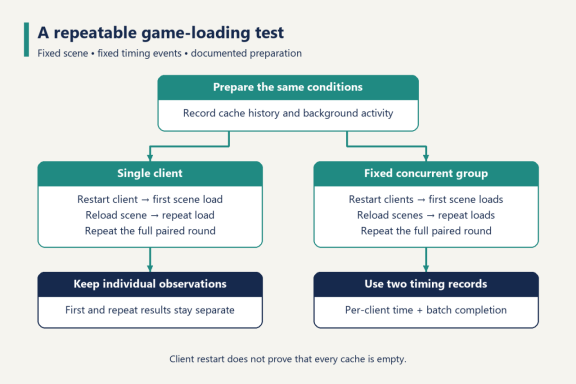
Test workflow separating first and repeat loads for single and concurrent clients
Collect paired first and repeat loads
Use at least five valid rounds as an initial working sample. Each round contains a first-load measurement and a repeat-load measurement, so five rounds give five observations in each group. This count is a practical recommendation, not a claim of statistical significance.
1. Apply the documented server and game preparation. Restart the selected client and complete the same startup and login steps. Record anything unexpected before continuing.
2. Launch the game and reach the agreed starting state. Time the first load of the selected scene using the fixed start and finish events.
3. Leave the scene through the same normal game path. Return to the agreed starting state, then load that scene again in the same client session and record the repeat time.
4. Save both observations with the round number. Repeat the complete preparation and restart sequence for the next round.
The repeat load should follow an actual reload of the scene. Waiting in a menu and returning to an already active scene would measure a different operation. Document how the game returns to the starting state, including whether you leave the level or exit the game, and use that route consistently.
Keep the groups separate. One first load followed by four repeat loads does not provide five comparable first-load measurements. A faster later run is useful information when its preparation and sequence are known; it becomes ambiguous when all five values are pooled under a single label.
Add a fixed concurrent group
Choose the group size before measuring. Five clients can be a manageable example for organizing a maintenance test, but select a number that answers your own operational question. It is not a server capacity recommendation. Use the same client set for every configuration and record hardware differences within that set.
Prepare all participating clients, bring them to the same starting state and give a common load signal. Record each client's actual start event and completion event. Its individual load time runs between those two events. Also record the batch completion time from the common signal until the last participating client is ready.
These two clocks answer different questions. Individual times describe each player's wait after starting the load. Batch completion describes when the whole group is ready, including variation in when the operators initiated the requests. Note visible start delays rather than silently treating staggered requests as simultaneous.
Repeat the same pairing used for the single-client test: first scene loads after client restart, followed by repeat scene loads in the same session. Collect the planned number of rounds for both conditions. Keep the server preparation policy and order consistent across single-client and concurrent groups, and record the order because shared caches can retain data between groups.
Configuration | Condition | Round / client | Seconds | Notes |
To complete | Single, first load | To complete | To measure | To complete |
To complete | Single, repeat load | To complete | To measure | To complete |
To complete | Concurrent, first load | To complete | To measure | To complete |
To complete | Concurrent, repeat load | To complete | To measure | To complete |
To complete | Batch completion | To complete | To measure | To complete |
Duplicate the relevant rows for every round and participating client. In the batch row, identify whether it belongs to the first-load or repeat-load group. Keep raw observations even after calculating a summary. The original record helps explain why two apparently similar batches produced different results.
Decide how to handle interrupted runs
Define invalid-run conditions before testing: a download starts, the wrong scene loads, a login prompt interrupts the selected interval, or the common start signal is missed. Preserve the observation, label the interruption and collect a replacement valid round. A slow result alone is not a reason for removal.
If one client fails to complete a batch, record that outcome and the affected batch. Do not produce a successful batch-completion time by omitting that client. Resolve the interruption, document any configuration change and repeat the appropriate group. A change to the image or game build starts a new configuration record.
This is the working evidence for CCBoot game disk performance: repeatable events with a traceable preparation history. The sheet should let someone distinguish a genuine comparison from a fast run collected under different conditions.
Compare one change against the baseline
Name the baseline configuration A. Apply one planned change, save its exact setting in the environment sheet and name the new configuration B. Repeat the selected scene on the same client groups, retaining the timing method and preparation policy. If the change requires a restart, account for the resulting preparation in both configurations before comparing them.
For each condition, report the median and the minimum-to-maximum range. Compare first loads with first loads and repeat loads with repeat loads. For concurrent rounds, retain client-level results alongside batch completion. A single pooled median can hide one client that consistently finishes later than the others.
Five observations are a small working sample. Use them to see whether the procedure is stable and whether a longer session is worthwhile. If the ranges overlap substantially or results drift with run order, collect more rounds and investigate the conditions before treating a small median difference as a durable improvement. Avoid percentile claims that the sample cannot support.
For matching conditions with a positive baseline median, calculate the loading-time reduction as: (baseline median minus changed median) divided by baseline median, multiplied by 100%. Retain a negative result when the changed configuration takes longer. Attach the medians and conditions so the percentage can be checked.
Observe server disk activity, network use and CPU or memory behavior during the same interval. These observations help identify which part of the path deserves a closer look. A synthetic storage benchmark measures its chosen I/O workload; run it separately from game timing so it does not add competing traffic to the experiment.
Where practical, repeat configuration A after B. That return check helps expose changes caused by time, background activity or preparation order. Keep all three sets. For settings or current hardware appropriate to your installation, check your configuration with CCBoot support using the environment sheet and raw results.
Agree on acceptable waiting time before evaluating the changes. The useful outcome is a configuration that meets your center's measured needs under the conditions you specified, with enough consistency to reproduce the result at the next maintenance review.
Documentation to keep with your test record
Store raw observations with the environment sheet and timing clips. Identify who ran the test and when, with a description of the exact configuration change. This makes the next review a continuation of an existing baseline rather than an attempt to reconstruct one from memory.
Use the CCBoot setup documentation to check the configuration relevant to your current installation. If you are preparing an evaluation environment, download CCBoot for an evaluation and record its settings before collecting the baseline.
A repeatable CCBoot game disk performance test ends with evidence another operator can follow: the same event, the same preparation and individually recorded outcomes. Preserve those details when you share a result. They are what make a loading-time comparison useful after the stopwatch has stopped.